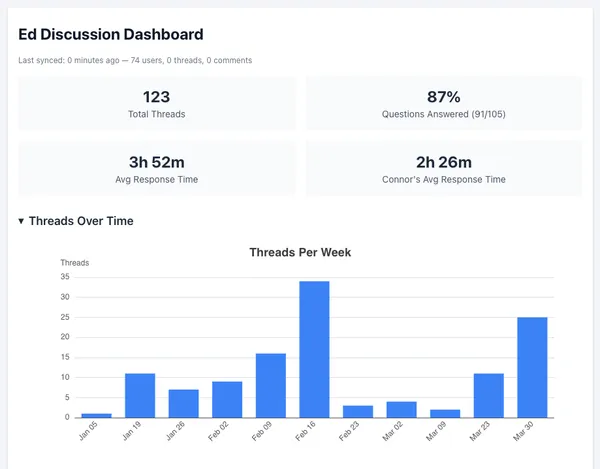
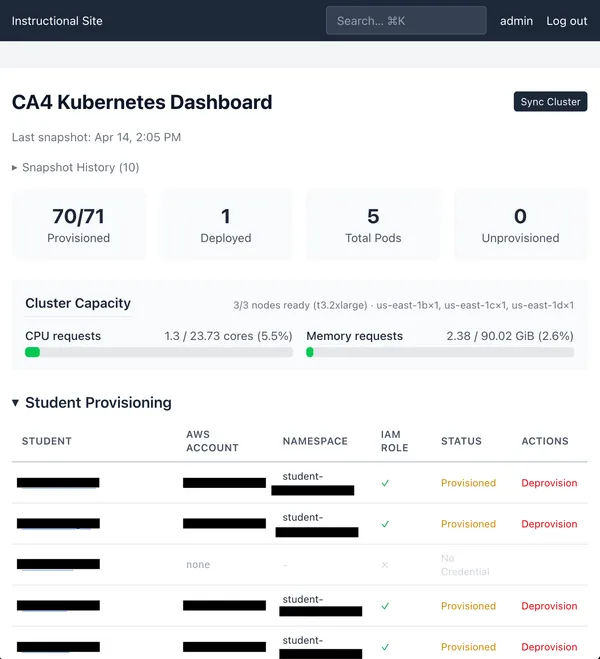
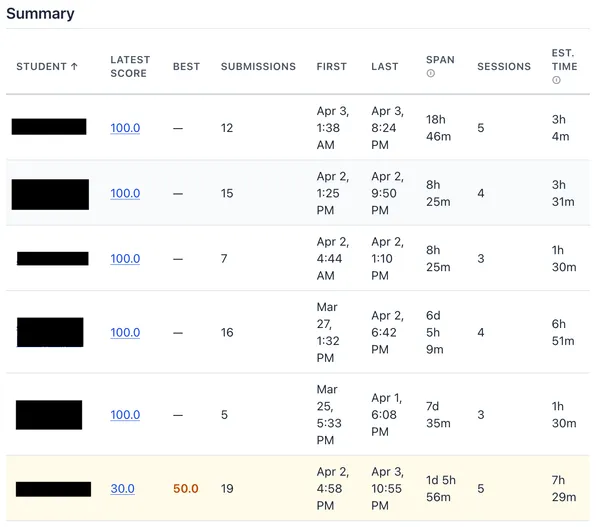
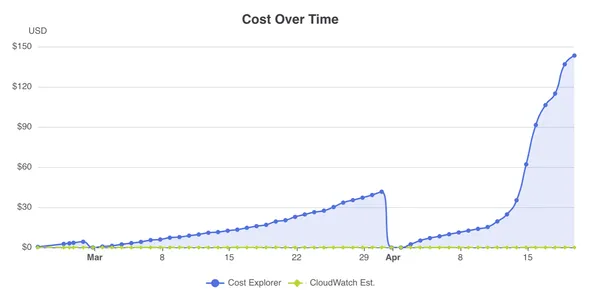
← Back to Home
All Weekly Reports
16 reports · 34,333 words · ~172 min total
Week 1
1,133 words · 6 min read
Summary
January 12 - January 18
Meetings
- 01/13 9am-10am Tuesday, Instructional Team Meeting
- 01/16 1:30pm-2:30pm Friday, Instructional Team Meeting
- 01/16 2:30-3:00pm Friday, 1-on-1 with Prof. Adams
Accomplishments
- Developed and deployed senior project website, https://cs351.couetil.com
- Met instructional staff and graduate teaching assistants
- Wrote analysis of how the past course session used Gradescope’s Autograder
- Developed example Autograder assignment for use as Cloud Assignment 0
Next Steps
- Update Cloud Assignment 1 for new class session. Make sure typos are fixed. Determine publishing format (PDF or HTML).
- Develop ideas for new Cloud Assignment 2.
- Read through “Cloud Computing: Theory and Practice, 3rd edition” by Dan
Marinescu for Cloud Assignment ideas.
Analyzing course use of Gradescope’s Autograder
During the spring term of 2025, Patryk Tomalak developed four cloud assignments
that utilized a Gradescope feature called
“Autograder”. By packaging resources in a zip file, instructors
can create a custom grading experience for any assignment. The autograding
experience for the cloud assignments were designed as “mastery learning”
exercises encouraging students to solve assignments step-by-step as they worked
towards a perfect score. The autograder scripts run on each student submission,
providing feedback by awarding points or displaying helpful error messages.
Students have an unlimited number of submission attempts during the assignment
time period, and assignments were self-contained. That is, apart from
registering for an Amazon Web Services (AWS) account, every step required to
pass an assignment was documented within the assignment PDF itself, and
successful completion of an assignment did not rely on the result of previous
assignments.
I will take a moment to analyze the approach taken by Patryk in developing
these assignments. Assignment tasks revolved around provisioning AWS resources
- virtual machines, cloud functions - and using orchestration features, both
open-source and proprietary to the AWS platform. The autograder scripts relied
on an AWS access key to review a student’s AWS account, the student themselves
would create a “CS351-autograder” user with read-only access, to which they
associate and store an AWS access key for later submission to Gradescope. The
scripts also initiated key-based SSH access to any virtual machine by means of
a private key packaged in the grader zip file, for which the corresponding
public key was shared with students in each assignment. These access mechanisms
allowed instructors to query two sources of information: First, the student’s
account with a cloud provider, which contains the data on how they are using
the platform, and second, the resources provisioned using the platform,
enabling comprehensive auto-verification of an assignment’s requirements.
The grader zip files followed a common directory structure:
grader.zip
├── config
├── id_rsa
├── requirements.txt
├── run_autograder
├── run_tests.py
├── setup.sh
└── tests
    └── test_aws.py
config: contains a TOML configuration for the grading script’s AWS API client.id_rsa: the private key used for SSH connections to student resources.requirements.txt: python dependency list for the grading script.run_autograder: bash script that runs on each student submission, copies the assignment submission files and runs “run_tests.py”.run_tests.py: Uses unittest to execute all test cases defined in the “tests” directory.setup.sh: shell script that runs on container initialization, installing python system-wide along with the dependencies from requirements.txt. Also copies the remaining grader files to the appropriate places.test_aws.py: comprehensive unit tests that take advantage of Gradescope’s Python utilities for the “mastery learning” experience.
Several Python libraries power the unit tests:
gradescope-utils: Assigns question numbers and grading weights to each unit test, which are eventually reflected in Gradescope’s UI.botocore and boto3: AWS SDK for Python.paramiko: SSH client and server implemented in Python.
A typical unit test will verify the autograder has access to the student’s AWS
account, that the “CS351-autograder” user exists, and that an AWS budget was
created to detect free-tier overruns, before listing any expected resources,
like an EC2 instance, and connecting to or asserting against them. The stdout
of the executed unit tests are parsed by another Gradescope utility “JSONTestRunner” and stored
in a file “results.json”. The contents determine what the
student will see in their assignment submission and their final score.
Creating a cloud assignment
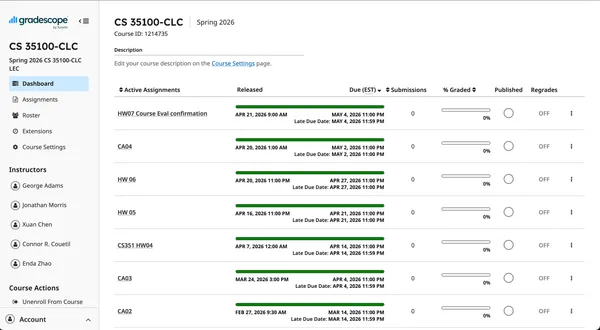
Visit https://www.gradescope.com. Log in and visit course “CS 35100-CLC”.
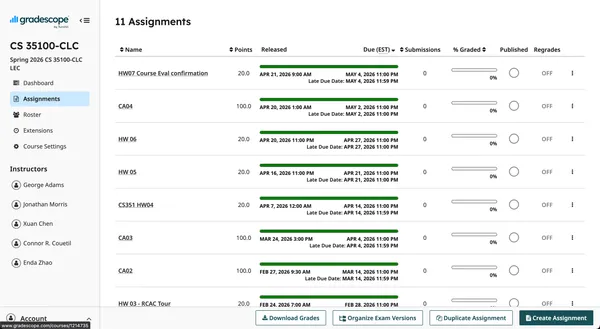
Click “Assignments” on the left menu.
https://www.gradescope.com/courses/1214735
Click “Create Assignment” at the bottom right.
https://www.gradescope.com/courses/1214735/assignments
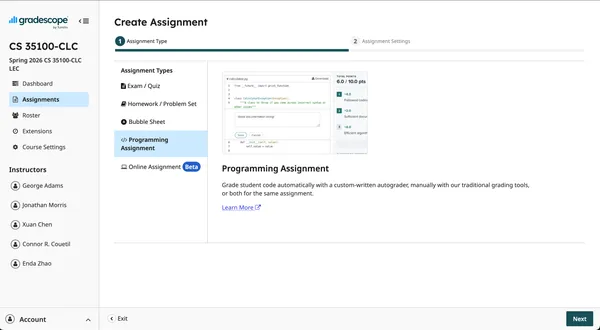
Select the “Programming Assignment” type then click “Next”.
https://www.gradescope.com/courses/1214735/assignments/new
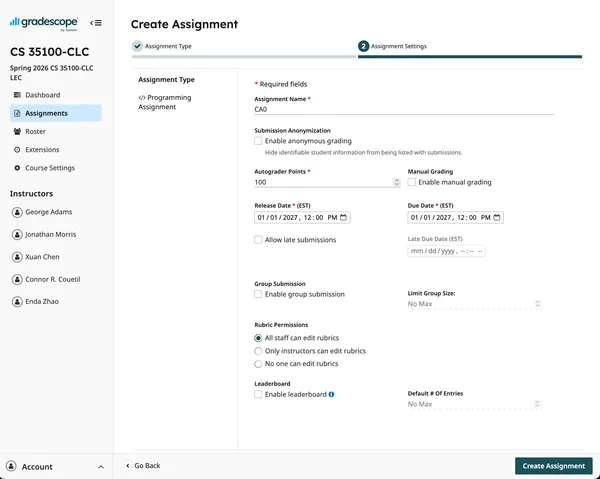
Fill in the displayed fields. You must specify the total points for the
assignments, the release date, and the due date. Last session all cloud
assignments were worth 100 points. Then click “Create Assignment”.
https://www.gradescope.com/courses/1214735/assignments/new
You have created a new assignment and are now able to upload a zip file
containing the autograder files that will run when students submit.
Let’s start designing a simple cloud assignment. Our goal for this assignment
is to verify students have correctly configured our autograder’s access to
their AWS account, and that they are able to spin up an EC2 instance the
autograder can SSH into. This will help instructional staff feel confident
all students are prepared for the course assignments.
Remember the directory structure for our autograder setup, and keep the
documentation page as reference.
grader.zip
├── config
├── id_rsa # we'll change to id_ed25519
├── requirements.txt
├── run_autograder
├── run_tests.py
├── setup.sh
└── tests
    └── test_aws.py
The config file should contain our AWS SDK settings.
[default]
region = "us-east-1"
output = "json"
Next we’ll generate a new private key, this time a shorter ed25519 key, using
ssh-keygen. Do not set a passphrase. Keep the public key at hand, we’ll
include it in the assignment document.
$ ssh-keygen -o
Generating public/private ed25519 key pair.
Enter file in which to save the key (~/.ssh/id_ed25519): ./id_ed25519
Enter passphrase for "./id_ed25519" (empty for no passphrase):
Enter same passphrase again:
Your identification has been saved in ./id_ed25519
Your public key has been saved in ./id_ed25519.pub
The key fingerprint is:
SHA256:npsK/8qXY9TFTsDJEbxcAxqwsWfNenrfg2dkReiVYbA user@hostname.local
The key's randomart image is:
+--[ED25519 256]--+
|      o..++= ..+o|
|       + =* o +.o|
|      o +.o= E o |
|       o .o + . .|
|        S..+   . |
|       ..+. . o  |
|    .  .+..  +   |
|     +  =+ ...+  |
|      =*+.  .o.. |
+----[SHA256]-----+
Our python script will rely on libraries defined in requirements.txt
gradescope-utils>=0.3.1
botocore
boto3
paramiko
and setup.sh initializes the Ubuntu container created for our
autograder assignment.
#!/usr/bin/env bash
apt-get install -y python3 python3-pip python3-dev

pip3 install -r /autograder/source/requirements.txt

mkdir ~/.aws/
cp /autograder/source/config ~/.aws/config
cp /autograder/source/id_ed25519 $PWD
run_autograder will run on each submission,
#!/usr/bin/env bash

# Copy credentials to the AWS credentials directory
cp /autograder/submission/credentials ~/.aws/credentials

cd /autograder/source

# Run the Python script
python3 run_tests.py
passing control to Python through run_tests.py.
import unittest
from gradescope_utils.autograder_utils.json_test_runner import JSONTestRunner

if __name__ == '__main__':
  suite = unittest.defaultTestLoader.discover('tests')
  with open('/autograder/results/results.json', 'w') as f:
      JSONTestRunner(visibility='visible', stream=f).run(suite)
Everything we have defined so far will remain much the same for each
cloud_assignment. It is the simple scaffolding enabling our method of grading
assignments.
Now, let’s get to the meat of the autograder setup: the unit tests. This will
vary by assignment, and will represent most of the work of creating cloud
assignments. All our unit test files will be in a directory tests/. For now,
all unit test functions will be in a single file, test_aws.py.
Let’s create a minimal test_aws.py file.
import unittest
import boto3 # AWS SDK
import paramiko # SSH client
from gradescope_utils.autograder_utils.decorators import weight, number

class TestAWS(unittest.TestCase):
  @weight(1)
  @number(1)
  def test_case(self):
      self.fail("TODO")
Finally, we’ll zip everything up.
$ tree .
.
└── grader
   ├── config
   ├── id_ed25519
   ├── id_ed25519.pub
   ├── requirements.txt
   ├── run_autograder
   ├── run_tests.py
   ├── setup.sh
   └── tests
       └── test_aws.py
$ (cd grader; zip -r ../grader.zip *)
adding: config (stored 0%)
adding: id_ed25519 (deflated 33%)
adding: id_ed25519.pub (deflated 4%)
adding: requirements.txt (deflated 4%)
adding: run_autograder (deflated 33%)
adding: run_tests.py (deflated 36%)
adding: setup.sh (deflated 36%)
adding: tests/ (stored 0%)
adding: tests/test_aws.py (deflated 33%)
$ zipinfo grader.zip
Archive:  grader.zip
Zip file size: 2532 bytes, number of entries: 9
-rw-r--r--  3.0 unx       43 tx stor 26-Jan-18 17:59 config
-rw-------  3.0 unx      444 tx defN 26-Jan-18 18:00 id_ed25519
-rw-r--r--  3.0 unx      123 tx defN 26-Jan-18 18:00 id_ed25519.pub
-rw-r--r--  3.0 unx       49 tx defN 26-Jan-18 19:48 requirements.txt
-rw-r--r--  3.0 unx      200 tx defN 26-Jan-18 19:49 run_autograder
-rw-r--r--  3.0 unx      307 tx defN 26-Jan-18 19:49 run_tests.py
-rw-r--r--  3.0 unx      221 tx defN 26-Jan-18 19:49 setup.sh
drwxr-xr-x  3.0 unx        0 bx stor 26-Jan-18 19:56 tests/
-rw-r--r--  3.0 unx      257 tx defN 26-Jan-18 19:56 tests/test_aws.py
9 files, 1644 bytes uncompressed, 1152 bytes compressed:  29.9%
It’s time to upload our autograder definition, and run a test to see if its working.
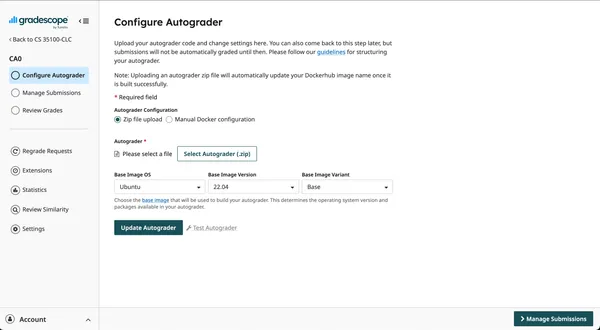
Navigate to the “CA0” assignment we created and click “Select Autograder”. Upload the zip file we just created.
https://www.gradescope.com/courses/1214735/assignments/7494302/configure_autograder
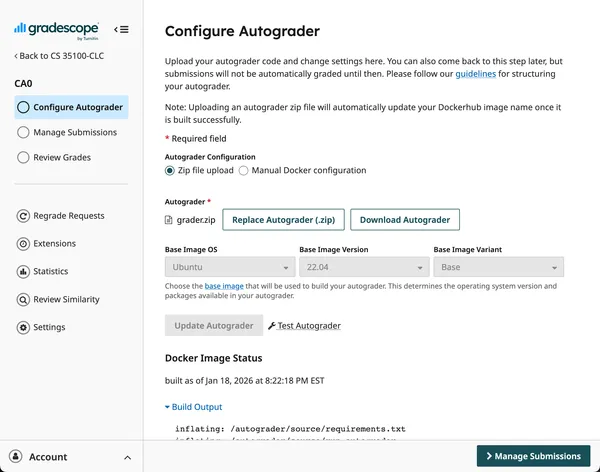
Then click “Update Autograder”. This will start a build of the Docker image,
and the build log, along with any errors, will be displayed below the update
button for debugging purposes.
Now click “Test Autograder”.
https://www.gradescope.com/courses/1214735/assignments/7494302/configure_autograder
You’ll be asked to upload a submission file. Our current autograder script
doesn’t care what you upload, so upload a blank file for now. Students will
eventually submit a file containing the AWS access key credentials for the
autograder to access their AWS account.
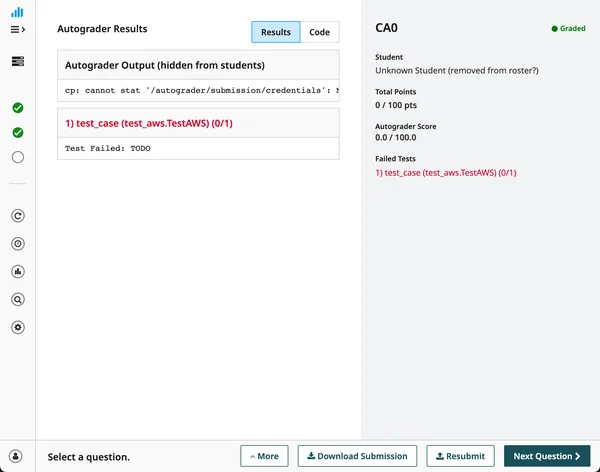
Click “Upload” and wait for the autograder to finish. The result will show a
failure, like we expected, and include debugging information from the run.
https://www.gradescope.com/courses/1214735/assignments/7494302/submissions/381402520#
This upload and test flow will be how we test cloud assignments before release.
Let’s take a look at part of the final test_aws.py file for Cloud Assignment 0.
import unittest
import boto3
import paramiko
from gradescope_utils.autograder_utils.decorators import weight, number

class TestAWS(unittest.TestCase):
  _cache = {}

  @property
  def account_id(self):
      """
      Returns the AWS account id for the current AWS user
      """
      if 'identity' not in self._cache:
          self._cache['identity'] = boto3.client('sts').get_caller_identity()
      return self._cache['identity']['Account']

  ...

  @property
  def ec2_instances(self):
      """
      Returns a list of all ec2 instances in the account
      """
      if 'ec2_instances' not in self._cache:
          self._cache['ec2_instances'] = (
              boto3.client('ec2').describe_instances(Filters=[
                  {'Name': 'instance-state-name', 'Values': ['running']}
              ])
          )
      return [
          instance
          for res in self._cache['ec2_instances']['Reservations']
          for instance in res['Instances']
      ]

  ...

  @weight(15)
  @number(1.1)
  def test_aws_account_access(self):
      """
      Autograding - can connect with AWS?
      """
      if not any(char.isalpha() for char in self.account_id):
          print(f'AWS Account ID: {self.account_id}')
      else:
          self.fail('Accessing the account failed, go back to the cloud assignment handout and try following the instructions carefully')

  @weight(15)
  @number(1.2)
  def test_aws_autograder_user(self):
      """
      Autograding - required user 'CS351-autograder' exists?
      """
      if any(user['UserName'] == 'CS351-autograder' for user in self.iam_users):
          print('CS351-autograder detected in users')
      else:
          self.fail('unable to find CS351-autograder in IAM users')

  ...

  @weight(15)
  @number(3.1)
  def test_ec2_instance_exists(self):
      """
      EC2 - Does the correct instance exist?
      """
      num_instances = len(self.ec2_instances)
      if num_instances != 1:
          self.fail(f'Did not find the expected number of EC2 instances running (found {num_instances}, expected 1). Remember, use the us-east-1 region and have exactly one instance running for this lab.')

      instance = self.ec2_instances[0]
      tags = instance.get('Tags', [])
      if not any(tag['Key'] == 'Name' and tag['Value'] == 'ca0' for tag in tags):
          self.fail('EC2 instance must be named ca0')

      if instance['InstanceType'] != 't2.micro':
          self.fail('EC2 instance must be a t2.micro')

      volume_sizes = [volume['Size'] for volume in self.ebs_volumes]
      if not all(size < 30 for size in volume_sizes):
          self.fail('You exceeded the free EBS volume size of 30GB.')

      platform_details = instance.get('PlatformDetails')
      if not platform_details or 'Linux' not in platform_details:
          self.fail(f'Expected EC2 instance to be running Linux. (found "{platform_details}")')

  ...

  @weight(25)
  @number(3.2)
  def test_ec2_accessible_by_ssh(self):
      """
      EC2 - can connect to instance over SSH?
      """
      instance = self.ec2_instances[0]
      public_ip = instance.get('PublicIpAddress')
      if not public_ip:
          self.fail('Unable to find public ip address for EC2 instance')

      keyname = instance.get('KeyName')
      if not keyname:
          self.fail('Unable to find key pair attached to EC2 instance. Make sure to attach your generated secret key when creating the VM')

      pkey = paramiko.Ed25519Key.from_private_key_file('./id_ed25519')
      ssh = paramiko.SSHClient()
      ssh.set_missing_host_key_policy(paramiko.AutoAddPolicy())
      ssh.connect(hostname=public_ip, username='ec2-user', pkey=pkey, timeout=2)
      stdin, stdout, stderr  = ssh.exec_command('uname -a')

      if not stdout.read().decode('utf-8'):
          self.fail('Unable to connect to EC2 instance over SSH.')

      print('Successfully connected to EC2 instance over SSH')
There are two autograder details to note: First, the title in the UI for a particular
question is determined by the docstring in the unit test function. Second, all
weights for each unit test must add to the total number of points for the
assignment.
Week 2
5,662 words · 29 min read
Summary
January 19 - January 25
Meetings
- 01/20 2:30-3:30 Tuesday, 1-on-1 with Prof. Adams
- 01/23 1:30-2:30 Friday, Instructional Team Meeting
Accomplishments
- Fixed student issues related to Cloud Assignment 0.
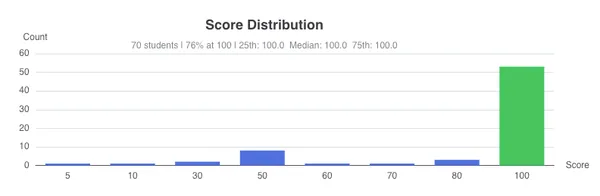
- Cloud Assignment 0 was completed by 73/77 students and the average score was 100%.
- Cloud Assignment 1 draft was completed
- Read Chapters 1 and 2, and Appendices A and B, of Dan Marinescu’s “Cloud
Computing: Theory and Practice”
Reflections on Cloud Assignment 0
Students encountered several problems while working through the assignment,
I’ll summarize those problems shared through Ed.
There were three issues involving the credentials file.
- The credentials file values should not have had quotes around the stored
values. This was a problem with the assignment handout, which contained quotes
around the placeholder values and misled students.
- The credentials file must not have a file extension. Several students
had a file extension at the end of the filename, such as “.txt”, which caused
our grader script to not find it. In a minority of cases a filename will not
carry a file extension, by convention, and students assuming the common case
would have been encountered this issue, as most GUI file editors will add file
extensions to files. This problem is exacerbated by a common operating system
practice, hiding file extensions in a file explorer, which occurs in both MacOS
and Windows by default.
- The credentials file must not be “UTF-8 (with BOM)” encoded or a
non-plain text format. In a striking demonstration of cloud computing’s
pervasiveness, a student created a credential file in Google Docs, downloaded
it as a .txt on their own computer, and then uploaded it to Gradescope as a
submission. The file was “UTF-8 (with BOM)” encoded, which the AWS SDK was
unable to read. Another student had the same issue with file encodings when
using VSCode. Interestingly, one student tried uploading a PDF as a credentials
file.
Let’s discuss how to remediate these problems.
(1) can be fixed by testing the cloud assignment with more people ahead of
time, to catch any typos. Often the person writing the assignment holds
different assumptions than those working through it for the first time. In my
case, I had my old credentials file lying around, which I re-used, and which
didn’t contain quotes, rather than making a new one during testing.
(2) can be fixed by having our grader script load any file with “credentials”
in the name. Postel’s law would serve us well: “be conservative in what you
send, be liberal in what you accept.”
(3) can be detected by the grader script which can convert it from one encoding
to another. Worse issues, like uploading a PDF, can be avoided by improving
assignment instructions.
AWS Free Tier Changes
The AWS Free Tier changed on July 15, 2025, last summer after the previous
course section ended. I will discuss the specific changes in a later section,
here the relevant detail is that the EC2 instance types eligible for free tier
billing changed from t2.micro and t3.micro to t3.micro, t3.small, t4g.micro,
t4g.small, c7i-flex.large, m7i-flex.large.
My account was created before July 15, 2025, so I was on a different free tier
than students in the current section. For this reason, I did not realize the
free tier instances had changed, and I developed my grader script to verify the
constraints of the old free tier. It took me several deployments and back and
forth with the students to have the new grading script working.
This exposed several problems: (1) the free tier assumptions inherited from
past assignments no longer hold, requiring us to reconsider our approach to
developing assignments. (2) the develop-debug-deploy loop for Gradescope’s
autograder is relatively slow (3) we don’t have an automated testing framework
for our grader scripts, forcing manual testing and (4) Ed, while quite good, is
not the ideal for back and forth debugging with students, I’m forced to ask for screenshots and for them to try things and get back to me.
Let’s momentarily discuss some steps we could take to address these problems.
(1) is a problem that has become an opportunity. The new free tier is much more
flexible, and opens up new opportunities for assignments. Instead of the free
tier dictating the architecture for our cloud assignments, our architectural
choices have been freed, and now the free tier simply dictates the scale. More
on this later.
(2) The develop-debug-deploy loop for the autograder script can be sped up.
Gradescope allows for two deployment options: Manually uploading a zip file,
our current aproach, which requires Gradescope to build a Docker image on our
behalf based on its contents. Or we can register a link to an image in a
container registry we control. We simply build and deploy our image, and the
autograder will pull it on each container run. This gives us more flexibility
with how we engineer our Docker container, and many more opportunities to
improve the automation of and speed at which we can deploy our grader scripts.
(3) Our scripts are manually tested at the moment. Automated testing would
improve our confidence in their results, and help prevent any regressions as we
update and develop the assignments. Additionally, it would help future
sections of the course as new teaching assistants inherit maintenance of these
assignments. However, it is challenging to develop integration tests that
includ third-party components, particularly infrastructure. I think we can take
two approaches, of which I favor the latter: First, determine if its feasible
to mock API call results to make sure our test assertions are appropriate,
which requires us to fake what AWS API responses will look like. And second, we
could develop ansible and terraform scripts that deploy solutions on our own
infrastructure, figure out some way to trigger an autograder grader either
locally or automatically, and perform an end-to-end integration test at
development time, not deploy time.
(4) Ed is a great platform for asynchronous communication, but debugging with
students is more effective synchronously, and when they can share what they’re
looking at. Currently they’re restricted by how fast they can type and
how many screenshots they can share. Perhaps we should consider an office hour
for cloud assignment issues, or a weekly zoom meeting that students can drop
into to share their screen and have a quick discussion.
Delayed Mail Delivery for Purdue Outlook
One student had an issue Thursday (1/22) evening. When you register for an AWS
account, they send a verification code to the provided email that has an
expiration time of 10 minutes. That email was consistently delivered to the
student’s inbox more than 10 minutes later, impeding them from verifying their
account. The email verification step is required if students are to create
their own AWS accounts. That night I sent my self an email from my personal
email account to my purdue account and it took 4 hours to get delivered, and it
was to my junk email folder, where I had to report it as non-spam. The next
morning I sent another test email, and it was delivered within a minute.
Unfortunately, this has exposed that we are at the mercy of Purdue’s e-mail
infrastructure when students are setting up their AWS accounts and working on
the cloud assignments.
A possible fix for this issue touches on a prevailing conversation about
administering this course: to grant students regular IAM accounts registered
under an instructional staff-controlled AWS account. Thus, students would
receive a simple username and password login at the start of the course,
without email verification, and on first login could be easily required to
register a proper MFA device for subsequent logins. I will discuss course
administration approaches later in this report.
Sharing privileged credentials on Ed
In a private Ed post, a student posted a screenshot of their AWS credentials
with me. Ed uploads files to their content delivery network (CDN), which does
not perform authentication for performance reasons and access reasons. I
informed them of the risk they are taken, removed the image from their message,
and advised them to rotate their credentials. In future assignments I will
emphasize the privileged nature of their AWS credentials, they risk they assume
if they are irresponsible guarding them, common mistakes to avoid such as
committing them to source control, how to evaluate whether or not to put
certain data on cloud providers, and useful way to store and secure secrets for
their personal projects.
Projected calendar of the course
Let’s take a look
| Week | Dates | Textbook | Topics | Assignments | Exams |
|---|
| 1 | 1/12-1/18 | Ch. 1,2 | The Motivations for Cloud, Elastic Computing and its advantages | | |
| 2 | 1/19-1/25 | Ch. 3 | Types of Clouds and Cloud Providers | CA0 (1/20-1/23) | |
| 3 | 1/26-2/1 | Ch. 4,5 | Data Center Infrastructure and Equipment, Virtual Machines | CA1 (1/27-2/6) | |
| 4 | 2/2-2/8 | Ch. 6 | Containers | | |
| 5 | 2/9-2/15 | Ch. 7 | Virtual Networks | CA2 (2/10-2/20) | |
| 6 | 2/16-2/22 | Ch. 8 | Virtual Storage | | Midterm 1, Feb. 17 |
| 7 | 2/23-3/1 | Ch. 9 | Automation | CA3 (2/24-3/6) | |
| 8 | 3/2-3/8 | Ch. 10 | Orchestration: Automated Replication and Parallelism | | |
| 9 | 3/9-3/15 | Ch. 11 | The MapReduce Paradigm | CA4 (3/10-3/20) | |
| 10 | 3/16-3/22 | Ch. 12 | Microservices | | |
| 12 | 3/23-3/29 | Ch. 13,14 | Controller-based Management Software, Serverless Computing and Event Processing | CA5 (3/24-4/3) | |
| 13 | 3/30-4/5 | Ch. 15 | DevOps | | Midterm 2, Mar. 31 |
| 14 | 4/6-4/12 | Ch. 16 | Edge Computing and IIoT | | |
| 15 | 4/13-4/19 | Ch. 17 | Cloud Security and Privacy | | |
| 16 | 4/20-4/26 | Ch. 18 | Controlling the Complexity of Cloud-Native Systems | | |
I’ll note there are 1-2 weeks of space to delay a cloud assignment. I expect to
release Cloud Assignment 1 on January 27th, and Cloud Assignment 2 on February
10th.
Reflections on assignments in Dan Marinescu’s Cloud Computing: Theory and Practice
Dan Marinescu’s Cloud Computing textbook is very good, I’m enjoying reading it
so far. I’m through the first two chapters, and have read the two appendices,
which are the most relevant to the cloud assignments for CS 351. I’ll discuss
the appendices and several of their suggestions in this section.
Appendix A: Cloud projects
Appendix A discusses possible cloud projects for students to complete. They
are as follows:
- Cloud simulation of a distributed trust algorithm
- A trust management service
- Simulation of traffic management in a smart city
- A cloud service for adaptive data streaming
- Optimal FPGA synthesis
- Tensor network contraction on AWS
- A simulation study of machine-learning scalability
- Cloud-based task alert application
- Cloud-based health-monitoring application
I’ll break the suspense — I think “A cloud service for adaptive data
streaming” or “A simulation study of machine-learning scalability” are possible choices
for an assignment.
“A cloud service for adaptive data streaming” is a project to find the optimal
architecture for adaptive data streaming problems. Consider adaptive audio
streaming, which is a multiobjective optimization problem. From the text, “We
wish to convert the highest quality audio file stored on the cloud to a
resolution corresponding to the rate that can be sustained by the available
bandwidth; at the same time, we wish to minimize the cost on the cloud site and
also minimize the buffer requirements for the mobile device to accommodate the
transmission jitter. Finally, we wish to reduce to a minimum the start-up time
for the content delivery.” The performance of a solution depends on resource
constraints: available CPU cycles, buffer space on the sender and receiver, and
network bandwidth.
“A simulation study of machine-learning scalability” is based on work done
control a video game, StarCraft, which will likely engage students who are fans
of video games in general or the game itself. Graduate students were asked to
build a convolutional neural network (CNN) to predict the computational effort
required to build a deep neural network (DNN), and then (1) build a dataset by
running a scenario 20,000 times, (2) train the model to predict a “best”
action, then (3) rerun game scenarios using the new predicted best action.
I chose these assignments because they are relevant to current industry trends:
streaming multimedia to clients, and training AI/ML algorithms. They are also
easily benchmarked, allow us to evaluate student’s implementations by comparing
their performance against each other. This produces a rank of solutions by
performance, with which we can confer extra credit to the best performing
solutions, incentivizing students to be creative and go above and beyond.
The textbook contains the cloud architecture they used to implement some of these projects
projects, but the assignments would have to be adapted for the skill level of
our students. Additionally, these projects are outside the scope of my
expertise, and I would require support from other instructional staff.
Now to discuss the remaining assignments. Project 1 is a distributed
computation where students would be expected to implement the algorithm. Its a
simulation of a cloud architecture, not an implementation of the cloud
architecture. It’s both outside the scope, and in a way trivial, for this
course. Project 2 uses an algorithm to assess what nodes in a cluster or
network are malicious. I believe it would use too many resources to implement,
or require adaptation to multiple containers on a node, while not being
relevant to most industry work at the moment. Project 3 is quite fun, but more
an exercise in object-oriented simulation. Project 5 uses a third-party tool
for electrical and computer engineers. Project 6 is a condensed matter physics
simulation that is algorithmically focused, and whose cloud principles, that is
choosing the right instance for the right job, is better expressed in
another manner. Project 8 uses a considerable number of AWS services to
develop a web application, whose architecture does not fit in the free tier,
whose effort exceeds 10 days, and whose principles can be taught more simply.
Project 9 is an IoT data-streaming application, which would require us to
provide or simulate IoT devices to stream data to student servers.
Appendix B: Cloud application development
Appendix B is an introduction to application development on AWS. It’s useful as
a tutorial and exposes useful features, but suffers from some issues: (1) it’s
specific to a single cloud vendor, (2) language examples are in C# and Java
neither of which were used in the course last semester, and (3) the information
is out of date.
Instructional Infrastructure
My experience developing CA0, the issues students have had working on the
assignment, and my curiosity with regard to student engagement with the cloud
assignments, have spurred questions about our “instructional infrastructure”.
In my formulation, instructional infrastructure is the processes and rules used
when producing content for the course, and the mechanisms that enable feedback
and review of that work. Let’s consider cloud assignment 0. I took a series of
steps to (1) develop the assignment, through consideration of current textbook
content and discussion with the instructional staff, (2) test the assignment,
by producing an autograder script and manually testing it, (3) publishing the
assignment, by writing the assignment using a web framework and exporting the
resulting web page as a PDF shared through brightspace, and (4) received
feedback about the assignment, by observing Ed discussion, answering questions,
and tracking student progress using Gradescope’s log of grading results.
I believe the most valuable practice we can adopt this class semester is a
culture of assessment and reflection. We can improve our ability to assess
student experience and engagement with assignments by collecting more and
higher quality data, and we can tighten feedback looks with regard to that data
through automation and clear processes. I will discuss some possible steps to
enrich these factors.
Currently, we get information about student engagement with the assignment
through Ed discussion, which is working fine. Using Gradescope submission
statistics, we can see student progress on an assignment, but Gradescope only
shares the data of their final submission attempt. Finally, we have the
capability to inspect a student’s AWS account using the autograder, but only at the
time that they perform an assignment submission, and we don’t take advantage of
its full potential. We also do not get any signal from how they experiment with
AWS between submissions.
Here I’ll propose some ideas to tackle problems (1) granular tracking of
assignment progress and (2) evaluation of student AWS use.
Consider the autograder: Gradescope invokes a docker container on each student
submission. The container contains our grading script, which runs arbitrary
code, and is where we have defined the point values of assignment “questions” corresponding to particular assertions we
make about the state of a student’s AWS account and derived resources, which
add up to the students final grade. Now, to work towards (1), we can place
monitoring code in the grading container that records the time of submission, a
snapshot of the state in a student’s AWS account, and the point total of that
particular submission, and store that information in a database under
instructor control. We’ll then be able visualize and calculate statistics
related to student engagement: submissions per assignment, speed of completion,
activity over time, and much more. We can use this information to assess cloud
assignments and learning outcomes in order to improve future assignments. It
would require setting up cloud infrastructure under management of the
instruction staff to collect, store, and display this data.
With regard to (2), we have inverted our control as instructional staff.
Student’s grant us permission to review their solutions, on their terms.
Thus, to get more information about a student’s use of their account, we must
ask permission or use indirect means of access, currently, the “credentials”
files uploaded during assignment submission (also note that this method places
privileged student data — an access token with full administrative access to
their personal AWS account tied to their credit card — on Gradescope’s
servers, subject to their security controls).
Let’s consider how to address this problem. Our goal is two-fold, in fact, we
are desperately trying to achieve them today, but our means are insufficient.
Those two goals are (1) how do we control student resource use such that they
do not incur charges for completing course assignments, and (2) how can we
understand and enable student cloud use so we can assess and meet learning
outcomes.
I suggest we create a class AWS account under the control of instructional
staff. At the start of the course, we can create IAM users for each student
based on their career account username, and assign a temporary password for
their first login. After logging in, they can change their password and
configure an MFA device, which we can enforce as account administrators. For
each new cloud assignment, we can create a permission group that grants student
access to only those resources needed to complete the assignment. This lets us
control whether a student has permission to create an EC2 instance or a Lambda
function, however, it is limited in that the security group will not limit the
number of EC2 instances a student can spin up. So, we still have the problem
of a student spinning up Bitcoin miners on our dime.
To address that particular issue, we can register an AWS EventBridge rule that
triggers a Lambda function function every time an ec2 instance is launched. It
would track student instance use in a DynamoDB cluster, and if a student goes
over the alloted resource limit for a particular assignment, the function could
restrict EC2 service access temporarily and kill any excess instances,
notifying us if necessary. Events are not limited to EC2 instance spinups, we
can actually monitor billing in real-time, letting us track course spend
granularly during the semester.
By creating a method by which we are account administrators with full control
over student resource access, we now have the appropriate permission level to
monitor student resource usage holistically, and the data by which to evaluate
that usage.
The dollars and cents of cloud assignments
Two of our previous discussion topics require us to rephrase cloud assignment
proposals in financial terms. The changes to AWS’s Free Tier limits total
cloud usage for the course to under $100 per student (possibly $200), and the
suggestion to bring students under an instructor-controlled account makes cloud
assignments a departmental budget item. Here I’ll suggest a framework for how
to price a cloud assignment.
A cloud assignment uses several AWS resources, is available during the time
period defined by its release and due date, and is expected to be worked on by
all students enrolled in the class. Using this information, we’ll define a
simple formula to evaluate the cost of an EC2-based assignment.
(Assignment Length in days) * (EC2 Instance cost / hr) * (Number of instances used to complete assignment) * (Number of Students) = Maximum Total cost of assignment
We can use this formula to estimate funding for the class. The formula assumes
the worst case of max utilization per student for the whole assignment period,
aka, the “class of bitcoin miners” scenario. We don’t have the data for a more
accurate estimate. We can now architect assignments from two directions: what
cloud principles would we like them to learn and how many resources will they
have access to learn those principles? The synthesis of these two approaches
clearly defines possible system architectures students can implement.
Note: EC2 instance cost depends on instance type and chosen operating
system. Amazon Linux is the most affordable option, Ubuntu demands a 4%
premium, RHEL %28, SUSE 66%, and Windows a whopping 103%. These premiums can
change depending on the instance type. An instance type’s base price is a ratio
between allotted type of CPU chip, number of vCPU, GiB of memory, network
bandwidth, block storage bandwidth, and hypervisor scheduling algorithm. AWS
has different hypervisor scheduling formulas to assign hardware resources
capacity to each virtual machines, the two available to free tier instances are
“burst” and “flex”.
Let’s take as an example the traditional three-tier web application system
architecture containing 1 proxy server, 3 application servers, and 1 database
server. Allow me to digress, to develop more deeply the details needed to
produce both an appropriate estimate of the cost of the cloud assignment, and
an appropriate architecture reflecting real-world considerations.
An application server will need a general purpose CPU. The Proxy server should
be memory and/or network optimized, it wants to cache a lot of stuff, hold
connections open, and route requests quickly. The database needs an I/O
optimized instance with plenty of block storage bandwidth, whose memory size will
depend on the data its storing.
Let’s examine the properties of free tier instances:
| Type | CPU | Price/hr | vCPU | Memory | Network | Block Storage | Hypervisor Schedule |
|---|
| t3.micro | Intel Xeon Platinum 8000 1st/2nd Gen | $0.0104 | 2 | 1GiB | 5 Gbps | 2.8 Gbps | Burst |
| t3.small | Intel Xeon Platinum 8000 1st/2nd Gen | $0.0208 | 2 | 2 GiB | 5 Gbps | 2.8 Gbps | Burst |
| t4g.micro | AWS Graviton 2 | $0.0084 | 2 | 1 GiB | 5 Gbps | 2.8 Gbps | Burst |
| t4g.small | AWS Graviton 2 | $0.0168 | 2 | 2 GiB | 5 Gbps | 2.8 Gbps | Burst |
| c7i-flex.large | Intel Xeon 4th Gen | $0.08479 | 2 | 4Gib | 12.5Gbps | 10Gbps | Flex |
| m7i-flex.large | Intel Xeon 4th Gen | $0.09576 | 2 | 8GiB | 12.5Gbps | 10Gbps | Flex |
AWS Graviton 2 are proprietary chips (latest is gen. 5) and
the t4g family is “burstable”. “Burstable” is AWS’s answer to the noisy
neighbor and bin packing problems of virtual machines. VMs compete for
resources — you can’t respond to an HTTP request on a cloud server if another
VM is using the phsyical interface you’re requesting, i.e. the network
interface card — so hypervisors control a virtual machine’s access to
resources, AWS has a proprietary hypervisor “Nitro” they use for most of their
EC2 instances.
t3 and t4g instances are heavily throttled by the hypervisor, they are only guaranteed
a 10%-20% baseline performance per vCPU. A VM earns “CPU Credits” when idle, which
are paid to the hypervisor to “burst” and get more resource access. Those
resources could be CPU time, network bandwidth, or disk bandwidth. t3 instances
are Intel Xeon Platinum chips, while t4g are AWS Graviton CPUs based on the ARM
“Neoverse” design.
c7i and m7i are Intel Xeon chips, they has half the maximum cores of the ARM
chips, but 4x more cache and a 25% faster clock rate. Databases perform better
on these chips. m7i are
“memory optimized” with a 4:1 ratio of memory to vCPU, twice as much as the c7
family. Both are “flex” scheduled, which guarantee a more generous 40% baseline
performance.
Returning to our 3-tier architecture, the database server can use the c7i.
Assignment datasets are small so the DB doesn’t need much ram, but it should be
a non-burstable instance because it will serve multiple clients, we want it to
be consistently fast. Flex is the next best free option. The proxy will use the
m7i instance type, it will need to hold open a lot of concurrent connections
and copy a lot of data from memory, the extra memory will directly contribute
to scaling the service for more active users.
The application servers will be performing a variety of jobs, all with
different execution patterns. Application servers are also often written in a
single threaded language. Javascript runs serially using an event loop for
concurrency. Python has a “Global Interpreter Lock” preventing parallelism.
They cannot take advantage of more vCPU easily. Using affordable, general
purpose instances with a low vCPU count that are easy to recreate and fail
independently is a good strategy. The t3 and t4g instances types fit the bill,
t3 are x86 and t4g are ARM.
Now we can plan out how much a cloud assignment will cost to implement a 3-tier
architecture using three t4g instances, a c7i-flex.large, and a m7i-flex.large.
- 77 Students
- 3 t4g.small ($0.0168/hr)
- 1 c7i-flex.large ($0.08479/hr)
- 1 m7i-flex.large ($0.09576/hr)
- 10 day assignment
(77) * (3 * .0168 + .08479 + .09576) * (10 * 24) = $4267.956 ($55.428/student)
If we use t4g.micro instead, it’s $3802.26 ($49.38/student). Remember, this is at max
utilization for the whole assignment period.
I hope this approach to pricing assignments is clear. In fact, I’ll suggest
implementing this particular architecture as a good goal for cloud assignment
2. The AWS free tier change has caused short-term problems, but inspired
long-term possibilities.
Development of Cloud Assignment 1
Currently covered chapters in the textbook are:
- The Motivations for Cloud, Elastic Computing and its advantages
- Types of Clouds and Cloud Providers
- Data Center Infrastructure and Equipment
- Virtual Machines
This assignment will incorporate elastic computing concepts, use technologies
likely introduced in previous coursework (web servers, databases), and be an
introduction to deploying an application on infrastructure-as-a-service. It is
not too difficult, but is significant enough to merit a 2 week assignment
period (10 days). It will address the same topics and use the same resourcs as Patryk’s past cloud assignment, but to my taste.
The previous Cloud assignment had students spin up an EC2 VM, create an
init.sql file with a very simple schema and some example values, and load it
into a sqlite db using a Dockerfile. It also had students create a http
webserver using any approach, although nginx was recommended.
I like the idea of a student building a web application and “shipping” it on
cloud infrastructure, but let’s have them deploy a realistic application.
Using the Django web framework and SQLite, students will implement a simple
user interface powered by the Compiler Explorer API. It will have a text area
where a user can type in Python code and click a button to display resulting
Python bytecode. There will be another button to click, that will run the code
in a container environment on their VM, and display the result. The students
will learn how to use an application framework (Django+SQLite), and solve
little web application problems along the way. This will introduce students to
making a Software-as-a-Service application using an Infrastructure-as-a-Service
provider.
The students will be graded on:
- Navigating AWS
- Bootstrapping a VM
- Running a Python application server
- Configuring a database with an application server
- Writing an HTML user interface
- Writing an MVC controller
- Writing an MVC model
- Executing code in a container
- Querying SQLite statistics
- Creating a REST endpoint
- Benchmark Score (Extra Credit)
By the end of the assignment, they will have installed dependencies on the server,
created an web application project, implemented application functionality using
the framework, examined database query statistics, become familiar with REST
principles, and have deployed an application to the cloud.
The benchmark score is meant to incentivize students to be creative and go
above-and-beyond. We can load test their final application and create a
leaderboard of every student. It should be a separate Gradescope
assignment/submission, so if the load test crashes their VM, it doesn’t slow
them down getting a 100% on every other section. The top 5 students can get
extra credit, but only if they stand up in class and share the optimizations
they used to get the highest score. For example, they could put a proxy server
written in a compiled language to improve cache performance, or tune OS
settings to improve network performance and CPU utilization. There is the issue
of only “burst” and “flex” instances being available, so performance is highly
dependent on the hypervisor scheduling algorithm, but this is meant to be fun.
The autograder can check they are not using more than one instance of the allowed
type to enforce fairness. I can release it on the Tuesday before the Friday
it’s due, 7 days in, so I can have more time to implement the leaderboard, and
so students that finish the assignment early get another task to learn from and
challenge them.
The assignment should be completed on a single EC2 instance, so we as
instructors can be confident the first same is firmly in the free tier.
The new AWS Free Tier
Previously, particular services had time-based restrictions on usage, as well
as by usage type, for example, “750hrs of t3.small per month” for EC2, which
lasted for 12 months. Now, new accounts receive $100 in credits (rather than
time) that can only be spent on certain resources and within particular usage
limits. These credits last for a shorter time than before, 6 months, and only
by using up the $100 credits will your account be credited an additional $100
before the free tier ends. This is AWS’s way to encourage people to experiment with a variety of services shortly after creating their account.
Accounts created before the free tier changes remain on the old plan.
EC2
Free tier is limited to instance types:
t3.micro
t3.small
t4g.micro
t4g.small
c7i-flex.large
m7i-flex.large
EBS
Free tier use is capped at 30 GB of storage, 2 million I/Os, and 1 GB of snapshot storage with Amazon Elastic Block Store (EBS).
RDS
Free tier choices are db.t3.micro and db.t4g.micro instances and 4 engines: MySQL, PostgreSQL, MariaDB, and Microsoft SQL Server
Lambda
Capped at 1,000,000 free requests per month. Up to 400,000 GB-seconds or 3.2 million seconds of compute time per month
S3
No usage limits on the free tier.
SageMaker AI and Amazon Bedrock
These are AI focused services also in the free tier.
Additional Services
There are many additional services with a free tier allotment, but they are not commonly used.
Ideation for future cloud assignments
Cloud Assignment 2
I will propose the n-tier architecture project for cloud assignment two. The textbook chapters covered during assignment 2’s release period are:
- Containers
- Virtual Networks
- Virtual Storage
We can benchmark students implementations by performing a load test. We can
choose a problem such that we submit data to the student cluster they have to
process, and then we can query that data somehow.
Cloud Assignment 3
Will be about automation and orchestration. Should introduce Ansible,
Terraform, and Kubernetes.
Professor Adams also wants it to be about networking and storage too. I could
do a Kubernetes dive into these things. Also emphasize firewall settings (See
Table B.1 in Dan Marinescu’s Cloud Computing, Appendix B). From Appendix A,
project “A.4 A cloud service for adaptive data streaming” could be a good one
here, or assignment 2. ████ and ████ could also work on implementing some of
these algorithms while I work on the surrounding infrastructure and create the
write up. They could do “A.7 A simulation study of machine-learning
scalability” together.
Cloud Assignment 4
Probably something to do with the RCAC visit.
Cloud Assignment 5
Should be the FaaS project and implementation
Approach to developing Cloud Assignment 1
Goal: Students will develop their own SaaS on top of IaaS, becoming familiar with EC2 virtual machines.
Application: Detect a bird in a photo.
Constraints: 1 t4g.small EC2 VM. No other AWS services.
Total Possible Cost: Using our above formula, the Max Cost per student for this assignment is (10 * 24) * (0.0168) = $4.032.
Rationale for Cloud Assignment 1
The assignment was designed to meet four goals.
- To demonstrate the breathtaking progress in cloud services and intelligent computing.
- To provide students experience with a realistic application they can learn from and experiment with.
- To establish foundational application-level knowledge that can be expanded on to teach system-level decision-making.
- To choose an application design that has implications beyond computing and into ethical and privacy concerns.
Inspired by the XKCD comic “Tasks”, I wanted to demonstrate to
students that what we’re able to do today was unthinkable 10 years ago. We can
run a complicated image recognition task that takes a natural language input
and transforms that not just into a classification of an image but the
generation of a bounding box and a coloring of the object shape itself. All of
this on the cheapest available virtual machine on AWS, and in less than a
second. Unbelievable.
I also wanted students to have experience with a realistic and common type of
application they will encounter in industry. Having them deploy one of the most
commonly used web frameworks using the basic tools you would find on a
POSIX-compatible system introduces struggle and manual grunt work, the recent
memory of which will motivates the adoption of cloud-focused tooling like
containers and automation. For example, struggling to install Python helps you
realize how useful it is to be able to reference a specific version of Python
in a Dockerfile.
Another point is that a realistic application can be scaled according to
systematic, non-contrived principles. Slightly modifying the requirements of
the application can necessitate major modifications to the system architecture.
The bird image recognition application can be taken different directions with
regard to scale and requirements without compromising the conceptual integrity
of the service. This allows students to have a stable reference point for
system design decisions, and recognize more easily the subtleties of change and
its implications. For example, if students were asked to implement a history
feature, we would need sufficient storage space for uploaded images which
motivates the introduction of S3. Or if they were asked to scale the service to
accommodate more load, we could introduce a N-tier web architecture with
multiple EC2 instaces to serve as the proxy, application, and database servers.
Finally, image recognition is a ethically charged technology. Today, human
rights abuses are enabled by malicious application of face detection and other
image-based machine learning algorithms. Discrimination and bias can easily
intrude on in naive image recognition applications. We’ve started with an
innocuous software service, bird recognition, but we could raise the stakes
easily by having students strip geolocation data from EXIF metadata embedded in
uploaded images, bringing up questions of user privacy. Or the “Bird.ai”
startup introduced in Assignment 1 could raise VC-funding contingent on
implementing a feature where the background of a bird photo is analyzed to mine
features for another ML algorithms, raising questions data sovereignty.
Students today are the future professionals that must grapple with these
technologically driven issues.
I hope this assignment serves a good foundation for following course
assignments, and may provide interesting ideas for the development of
coursework in future sections of the course.
Week 3
2,376 words · 12 min read
Summary
January 26 - February 1
Meetings
- 1/27 2:30-3:30PM Tuesday, 1-on-1 with Prof. Adams
- 1/29 1:30-3PM Thursday, 1-on-1 with Grace Lingley, Curriculum Developer
- 1/30 1:30-2:30PM Friday, Instructional Team Meeting
Accomplishments
- Cloud Assignment 1 document was published to Brightspace
- Cloud Assignment 1 autograder script was released on Gradescope
Building an autograder script
I built a docker test harness. It speeds up development as I don’t need to
deploy to Autograder to test the autograding script. Still need to publish as
.zip because we don’t have a class container image registry.
Autograder has a custom test harness. I’m trying to hook into it to distinguish
between test failures from assertions and test failures from the test harness
being wrong. I want students to get a message “TestHarness failed: Contact Ed”
so they don’t waste time thinking they did something wrong, and I get notified
quickly I need to update the autograder script. It’s tricky with Gradescope’s
setup though.
I made a choice with the autograder harness that if a non-AssertionError occurs
(that is, something is wrong with how the test is coded rather than with what
the student implemented) it will display a message and a stack trace to the
student, prompting them to share it with a TA (me) on Ed. This is the best I
can do for Cloud Assignment 1, because we don’t have any infrastructure for
storing and responding to errors. I can build that later.
Cloud assignment 2
Cloud assignment 2 will consist of the implementation of two features, and the
expansion of system architecture to accommodate those features.
The motivation for the concepts I’m introducing in Cloud Assignment 2 is
summarized by the following blurb: “In Cloud Assignment 1, bird.ai was building
their MVP. Now, they’ve raised a seed round and are ready to get more
customers”
The first feature is a history of submitted images and the resulting
classification. This introduces a need to store user-provided photos and keep
track of submissions per-user. Disk space on a server is limited (especially on
the AWS free tier), and students will be walked through why we transition data
off disk into object storage, in this case, S3. By carefully managing on-disk
data usage, we are able to scale the history feature to many more users and
image submissions without greatly expanding the storage capabilities of the
servers themselves, saving money and improving service resilience.
Now that images are stored in AWS S3, students will have to track submission
metadata and content in order to recover and display that information to the
user through a user interface. To that end, they will have to implement a
simple Django data model that will power the history feature experience,
introducing them to the “Model” in “Model-View-Controller”, highlighting how
system architecture decisions must be tied to application-level
implementations.
It’s not enough that images are stored in S3. Content-delivery networks, or
CDNs, are an important user experience and cost-saving measure. Users are
sensitive to latency, and delivering static images is not something either
Python or S3 is exceptional at. Any image requests from either of those
resources have to travel to the origin server in a specific AWS Region, latency
grows for users further away than that region. Additionally, pulling data out
of S3 is expensive in terms of data transfer. We will use these motivations to
introduce AWS Cloudfront as a CDN server in front of the S3 bucket, reducing
latency by pushing static assets to the edge of the AWS global network. AWS
Cloudfront is both lower latency and lower cost, reducing pressure on origin
servers, and improving key metrics of the user experience. Cloudfront is lower
latency by taking advantage of 100+ “Points of Presence”, or small regional
data centers, around the globe, running software that is optimized for serving
media. Cloudfront is 10x lower cost than S3 due to different trade-offs made in
its architecture and to encourage customers to reduce load on S3 servers.
The second feature I would like students to implement is geo-location related
to image submissions (Note: this may get pushed to the third assignment
depending on assignment 2’s length). Images have EXIF metadata that, among
other parameters, records the longitude and latitude where a photo was taken.
Students will be asked to strip the metadata from each submitted photo and
store it in the database, using that data to populate a map showing where every
photo was taken. This feature is meant to demonstrate to students how much
information you are sharing with cloud software vendors when you use their
services. There is a possibility to grab the IP of the user at time of
submission and perform IP-based geo-location, but it can be difficult to find a
IP to location database with a permissive licensing model. Students will learn
how to query PostgreSQL using its geospatial capabilities to power the feature,
and a mapping service will be hosted, introducing multi-node service
architectures. Again, this is a stretch goal and will likely be introduced in
Cloud Assignment 3.
The final application architecture will consist of an AWS RDS instance running
PostgreSQL instead of SQLite. It introduces different types of relational
databases, and gives an opportunity to contrast SQLite’s in-memory database
model with PostgreSQL’s client-server model. PostgreSQL is commonly used in
industry, and has a vast open-source ecosystem, which students can take
advantage of for self-learning. Students will deploy their updated application
onto an EC2 instance, and configure the application to connect to the
AWS-managed database, giving them valuable DevOps skills. Students will also
have to write a Dockerfile for their Django application, so they codify
concepts and commands learned in Cloud Assignment 1 and put them to work
containerizing the application.
This is the nuts and bolts of software development, and students’ mental-model
of software will be challenging by pushing this assignment to production.
It’s important to touch on what was not introduced in this assignment. Ansible
has been ommitted, so students gain more experience manually configuring
servers. Infrastructure-as-Code has not made an entrance either, students will
gain more familiarity with the AWS console by setting up AWS Cloudfront and S3
manually in this assignment. Orchestration has not been introduced yet either,
we are slowly ramping up the complexity of our application, creating a
correspondence with how software grows in the real-world, organically, through
communication with users, with changes being motivated by technical or product
needs.
There is an opportunity to disucss virtual networking in Linux by how Docker
sets up container networking, which will be mentioned in the assignment as
well. Students will be encouraged to explore the network configuration on the
EC2 instance, and to answer questions about what changes the Docker daemon
makes when running containers. Virtual storage will also be mentioned, in the
context of Docker Volumes, EBS, and S3.
Cloud Assignment 3
Cloud Assignment 3 coincides with two important chapters in the textbook:
Automation and Orchestration. These practices are important when scaling a
software service beyond a single server into multiple supporting resources.
This assignment will introduce an N-tier web architecture for the bird.ai SaaS.
All previous features will continue to be supported, but focus will be place on
a system architecture meant for scaling. Part of the deliverables for the
assignment will be producing an architecture that can handle a sustained load
test from the autograder. Another focus will be placed on the instance types
chosen for each component of this service. Students are presented with a wide
array of choices from EC2, how will they make decisions about what to use? By
connecting how a software operates to the hardware that best supports that
operation is an important principle to be aware of, and will help students
become informed consumers of cloud services.
Let’s discuss what an N-tier architecture looks like. First web application
servers are meant to be scaled horizontally. They are typically stateless, and
handle a variety of tasks. They are best run on general-purpose instances.
Multiple application servers must be load balanced, and a proxy server will be
introduced, requiring a memory-optimized instance to support caching and a
higher number of concurrent connections. Finally, application servers will
connect to a shared database, which should be run on hardware that is
IO-optimized and whose architecture has been well-tuned for that type of
workload. All these pieces expand a students perspective from an application as
a single process on a single machine, to a suite of processes across multiple
machines that work together to achieve more than they could separately. It also
forces them to inspect and understand the software they are running, so they
can choose the right platform to run it on.
Having more than one server introduces challenges that will motivate
automation-based practices to initialize servers and deploy applications. This
assignment will introduce Ansible, and students will have to write playbooks
for common tasks. The assignment will also introduce Terraform, an common tool
in industry, which will be useful for them to manage the complexity of this
assignment with less risk of incurring costs due to unused resources remaining
provisioned. The load test performed against their architecture comes with
risks, crashing EC2 instances or web servers. Their automation scripts will
allow them to get back to where they were before quickly, with the threat of a
crash being additional motivation to have automation already defined for a
software service.
I had initially thought this assignment would be a good opportunity to
introduce Kubernetes. I believe that will wait until Microservices have been
introduced, during the time period for Cloud Assignment 4. It will already be a
lot to introduce multi-node architectures and different automation practices to
students. Kubernetes is such a big topic (auto-scaling, control-planes,
scheduling, software-defined networking, etc.) it merits a more focused
assignment.
Calendar Update
I’ve updated the course calendar to account for Spring Break and to give a week
break to students after each midterm. The projected course calendar is now on
this project’s home page.
Publishing HTML to Brightspace
I’ve developed a script that converts assignment assets to a single file that
is easy to publish to Brightspace. It inlines styles, fonts, and images into
the HTML document itself, making it completely self-contained for rendering by
a web browser.
I’ve also added Grace to my repository holding my senior project files, so she
can stay on top of progress and have a point of reference if she has questions
about how assignments are developed or tested.
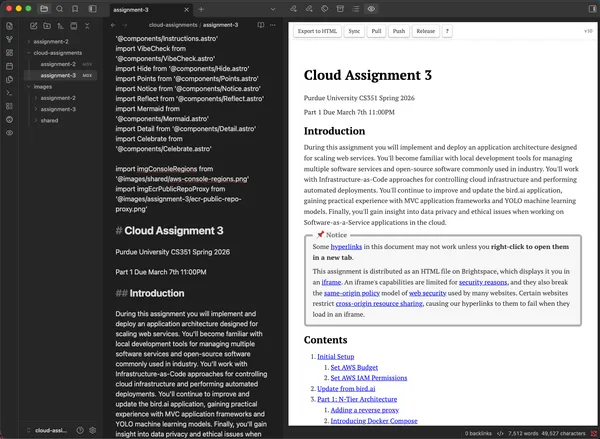
Markdown Editor
Grace will be taking over the class after I’ve graduate. She uses a markdown
editor for writing, it will be ideal if I could integrate a WYSIWYG editor with
Astro so she could edit assignments more easily, and I could turn the
publishing workflow into a GUI rather than TUI interface.
Possible approaches:
- Obsidian integration
- Another markdown integration.
CloudBank
During a meeting with Grace, Justin Gillingham popped in. He asked us how we
were managing the AWS free tier, and I explained our current approach to cloud
assignments and outlined how were were planning resource utilization across the
course to make sure students were staying with the free tier. He specifically
asked what we were doing for students who had already exhausted their free
tier. I told him of the two students who had raised the issue already, and how
I told them it would be best if they could get a credit card from a parent who
likely hadn’t used the free tier before, and in particular for this first
assignment, it could be completely quickly with only a few cents in charges if
they were ok with that.
He then mentioned there is a NSF program called “CloudBank” which provides
credits for different cloud platforms to researchers. He suggested we write a
proposal and try to get credits through the program, which would grant us an
AWS account pre-filled with credits we would then use for instruction. We would
have to figure out a way to manage cloud resources so students don’t consume
too much.
Justin also let me know there is a graduate section of the course that Douglas
Comer is teaching right now, he offered to put me in touch with the GTA. I’m
curious what assignments they have planned for the semester.
Gradescope’s Autograder Runtime
Gradescope’s Autograder feature relies on executing instructor-created grader
scripts in a Docker container to produce the resulting grade for a student’s
cloud assignment submission.
The typical use case is to run and verify a student’s code submission, perhaps
by running unit tests in a sandboxed environment. Our usage is different,
there’s nothing to sandbox, we reach out of the environment, into the
students cloud infrastructure. A student submission is not code at all, it’s a
permission slip, sharing AWS credentials that grant read-only access to their
account.
The container that runs on every student submission may be defined in two ways:
as a zip file, whose upload triggers a rebuild of the autograder container for
that assignment, and as a URL pointing to an image in a container repository.
That image in the container repository is pulled everytime a student submits
their assignment, and I’ll be exploring it in the next few paragraphs.
Any autograder container has to derive from Gradescope’s base image
gradescope/autograder-base. Currently, the base image is built from Ubuntu
22.04 for x86 and has not been updated in 2 years. Its image layers contain
test harness logic and an SSH configuration for monitoring its execution. A
metadata file and the student submission is mounted into the container at
runtime and the container fetches the latest test harness code from
Gradescope’s S3 bucket in us-west-2 before executing the “run_autograder”
script provided by an instructor. The default python installation is version
3.10.12 (released Jun 2023). A final quirk, it uses dumb-init instead as PID
1 in the container instead of the more typical tini.
Our Elastic Container Registry must be accessible by Gradescope’s autograder.
That’s only possible as a public repository, which students could theoretically
find. The only other options are to host the images using GitHub or DockerHub.
I have reached out to Gradescope support about this issue, who responded and
informed me they have notified the technical team. I am awaiting a response.
After some more research, there may be a way to circumvent this issue.
Gradescope’s own infrastructure is hosted on AWS, and I’m able to glean their
AWS Account ID by the default configuration of autograder containers. I may be
able to grant access to the private ECR repository with only that ID. I will
experiment with that this week.
Week 4
3,486 words · 18 min read
Summary
February 2 - February 8
Meetings
- 2/3 2:30-3:30PM Tuesday, 1-on-1 with Prof. Adams
- 2/6 1:30-2:30PM Friday, Instructional Team Meeting
Accomplishments
- Cloud Assignment 1 completed by 100% of students, 99.71% average score
- Instructional Website at cs351.couetil.com
- Senior Project Website is now at senior-project.couetil.com
- Student AWS account integrations with CS 351 are more secure.
- Cloud Assignment 2 initial draft
Calendar Update
Midterm 1 will be delayed by a week.
Autograder ECR access
I’ve been creating a new Cloud Assignment, which means I need to write a new
autograder script to package in a Gradescope container.
Gradescope has two methods of uploading an autograder container. The first is
to package the grader script in a zip file and upload it through the user
interface. This is manual, repetitive, slow. The second method is to register a
container repository following the Open Container Initiative (OCI)
distribution specification that you publish an assignment image to. I’ve
decided to take this approach, its easier to manage and quicker to update.
Elastic Container Registry (ECR) is Amazon’s service to manage container
images. I’ve created a private repository to store each all assignment
autograder images. When I first registered this repository with Gradescope,
autograder runs were not able to pull container images from the private repo,
they didn’t have access permissions.
I then noticed that the default image repository in the Gradescope user
interface was filled with a URL.
405699249069.dkr.ecr.us-west-2.amazonaws.com/production-autograders-0042:us-prod-docker_image-570142
That’s the image Gradescope built for us when we uploaded a zip file to the
user interface. Sitting in their company infrastructure. Which means I now know
their Account ID. That I’ll use to grant them and only them access to the
private ECR repository.
And it worked. This policy let them pull the autograder image.
{
  "Version": "2012-10-17",
  "Statement": [
    {
      "Sid": "AllowCrossAccountPull",
      "Effect": "Allow",
      "Principal": {
        "AWS": "arn:aws:iam::405699249069:root"
      },
      "Action": [
        "ecr:GetDownloadUrlForLayer",
        "ecr:BatchGetImage",
        "ecr:BatchCheckLayerAvailability"
      ]
    }
  ]
}
Instructional Site
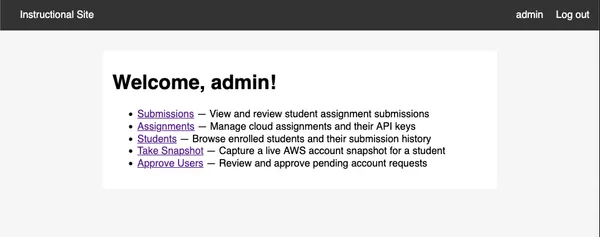
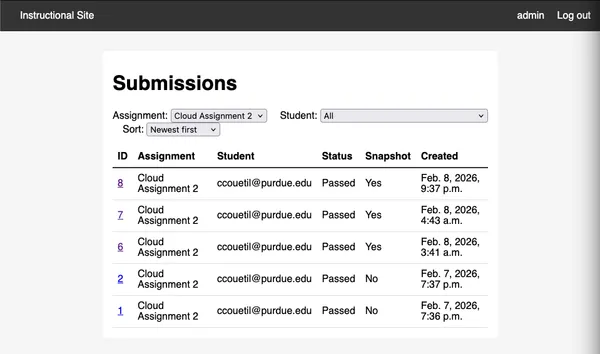
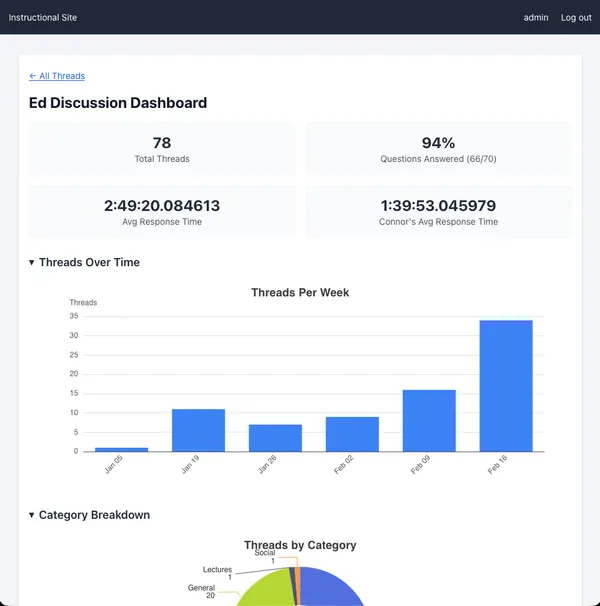
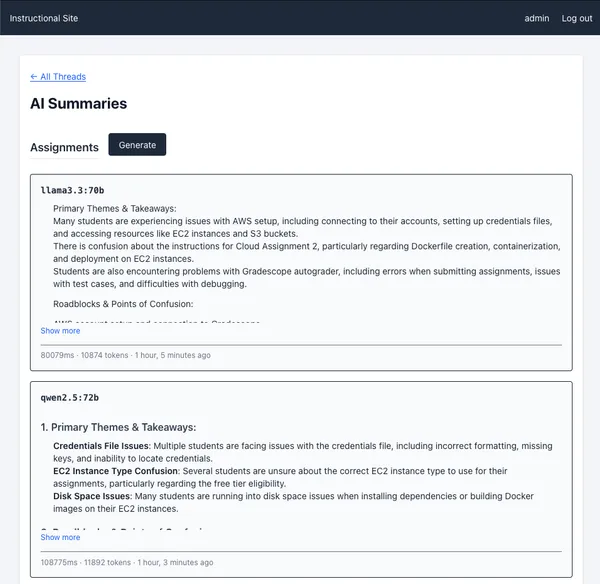
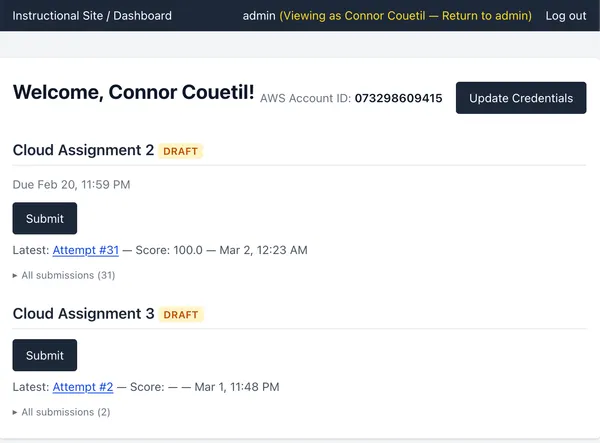
I’ve created an instructional website to help run the course. It performs
various tasks, the most important of which is to track cloud assignment grading
requests from students.
https://cs351.couetil.com
There is a monitoring script in the autograder containers. On each run, it will
collect submission metadata and the result of a grading attempt. We can use
the assignment data to uniquely identify a student using their email address.
https://cs351.couetil.com/submissions/
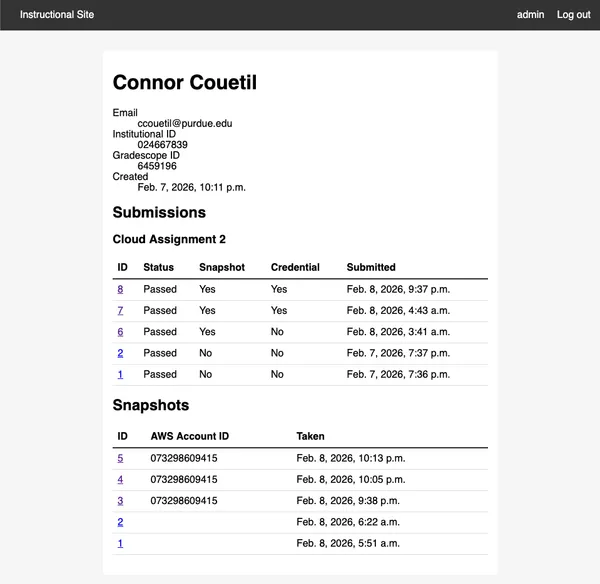
The submission metadata also provides their Purdue ID.
https://cs351.couetil.com/students/1/
The monitoring script collects their credentials file. The site will associate
the credentials file with a user and keep track of if any changes between
assignments. Storing the users credentials gives us another capability.
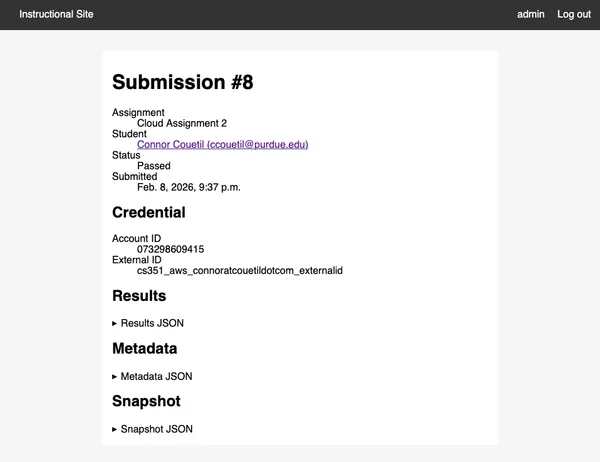
First, we can create a snapshot of their AWS account and write it to a JSON
file during the test run. We use it in the test script, and send it back to the
instructional site in order to record exactly the data that gave a student a
particular score on Gradescope. If a student ever has a question about why they
got a certain score on a Cloud Assignment, we’ll be able to tell them exactly.
https://cs351.couetil.com/submissions/8/
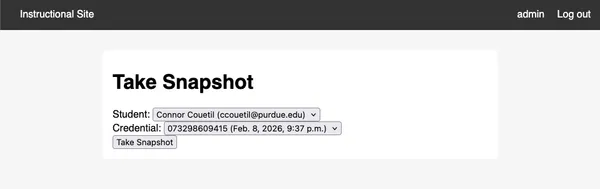
Let’s look closer at that snapshot. Remember, I said there was a second
capability we’ve gained by storing a student’s credentials for each submission.
Why don’t we go to the “Take Snapshot” feature and select a student.
https://cs351.couetil.com/snapshots/take/?student=1
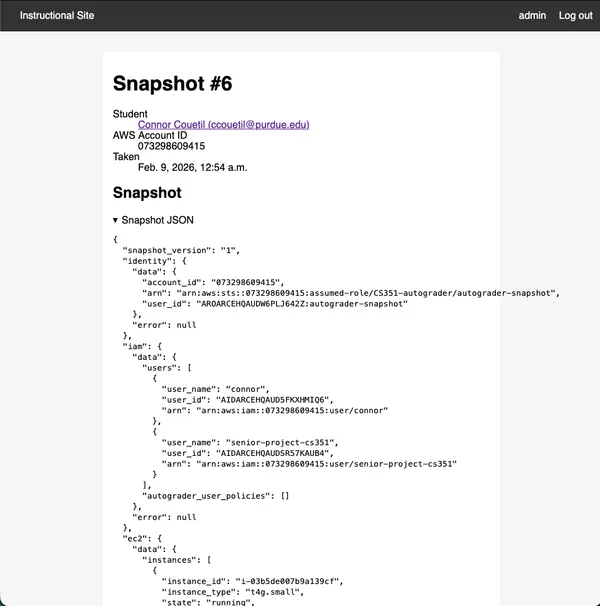
Click!
https://cs351.couetil.com/snapshots/6/
Now we can look at a student’s AWS Account configuration whenever we want. If
they raise an issue on Ed, we can quickly help them debug by taking a snapshot
of their AWS Account and using the information to reduce how much back and
forth we do through Ed messages.
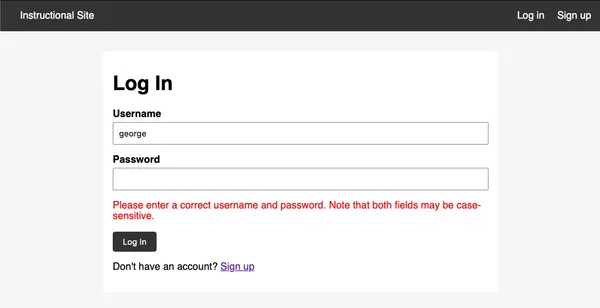
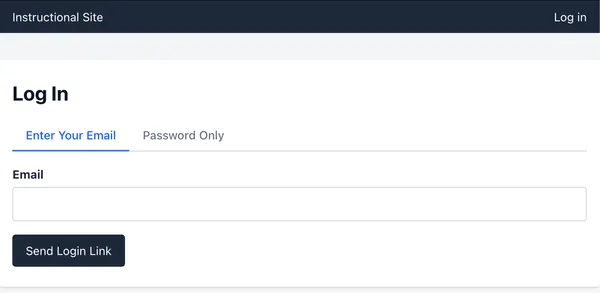
All these features are gated behind a login page. There is a public create
account page, but any new user has to be approved by an existing user before
they can log in.
https://cs351.couetil.com/accounts/login/?next=/
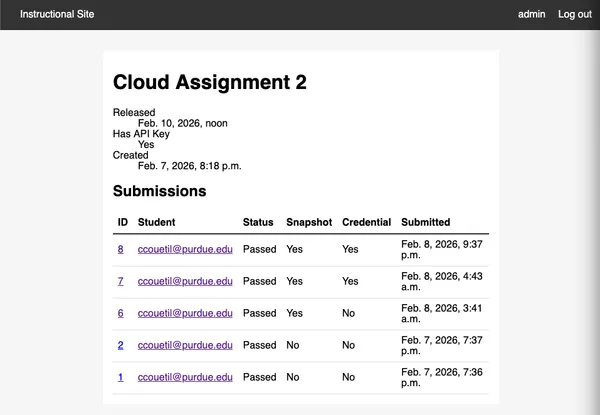
The fact that an autograder container can send submission files to our
instructional site means it must also have a public API endpoint. I’ve
implemented basic assignment management capabilities: an API token is generated
per-assignment granting access to the API and linking a student submission to
the particular assignment.
https://cs351.couetil.com/assignments/1/
To log onto the instructional website, create an account and send me a
message, I’ll approve you ASAP.
Instructional Site Infrastructure
The Instructional Site lives in my AWS account, and I’m managing it the same
way I’m teaching students to manage cloud projects in these assignments.
All resource use is defined using Terraform. Application deploys and EC2
instance initialize is performed with Ansible.
The site’s resources are in us-east-1. Keeping this site the same AWS region we
have students perform their assignments in reduces data transfer fees. I’ve
enabled CloudWatch alarms for projected monthly billing that exceeds $20 and
$50 dollars. All resources created for instructional infrastructure carry a
“Project” tag I can use for billing attribution.
The projected monthly cost for this application architecture is ~30/month.
- EC2 (t4g.small) ~$12.26
- EBS (20 GiB gp3) ~$1.60
- RDS (db.t3.micro) ~$13.14
- RDS Storage (20 GiB gp3) ~$2.30
- ECR (2 images) ~$0
- Cloudwatch (7 alarms) ~$0
- SNS (email notifications) ~$0
- Cloudfront (< 1TB/month egress, < 2M function invocations) ~$0
The infrastructure is meant to be managed through several commands packaged as
scripts:
./bin/tf: Run tf apply to update provisioned infrastructure../bin/deploy: Deploys an updated django application image to the EC2 instance../bin/connect: Access to a shell session on the production application server../bin/admin: Access to the django admin page of the production server.
The database server is a db.t3.micro that allows TCP connections to port 5432
from the EC2 instance hosting the Django server. Backups are only kept for 1
day to reduce cost. A private subnet and an availability zone is shared between
application and database to reduce data transfer charges and disallow ingress
traffic from the public internet.
The database minimally configured, let’s discuss some future changes.
- Add deletion protection on the database. At the moment, a terraform destroy
will cause data loss.
- Extend the backup time window, which will increase monthly costs.
- Increase database size, it is currently at 1GB of RAM and 20GB of disk
storage.
I’ve implemented CloudWatch alarms that will alert me at connor@couetil.com if
any of the following conditions are triggered:
- CPU > 80% (sustained over 10 min)
- Freeable memory < 100 MB (sustained over 10 min)
- Free storage < 2GB (single 5-min check)
- Connections > 50
The application server is a t4g.small with 2 vCPU, 2 GiB RAM, and Amazon Linux
2023 as OS. It’s configured with a systemd unit definition that starts a the
application container image. The django application is configured to use an AWS
RDS connection with values injected into the systemd definition from terraform
state at deploy time. The application is deployed to the EC2 instance using an
Ansible playbook.
I’ve added a CloudWatch EC2 status check for failure and the server has been
hardened with fail2ban to restrict SSH access attempts and with dnf-automatic
to automate software package updates.
The django application will have an default super user “admin” configured. I’ve
stored the password in my password manager.
SSL termination is performed by an AWS Cloudfront distribution using the EC2
instance as an origin server. DNS is managed by Cloudflare, the website URL is
“cs351.couetil.com” (I’ve moved my senior project website to
“senior-project.couetil.com”). Non-SSH access to the application server is
restricted to the AWS Cloudfront IP range.
Access to the django admin page is a concern, I’m storing student AWS
credentials. There two means of interfacing with the django application:
through a standard user interface, which can be accessed by normal users, and
through the django admin page, only accessible by super users. The django admin
page provides a granular view to database tables, whereas the standard user
interface hides privileged information and performs all sensitive operations
server-side, so no student credentials are sent out of AWS. I’ve made the admin
page inaccessible publicly, it can only be accessed using SSH forwarding.
Account Snapshots
I can now generate snapshots of an AWS account, both in the autograder
container and on the instructional website. This is performed by using a Python
library I’ve created aws_snapshot.
I’ve take the AWS SDK calls being made ad-hoc in the testing script and created
a typed specification that produces a JSON structure that can be stored,
inspected, and asserted against. You can create a snapshot of all the resources
you care about from any authorized AWS session.
When new assignments are created, the snapshot structure can be incrementally
added to in a safe way. The library has 100% test coverage (in fact, all the
code for my senior project has 100% test coverage, even the instructional
site.)
There’s a config.ini file injected into each autograder image that powers the
snapshot feature. It specifies the API url to POST the submission data to, the
API token for the assignment, and aws credentials that container uses to
authorize a snapshot of the student’s AWS account.
[api]
url = <SUBMISSION_API_ENDPOINT>
token = <API_TOKEN>

[aws]
aws_access_key_id = <FROM_INSTRUCTIONAL_AUTOGRADER_USER>
aws_secret_access_key = <FROM_INSTRUCTIONAL_AUTOGRADER_USER>
Student credential concerns
I am storing student AWS credentials in plain text in a database that is
encrypted on disk and in a private network. The credentials are read-only
access to a student AWS account. I am still concerned about storing stateful
long-lasting privileged secrets. Gradescope already stores and shows them to
any instructor or teaching assistant assigned to a class. It would be better if
we had a mechanism for a student to grant us an IAM role temporarily for a
single autograder run.
Let’s discuss a way to grant that temporary credential.
We’ll instruct students to set up cross-account role assumption. Students will
create an IAM “Role” instead of a “User”. The role will be called
“CS351-autograder” whose permissions will follow along this template:
{
  "Role": "CS351-autograder",
  "TrustPolicy": {
    "Version": "2012-10-17",
    "Statement": [
      {
        "Effect": "Allow",
        "Principal": {
          "AWS": "arn:aws:iam::<INSTRUCTIONAL_ACCOUNT_ID>:user/autograder"
        },
        "Action": "sts:AssumeRole"
      }
    ]
  },
  "ManagedPolicyArn": "arn:aws:iam::aws:policy/ReadOnlyAccess"
}
The policy grants permission to an IAM user in the instructional AWS account to
“assume” the role a student created in their account. Role assumption comes
with temporary credentials granting all privileges associated with that role.
Students will assign the ReadOnlyAccess policy to the role and will no longer
have to generate an access key. Roles are different than users. Roles are
identities with minimal permissions and short-lived credentials. There is no
way to gain access to the AWS console through a role and no way to attach a
privileged access key to a role.
We’ll discuss the other half of this authorization flow, but first I want to
describe how it has worked for previous assignments. Our grading scripts run on
Gradescope’s infrastructure in a container we provide them. Gradescope likely
runs the autograder container as an ECS task in their AWS account. That means
that the default AWS permissions structure in our executing container is
defined by Gradescope’s technical team. This has been experimentally validated
in the following manner: I’ve published an assignment’s autograder container to
a private Elastic Container Registry (ECR) in the instructional AWS account,
and updated the assignment settings to pull an image from that ECR repository
on each submission. At first, autograding attempts failed because the
repository was private. When I granted Gradescope’s AWS Account ID access to
the instructional ECR repository, their autograding infrastructure was then
able to pull repository images. If the default AWS permissions for an
autograder run is controlled by Gradescope, how can our autograder script get
access to a student’s AWS account for grading? That’s where the credentials
file comes in, and why we require students to create an IAM user with a
long-lived credential that they submit on Gradescope’s website. In this manner,
we use a student’s own privileged credentials at the start of each container
run to establish a new AWS SDK session that has the privileges needed to grade
a cloud assignment.
With that background, the changes needed to move liability from students to the
instructional staff, while improving security for both, becomes clearer.
Revisiting role assumption, the instructional AWS account will hold an IAM user
“autograder”. The user will have the privilege of being able to assume a role
“CS351-autograder” in any AWS account. When a student submits their AWS Account
ID as a credential to a Gradescope assignment, the autograder container will
read their account ID and external ID (more about that in AWS
documentation and in the assignment), then
assume that role. Now, short-lived credentials will be passed from the student
account to the grading script and grading will continue as normal. The only
long-lived AWS credential during an autograding run will be an access key from
the instructional account packaged with the container that will set up the
initial AWS SDK session. This means students are protected from accidental
credential exposure (which has already happened), and instructors can carefully manage permissions between Gradescope,
grading scripts, and student accounts.
The credentials packaged in the grading container for user “autograder” from
the instructional account has minimal privileges. All it can do is assume a
role in a student account, and get the user ID and account ID for the current
AWS session. No other access to the instructional account is enabled.
{
    "Version": "2012-10-17",
    "Statement": [
        {
            "Action": "sts:AssumeRole",
            "Effect": "Allow",
            "Resource": "arn:aws:iam::*:role/CS351-autograder",
            "Sid": "AllowAssumeGradingRole"
        },
        {
            "Action": "sts:GetCallerIdentity",
            "Effect": "Allow",
            "Resource": "*",
            "Sid": "AllowGetCallerIdentity"
        }
    ]
}
And with that the instructional staff becomes an intermediary managing access
between Gradescope and the student.
Students now only have to submit their Account ID and their secret External ID
to Gradescope to trigger an autograde request. They will continue to upload a
credentials file, and it will be an INI file with fields.
[default]
aws_account_id = ...
external_id = ...
We have now made some progress towards securing the execution environment.
Let’s discuss possible work for the future by reflecting on the question, “what
essential roles does Gradescope perform?” First and foremost, Gradescope
integrates with Brightspace to pass along grades. Second, it authenticates a
student and provides course management options to the instructor. Third, it is
an innovative user interface for students and staff to interact with. A fourth
feature used by this class appears to be essential, but is in fact, incidental.
Autograding does not need to be triggered by Gradescope. They are the
inspiration, but the autograding action performed is simple and wholly defined
by the instructional staff in assignment docker containers.
If we want to take more control over the cloud assignments, we can take one
step, then another.
The first step is to have our autograder scripts execute in the instructional
AWS account rather than Gradescope’s. The flow is as follows. An assignment
docker container (for example, “Cloud Assignment 2”) is constructed and
provided a configuration file containing an API token granting permission to
the instructional site’s REST API with permissions scoped to a particular
assignment. Gradescope will execute this container when a student submits their
account id, and the container will collect the credentials file and POST it to
the instructional site along with the assignment ID and API key. The
instructional site will read the student’s AWS account ID from the request,
find the grading script for the corresponding assignment, and start an
ECS+Fargate task that will perform the grading. It responds to the initial
container request with a URL of an endpoint the Gradescope container should
poll until the grading task is complete. When the grading task has completed,
the poll request will return an updated status and a URL to fetch the
results.json file for the student submission. Remember, the results.json file
is the API Gradescope has defined to control a student’s score on a particular
assignment. The autograder container will download the results.json file to the
appropriate location on its filesystem, and exit. The student will then see the
result of their submission in Gradescope’s user interface. With this setup, all
autograder containers submitted to Gradescope are the same except for a
configuration file that provides an assignment ID and API token for the
instructional website. No AWS credentials, either from the instructional staff
or students, will ever be shared with Gradescope. Publishing assignment
containers becomes simpler and more secure, and instructors will have total
control on the methodology used to grade cloud assignments, opening up avenues
for automation and innovation.
The second step, which is much too long of a step to consider at the moment, is
exploring what this class looks like without using Gradescope’s autograding
feature, and experimenting with different ways to provide Cloud Assignment
material to students.
Billing Event Streams
It would be nice to get a stream of billing events from students. That would
indicate what resources they’re experimenting with, as well as give us as
instructors an idea of if they are within or exceeding any free tier limits.
That might be possible by setting up AWS EventBus across instructional and
student accounts to collect billing events. AWS EventBus charges per 64KB sent,
and $1 buys you a million 64KB. Unfortunately, cross account requests double
charge, once for each account. This approach would necessarily incur a charge
for the student, even if small.
It’s impractical to stream billing events from AWS, as its expensive and the
real accounting is every 24 hours anyway. Instead, during each snapshot, the
CloudWatch “EstimatedCharges” metric will be recorded instead.
Submission Data Visualization
I will have to consider what pieces of data I’ll want to visualize per-assignment.
- Submission counts over time where their density determines the Y-Axis height
- X-Axis: submission time
- Y-Axis: submission density (how many submissions are near it in time)
- Line: One smoothed line through all points
- scores for students over time
- X-Axis: submission time
- Y-Axis: submission score
- Line: Un-smoothed line for each student through their submission points.
- bar chart of students current monthly bill
- X-Axis: Students sorted by bill size
- Y-Axis: bill size
- billing for students over time
- X-Axis: billing snapshot
- Y-Axis: billing snapshot
- Line: Un-smoothed line for each student through their submission points.
This is all I can think of at the moment.
Cloud Assignment 1 reflection
Next week I will reflect on Cloud Assignment 1’s Ed issues. I don’t have time
to go through them at the moment.
Managing Autograder SSH credentials
In order to grade Cloud Assignments, we have to access student instances over
SSH. Currently, we ask students to SSH into a fresh instance and manually
include autograder’s public key in the authorized_keys file. We publish the
public key in the assignment.
We could create an Amazon Machine Image (AMI) with the authorized_keys file
containing the autograder public key already present. Creating AMIs for
students to use in assignments provides opportunities for automation and
monitoring during assignments.
Accessibility Concerns
Cloud Assignments already have alt-text for all images and links. But it is
manually created, so they are minimally accessible. As part of the build step
for the Astro project, I can send each image and link to an LLM to summarize as
alt-text, then include that alt-text in the final build result. I can also
cache the result for every image and link based on a content-hash, so repeated
calls to an LLM for the same content will not be made. This is a low priority
at the moment, and will likely be worked on when I develop the markdown editor
integration when this course will be handed-off.
As a start, I could perform this step when I generate a single file of an assignment.
Accessibility standards provided by Grace.
I need a Microsoft CoPilot API key from Grace.
There is GenAI studio offered by Purdue. Grace shared the link, it didn’t work
for me at first. https://www.rcac.purdue.edu/knowledge/genaistudio
Student concerns about cost
There have been a lot of students outside of the free tier. Several students
have already incurred (minimal) usage costs. One student, with minimal extra
usage, suggested he might have blown $3 on his mistake.
It would be good to be upfront with students about how much an
assignment will cost in cloud credits. First of all, it teaches them to always
attach a cost number to their cloud use because it is not free (for serious
use). Second, its an opportunity for us to present the business side of cloud
computing in a way that directly affects their wallet, and being able to price
cloud usage, and knowing all the different components that go into a bill, is
actually really useful. So each assignment can have a “Cost” section where we
do a projected calculation of the price of an assignment, based on some
parameters. This would be fun, and a good educational addition to this course.
So an assignment will have a projected cost, and comparing the cost of
different assignments will give a notion of the “scale” of an assignment to the
students. As well as keep us, the instructional staff, honest about how much of
a student’s free tier we’re using and force us to make that calculation for
each assignment so we can present it to the student. Keeps us honest, keeps
them informed.
Cloud Assignment Structure
Cloud assignments are starting to develop a common structure
- Introduction
- informs the student of the learning outcome of the assignment
- Content
- a “Table of Contents” linking to assignment headings (auto-generated).
- Initial Setup
- walks the student through integrating their AWS Account with the
Cloud Computing course.
- Update from bird.ai
- a punchy introduction entertaining students and selling the
motivation for this week’s cloud assignment tasks
- Feature Design: <NAME>
- a design brief that describes the feature requirements. May include
screenshots of the final application for user-facing features,
dangling a tangible goal in front of students. Will provide
background on any software or services used to implement and release
the feature.
- Feature Implementation: <NAME>
- Walks them through how to implement the “Feature Design”. Students
will have to perform tasks that will be graded when they release to
production. If the autograder indicates they have made a mistake,
they will have to re-implement and re-deploy.
- Feature Release: <NAME>
- This section will explain how to release the feature to production.
Also contains tasks that students will be graded on.
- Estimating Assignment Cost
- This section will break down all the AWS services that are being used
and what they cost. It will provide the worst-case cost for the
assignment, as well as estimate the cost depending on how quickly a
student finishes the assignment.
- Teardown
- This section will explain to students how to clean up AWS resources
after the cloud assignment
Week 5
4,827 words · 25 min read
Summary
February 9 - February 15
Meetings
- 2/10 3:30-5PM Tuesday, 1-on-1-on-1 with Prof. Adams and Grace Lingley
- 2/13 1:30-2:30PM Friday, Instructional Team Meeting
Accomplishments
- Cloud Assignment 2 Part 1 released on Tuesday
- Cloud Assignment 2 Part 2 released on Friday
- 100+ student submission attempts for Cloud Assignment 2 by Friday
- 200+ student submission attempts for Cloud Assignment 2 by Sunday
Cloud Assignment 3
Motivation: The detection history feature went viral. Funny bird photos
captured with your application are all over BipBop and CrackerGraham. It proved
to investors you’ve gained traction and found PMF. You just raised a Series-A
round of $30 million dollars. Time to scale.
Ethical concerns: Investors are demanding that they find new sources of
revenue. One is also on the board of a large financial company interested in
purchasing your user data to feed into credit models they use to set interest
rates for clients who love squirrels.
Part 1 of Cloud Assignment 3 will focus on implementing the N-tier system
architecture for Software-as-a-Service applications. Part 2 will focus on
implementing an application feature that introduces the idea of distributed
systems. This system/application split will continue through assignments. This
format inspires many new assignments. If we take up our previous conversation
of different “tracks” in the Cloud Computing course, for one or two
assignments, students could select from a set of Cloud Assignments, each with a
different focus: “Network Engineer”, “Data Engineer”, “AI/ML”, “Full-stack
Developer”, “Cybersecurity”, “High-performance Computing”, “Computational
Biology”, “Simulation and Modeling”, “Site Reliability Engineering”. Each
assignment introduces a system architecture in Part 1, and then solves a
relevant problem using it in Part 2.
Part 1: N-Tier Architecture
- verify CA2 resources have been cleaned up
- introducing docker compose using nginx
- initialize EC2 instance using Ansible
- introducing container image repository
- deploy reverse proxy on EC2 using Ansible (on c7i-flex.large)
- register a domain name (DNS A record)
- introduce terraform and import CA3 architecture, add CA2 architecture back
- make bird.ai django application production-ready
- minimize docker image size by optimizing system and application dependencies
- deploy bird.ai application behind reverse proxy (on t3.small or t4g.small)
- create a postgreSQL server and connect to the bird.ai application (on m7i-flex.large)
Part 2: Squirrel-due University
- implement squirrel detection
- introduce large file S3 uploads,for mobile photos.
- implement EXIF data stripping and IP address collection
- host MaxMind GeoLite server for Geo-IP.
- host OpenStreetMap instance with Greater Lafayette map files.
- map will show location, bird picture, time taken.
- implement REST API for gossip protocol, peer IPs distributed by instructor
server (which is managing DNS).
I will have to host an assignment server, with two REST endpoints, acting as a
centralized co-ordination server to power the gossip protocol implementation
George, I’d like to have a guest blog or video on the topic of software ethics
in the context of this assignment, can you recommend anyone?
Grace, I’d like you to write a “The More You Know” for Cloud Assignment 3. We
have students updating the application code of the YOLO convolution
neural-network model to detect “squirrel” as well as “bird”. You’ve worked with
CNNs before, would you like to write a description of the specific YOLO model
we are using, and provide specifics about how our natural language
classification is transformed into an image classification?
The assignment is in progress.
Cloud Assignment 4
Motivation: Series B-*
Orchestration + Kubernetes
There could be an interesting ML element to add to for this one. Maybe they
distill a LLM in RCAC then take the model weights and deploy it to a Kubernetes
cluster using an ML runtime like Ollama.
The students will handle DNS Delegation use CoreDNS, the DNS that Kubernetes
itself uses. I will delegate a subdomain matching their student account name to
them, and they’ll configure CoreDNS for DNS delegation. I will also have to
figure out some way to handle the SSL certificates for the cluster.
It would be nice if I could collaborate with other students, professors, or
computing professionals at Purdue for this assignment, I don’t have practical
experience with Kubernetes and I’m sure someone on Purdue’s campus does. Does
RCAC run any Kubernetes clusters? They have an Anvil slide deck that mentions
Kubernetes clusters there:
https://www.rcac.purdue.edu/training/anvilcomposable. It’s basically a training
document, so I’ll use it as reference material for the assignment.
I’d also like to meet someone who has trained LLMs before. I’d like their
opinion and perspective on training and deploying an LLM model as part of an
assignment.
Cloud Assignment 5
Motivation: IPO or Acquisition (Exit)
They will build their own FaaS. They will write their own Terraform provider
(using Go!) that will deploy an application onto that FaaS. That application
will be vibe coded by the student. The autograder will test that their FaaS
works and that their terraform provider for it works, but the student will have
to bring their vibe coded application deployed on their own infrastructure into
class to show it off to the instructional staff and their peers to get the
rest of their points.
Crazy Idea
My Cloud Assignments could be “written” by AI, like Claude Code. It’s already a
conversational stream of markdown text, peppered with <components> and
begging to be interactive. A cloud assignment could be truly very interactive.
AI-controlled UI components: I have “The More You Know”, “Hint”, “Vibe Check”.
interspersing the assignment content. An “AI” bot is already involved in the
course. It even assigns points! Talk about feedback! This goes beyond mastery
learning, students could ask questions straight to the assignment, and the
assignment would answer back.
It would be like a “A Young Lady’s Illustrated Primer” but for computer science
education. An assignment would be a document published by the instructional
staff, introducing and motivating the assignment. The student would then talk
to the assignment to figure out what to do, driving the experience. The AI
would guide them through the assignment, and add or subtract points along the
way as they complete various tasks, until DING!DING!DING!DING! 100 points!
We would record every conversation a student has with the assignment, and pull
a bunch of data about how they are learning and how we could improve. For
example, with conversation content and telemetry, we would know precisely how
much time a student spends on an assignment. I believe this is the holy grail
metric of teaching. Studying the amount of time students spend on assignments
gives incredible feedback as to the courses students are engaged with. Of
course, different students will be engaged with different courses, interests
vary. But I believe examining the variability of time spent on assignments by
students would provide some very interesting patterns of behavior that would
help improve assignment development and scheduling.
If the assignments continue in my style, they would be cute and fun. I could
keep writing fun assignments like this, and they would become part of training
data, so that the interactivity becomes better and more creative over time. If
this is expanded to other classes, the components would be themed and appear
differently according to the tastes of the instructor or the intended audience.
For example, my “<Info>” component appears as “The More You Know” callout in
cloud assignments. It could appear as “Dive Deeper” in another course and be
styled differently, even though the underlying component and intent is the
same. This idea unifies the intent of different sections in an assignment
across courses, while preserving a distinct identity for each course. A course
could choose to disable certain types of components for their assignments if
they don’t think it fits the content. For example, a competitive programming
course would enable a leet-code style challenge component, while an intro
programming class would disable it, but both would have “<Info>” enabled.
We could anonymize and examine individual learning outcomes by looking at the
chat conversations. Both writing and voice would be possible. The student would
speak, and have to read the response (no voice back, we don’t want to have to
choose an accent for an AI voice, plus students should be encouraged to read).
I’ve already noticed during CS351 lectures, a majority of students have the
course slides out and open on their computer. Most are ready to engage with
course content that has been distributed to them over the internet. Also,
students ask for practice exams, expressing a desire to practice curated
content outside of class to prepare for an exam. A minority of students play
games during parts of the lecture. If we could create interactive, curated,
gamified assignments, students could practice on their own time in a fun and
interesting way, and instructors would gain useful engagement data that would
help improve their course (a flywheel).
Now, on the instructor’s side, it’s actually the same but flipped. The students
will have a AI bot that guides them through completing an assignment. The
instructors will have an AI bot that helps them write an assignment. This is
an important part of the process. The student experience will only be as good
as the assignments the instructors can write. Exceptional source material will
deliver an exceptional educational experience. By giving an instructor tools
that help them write the best assignment they’ve ever written, we’re giving an
opportunity for a professor to amaze students, motivating them to take
initiative and collaborate. The bot could also help the instructors manage the
course. I still remember taking CS408 Software Testing with Pedro Fonseca. The
assignments were exceptional in that course, I spent a lot of time on them and
learned so much.
The instructor would create a new assignment and write out the learning
outcomes. They would define a series of tasks they want the student to complete,
and each task would have an associated test that could verify it was completed
correctly. They would then write short essays on topics and ideas in the
assignment, and add links to resources. This would be organized as a knowledge
graph rather than a written document. The AI would then arrange and orchestrate
the assignment, guiding students through the tasks according to the learning
outcomes, and including content from the assignment knowledge graph along the
way.
We could share the software with other universities and collect collaborators.
We would share assignment content, increasing the base of high-quality training
data for the AI. We would also share anonymized and processed conversation
data, for analysis and training.
The AI Assignment would also hyperlink to high-quality course materials,
whether that is news links, class slides (which are often open by half the
class while in lecture), videos, or textbook chapters. When the AI creates a
hyperlink we would archive the target’s content at the time so whatever was
linked to and viewed in an assignment could be faithfully and accurately
reproduced.
Research Direction:
- cloud computing services and infrastructure
- financial planning for cloud software
- conversational and interactive AI interfaces
- software testing for computer science pedagogy
- knowledge graph approach to curriculum development
- statistical methods for measuring student engagment
Preliminary data on student submissions
We had two students submit the day part 1 of the assignment was released.
The first student to finish part 1 of the assignment was ██████████████████,
just a few hours after the assignment was released. He asked a question on Ed
at 9:40PM, and his first submission was at 10:02PM. Their last submission was
at 10:23PM, they were likely working on this assignment for just under an hour.
He made 7 total submissions over 20 minutes.
The first student to submit was █████████████████, 4 hours after the assignment
was announced. He posted on Ed when he couldn’t find the assignment on
Gradescope. He made the first submission 1 minute after I activated it.
A metric to track is estimated time spent on assignment. We would define a
“session” as a series of attempts where each sebsequent submission attempt is
within an hour of each other. We could average number of sessions spent on the
assignment, and then calculate the time per session by measure the time between
the first submission and the last submission, then calculate the total time
spent on an assignment by adding up all the session times. This could be
visualized per-student, and as a class average and standard deviation.
A student submitted 5 times in a row with the same result. She made a post on
Ed and it turns out she had a validation error in her choice of external ID
(The autograder has been updated to have informative error messages for both
the edge cases she triggered). Another metric to track will be number of
sequent submissions with the same grading result. That would be a pro-active
indicator that something is wrong with the assignment. She later completed Part
1 of the assignment after 16 submissions over 3 “sessions”, taking an estimated
4 hours.
Apart from Gradescope submissions, there are two other sources of student
engagement. The first is the class Ed discussion board. When a student posts
about an issue they are having with the assignment, we can be sure they are
engaging with it. The second is Brightspace. It records the first time students
view the Cloud Assignment HTML file. Using these three metrics, we’re able to
build a larger picture of student engagement, from their first look at an
assignment to their final submission.
Reflection on finishing Cloud Assignment 2
Cloud Assignment 2 has been a lot of work. I haven’t gotten enough sleep this
week, and the effort has de-prioritized work for other classes. I’m happy with
how the assignment has turned out, and I believe the trade-off I made this week
was a good one. I am having a lot of fun! It’s bringing me back to new
product launches I’ve been a part of.
This is part of the growing pains of delivering new curriculum content, and
just like riding a bike, sometimes you need to pedal hard to get up to speed
before you can cruise. I’m almost to a point where I can maintain a cruising
velocity, let’s consider what I could build that would help me, and what I have
already built during cloud assignment 2, that helps me deliver course content.
- tightening autograder test loops: already implemented, but would have to be
improved for the course handover.
- standardized methodology for building and testing a cloud assignment test
container: currently ad-hoc for assignment 2.
- publishing to brightspace: manual, but the kinks have been worked out and I
can build an assignment document and upload/update it in Brightspace in less
than 2 minutes.
- End-to-end test runs through the assignment: it’s just me and the early
adopters at the moment. It makes sense, this assignment has a been a crunch.
- staging environment: incremental updates during a assignment period are
dangerous. The method for handling bug fixes, or part 2 releases, is
haphazard at the moment. Some kind of staging environment, or even end-to-end
automated tests, would build confidence.
- versioning: At the moment, it’s not explicit what version of the autograder
is running during a submission. If I versioned the test script, either by
tying it to a git hash, or creating a content hash of the python file, I
could both log it during the run so version/release information can be viewed
in the gradescope UI by instructors, and I could also make it part of the
submission back to the instructional site, so a student score is tied to the
version of the autograder script that gave them that score.
Next assignment will go more smoothly, but perhaps we can keep the “Part 1”
then “Part 2” release schedule. It lets us put out a cloud assignment early,
and it encourages students to sit down and make time for two sessions of work
on a cloud assignment, possibly increasing student engagement and learning
outcomes. Students will have a first attempt, reflect on that attempt, and then
approach the second part with a new perspective. It also lets us get early
feedback on an assignment, the first day Ed posts of students engaging with the
assignment release were helpful - “early adopter” feedback. For the curriculum
developer, it places less pressure on delivering a whole assignment in a short
time period by adding 2-3 days of slack for “Part 2”. Because our assignments
have students complete them using a DevOps-oriented approach, returning to an
assignment after a few days shouldn’t be an imposition because they’ll have
built sufficient automation to get up and running quickly, and will have the
autograder for instant feedback. I placed a <Notice> after Part 1 of the
assignment is done that the student can stop their EC2 instance if they want to
take a break without losing their work. Stopping the EC2 instance will save
them money because they are not paying for idle CPU time. Because of the work
we performed in Part 1, all they’ll need to start Part 2 is start their stopped
instance and they’ll already have 50/100 points from the autograder and can get
started on the rest of the assignment immediately.
Our Cloud Assignments are evolving to have two parts: the first has a system
architectural focus, where students have to implement a canonical cloud
architecture. The second is application focused, the students have to implement
an application feature that takes advantage of, or demonstrates the
capabilities of, that new system architecture. This highlights the feedback
mechanism between product requirements and system capabilities, and provides
insight into a common misunderstanding between product teams and engineering
teams. For example, in our fictional bird.ai startup, the cloud assignment 2
conversation may have gone like: Product - “Hey, we’re just implementing a
history page, how hard can that be?”, Engineering - “So we’re letting users
upload and store as many images as they want? But at what cost?”. We could have
early releases of the architectural parts of the assignment, then the
application implementation part would be released a few days later.
It has taken me about 40 hours to complete this assignment, from writing the
assignment text to developing the starter application and autograder test
suite. I’d like to praise the programming language Python. Its ability to
introspect its own structure has been exceptionally useful for developing an
assignment that students can iteratively update and deploy in a DevOps-style.
I’ve created a stub Django model students update throughout the assignment. The
controller that uses that model to introspect on its structure to determine at
what step the student is in the assignment, taking a different control path
based on its guess. That way, students don’t have to update controller code to
account for structural changes in the data model (like a professional software
engineer would), they can focus on implementing the concept introduced in the
assignment and then immediately see the effects of their implementation . If
they’re curious, they can also then see how their implementation is being used
by reading the controller file. The controller file is heavily commented,
contrasting with the empty stub model file. Students will learn how the
controller works by reading the code, and then have to use that knowledge to
create a model based on just a few instructions and hints.
Something very useful during my time developing the assignment was having a
solution application and starter application split. The solution application
was the finished implementation of the whole project. I could iterate on that
during the initial phase of writing the assignment in order to test out any
ideas. The starter application is what the students will receive. It’s heavily
commented, with indications where to perform the implementation for each
assignment step. During testing, I could copy the starter into a new directory,
iteratively apply updates taken from the solution application, and emulate the
student experience. It showed me a lot: first, I realized I had disabled DEBUG
mode in the Django applications, so error messages were obscured, which would
have made debugging issues way harder for students. I also realized there were
inconsistencies between the solution application I had been iterating on and
the starter application, which I was able to fix. I will keep this application
split for future assignments, it has worked out well.
A challenge during this assignment was managing disk space, both locally and on
the remote server. Let’s identify the places where this crops up:
- Because of the
requirements.txt that ships with the application, images end
up being 2GB in size due to Python dependencies.
- Because
docker run by default does not remove stopped container images,
large images will accumulate and take up space.
- Because they save the image they deploy to a .tar file, that is an additional
2GB of disk used.
- Students using Intel laptops are producing container images that are 8GB in
size.
For the next assignment, I will have to optimize the size of the Python
dependencies. I will also have to instruct students on using the --rm option
with docker run and introduce them to the docker system prune command, to
clean up unused images. The systemd service definition I provided them handles
this on the server. I will avoid having students export tar files to disk by
having them push images to an ECR repository.
I’m not sure why Intel images are so large, when I did a multi-platform with a
linux/amd64 target and the image was 8GB. This is a concern because many
students in the class will be using Intel chips. I’m realizing I’ll have to
develop assignments to target both architectures. Although containers are
lightweight on a server, they’ve ended up being quite heavy on a laptop. A
possible way to remedy this would be to introduce a continuous integration
server (aka build server) server, where students send their build context
over, it builds it for them, and stores it in a class container repository.
Students would then pull from this image repository as needed, and we wouldn’t
have to worry about (1) if their PC architecture matches the cloud server (2)
if their PC is powerful enough to perform multi-platform container builds (3)
whether they have enough space on their laptop to deal with the detritus of
local container development.
A student was building containers for the platform linux/amd64 on their x86
architecture computer. When archived and sent to the t4g.small instance (ARM),
the container would not run because Docker Engine does not come bundled with a
virtual machine like Docker Desktop does for development.
Another aspect to this assignment is that a lot of compromises were made with
security in order to simplify this assignment. We’re deploying a
development-mode, permissive, somewhat “hackable” Django application onto the
public internet. The risk is not high, there’s no privileged data, the instance
has almost no privileges to other AWS services, the blast radius is small. How
should we communicate this to students? That this is a learning exercise and to
truly make the Django application production-ready would require a lot more
detail work? I will address this in Cloud Assignment 3.
The instructional infrastructure has already been useful for helping debug
student issues. A student posted on Ed about how they were stuck at 80/100 for
the assignment. I was able to look at their last submission on the
instructional site, grab their EC2 instance IP from the AWS snapshot taken of
their account, and visit their web server to inspect the issue. This helped me
quickly determine they had a permissions issue between Cloudfront and S3, and I
was able to provide a timely and thorough response to them and encouraged them
to make the post public so it would help other students. Having this
information available has lowered the effort to debug student issues with
assignments, allowing curriculum developers and teaching assistants to focus on
the primary work of creating better course content, rather than become mired in
chat-based debugging of a student issue.
Updates to instructional site
I’ve created graphs and summary tables on the instructional website to
summarize assignment submission data. There are informational tooltips you can
hover over to learn more about what data the charts display.
https://cs351.couetil.com/assignments/1/
I will be collecting SSH session history and HTTP session history soon, and
experiment with ways of displaying this history clearly to an instructor.
There’s an opportunity to “auto-debug” using RCAC’s GenAI service.
The styles have been modernized, and an effort has been made to make it easily
navigable. Please reach out with any feedback.
Paying the bills
I am spending money to help run the course. Let’s explore in what ways:
- host instructional infrastructure for data collection
- bring up infrastructure to test the cloud assignment
- using AI tools
- possibly buying a domain name for the course
I will have clearer accounting of the instructional infrastructure and cloud
assignment testing costs at the end of the billing period, I will summarize it
then. I have upgraded my Claude subscription to Max, $100/month, it will be
sufficient as a coding agent for the rest of the semester, and I use Gemini at
$20/month for research.
I will tag resources based on what their purpose to help keep track of spend,
and every month do a end-of-billing period review.
Domain name for use with the course
I’d like a domain name managed by the instructional staff so students can learn
about DNS and host websites behind human-readable names, they’ve been doing
everything IP-based at the moment. I’m proposing CA3 and CA4 will introduce
DNS to students in the form of A records first, then DNS delegation.
Let’s discuss possible domain names:
- boilers.cloud ($23/year @ Wordpress)
- purduecs.cloud ($23/year @ Wordpress)
- bird-ai.org ($12/year @ Wordpress)
- birdai.cloud ($23/year @ Wordpress)
- computing.cloud ($23/year @ Wordpress)
Jonathan suggested there is a possibility of running a class domain using
Purdue’s infrastructure.
How I’ve been using AI
I use Claude Code for agentic coding. The new Opus 4.6 model released a month
ago is a lot better at managing context length and working on multi-step long
running tasks. It makes many fewer mistakes than 6 months ago, it’s a night and
day difference.
One thing AI is good at is managing change. It is relentlessly detail-oriented,
and when I have to update one detail to satisfy some part of the assignment, it
will scan all other parts of the assignment for pieces that rely on that one
deatil. So if I have to make a quick update because a student identified a bug,
the AI will manage the change in that structure, and the correspondence between
assignment text and autograder script, much more quickly than I could myself,
or by using basic tools like grep.
Another thing AI is good at is driving automated testing loops. Because we have
an autograder script, and I can create new infrastructure and deploy code onto
it, the loop that builds the test script becomes very fast. I can test a bunch
of scenarios by manually setting up the intended architecture, and the AI will
write the autograder script that checks for and manages the differences between
those scenarios. It makes me much more productive.
I do notice the AI makes mistakes, but they tend to be (1) conceptual, it
doesn’t understand the purpose behind an assignment component, or (2) it makes
different trade-offs when trying to solve problems, and chooses a different
solution from the sphere of possibilities than the one I think is appropriate.
To avoid these becoming systemic issues, I rely heavily on the “plan mode” with
Claude Code. I’m able to fully review the plan document before any
implementation starts, and I often go back and forth to resolve small details
with it. Smaller changes are easy and quick to review, especially if I’m able
to review a backlog of changes as it is moving ahead with the implementation.
Using version control is important here, frequent commits improve confidence
and let you backtrack easily. Integral is the practice of maintaining 100% line
coverage in automated tests. It’s not a silver bullet, but it’s an effective
“golden master” test, verifying code updates do not introduce regressions by
verifying behavior has not changed, even if it hasn’t perfectly verified
the behavior is correct.
Now for what I DON’T use AI for. All my writing, the text of the assignments,
the weekly reports, is in my voice. For better or for worse! To make the cloud
assignments interesting, fun, and engaging is a lot of work, and although I use
AI for research (Gemini is great here), I don’t use it for writing.
Cloud Assignment 1 reflection
Ed Issues
11 issues, 3 remained private.
There were questions about requirements.txt. A student pointed out I had not
updated the due date in Brigtspace. Three students had issues running out of
temporary storage when installing Python dependencies on the server. A student
explained how to set the architecture type in order to find the instance needed
for the assignment. A student had a clarification question about installing
Python on the EC2 instance. A student could not connect to her instance, but
did not respond to inform me of the root cause. A student has two AWS
Accounts, and use different ones for CA0 and CA1, leading to some confusion.
███████████ posted about not being eligible for the free tier. And finally, an
hour before midnight, there was a 27 message back-and-forth debugging session
between a student and I to help him complete the assignment before the due
date, the root cause was a requirements.txt file that installed unnecessarily
large dependencies.
From looking at the lecture responses from students about CA1, I remember many
mentioned the parts of the assignment where they had to figure out some task
without explicit hand-holding, for example, many mentioned how figuring out
rsync was valuable. I will keep this in mind for future assignments, that
students like to figure things out on their own.
Week 6
2,384 words · 12 min read
Summary
February 16 - February 22
Meetings
- 2/17 3:30-5:00PM Tuesday, 1-on-1-on-1 with Prof. Adams and Grace Lingley
- 2/20 1:30-2:30PM Friday, Instructional Team Meeting
Accomplishments
- Cloud Assignment 2 complete, 1200+ submissions, 76% of students scored 100.
- Instructional Site is now at https://www.cs351.cloud/
Cloud Assignment 2 Data
Cloud assignment 2 had an average 18 submissions and 4.5 hours spent
per-student . I’m happy to report 76% of students achieved a 100%, and 94%
received at least a 50%. 5 hours seems like a reasonable amount of time for an
assignment that is due for 10 days, and it was likely exacerbated by container
build times for several students.
Submission times are clustered right after class, dropping a bit around dinner
time, with the biggest spike between 10pm-midnight. There are very few
submissions in the morning, students work on cloud assignments in the afternoon
and at night. Over a third of submissions were made on the due date. Only a
small percentage of students started the assignment on the last day, but 50% of
students started working on the assignment only 3 days before it was due, and a
majority of students only achieved a perfect score on the due date.
We now have a lot of data about student engagement for an assignment. When we
write the Cloudbank proposal, we can use this data to produce a more accurate
cost estimation of the course over the whole semester (they require us to
provide a “Period of Performance (PoP) Cloud Spent management” table that
projects month-by-month cloud spending for the research endeavor). This is also
useful cost and engagement data we can bring to request more funding for the
class. We’ll hold off on any specific projections until a couple more
assignments are complete.
I did k-means clustering on a group of features and the students were best
split into two cohorts. The most distinguishing features of these cohorts were
(1) over how many days did they work on the assignment, (2) total number of
attempts, (3) total number of sessions, (4) estimated time spent, (5) number of
days actively working on an assignment. The logistic regression surfaced
similar features, none are predictive though. We’re left with common sense: the
more time and effort you put into the assignment, the better score you’ll get.
Also, we shouldn’t build predictive models for cloud assignments, we’re not
here to predict an outcome, but identify what students are struggling and push
them all to the best outcome. Predictive analysis is limited in this domain,
time is best spent observing descriptive statistics of student progress
and effort.
https://www.cs351.cloud/assignments/1/
https://www.cs351.cloud/assignments/1/
https://www.cs351.cloud/assignments/1/
https://www.cs351.cloud/assignments/1/
https://www.cs351.cloud/assignments/1/analysis/
https://www.cs351.cloud/assignments/1/analysis/
AWS Account Organization
I’ve overhauled how the instructional site is managed on AWS to anticipate:
- Course infrastructure handover to new staff.
- Cloudbank integration requiring infrastructure handover.
- Student account management requiring proper billing and permissions.
How the instructional site was intially set up has several downsides:
- Billing ambiguity - course costs are mixed with my personal use of AWS.
- Blast radius - misconfigured IAM policies or inappropriate resource use can
escalate without limitation.
- No student isolation - difficult to impossible to properly restrict student
account boundaries in the event of deeper course integration.
- Handoff friction - account handoff requires removing and shifting resources,
causing operational burden and service downtime.
I’ve addressed these issues, and provided simpler solutions for the
eventualities, by creating a dedicated AWS Organization for the CS351 project.
Instructional infrastructure is isolated to a dedicated member account of the
organization, and students may also be given their own personal member
accounts, with all member accounts governed by Service Control Policies (SCPs),
which provide greater guardrails than IAM policies.
Future maintainers can take over governance of the organization, or the member
accounts can be transferred to another AWS organization under another
institution’s control (Cloudbank, Purdue, RCAC). All resources in operation in
the moved account at the time of the move will be unaffected. Student accounts
may be created at the beginning of a semester, and deleted at the end, and will
be governed according to different SCPs than the instructional infrastructure.
Billing is now isolated to each individual member account, making cost easy to
measure. Resource use restrictions are easier to audit, and automation to this
effect will be simpler to implement.
The instructional infrastructure permission model is simple to understand, it
has full access to the capabilities of an AWS account. Let’s discuss a student
account’s capabilities and characteristics.
A student’s AWS Account will be:
- Fully isolated - no cross-account access can occur, these safeguards are as
strong as the ones between any normal users’ AWS accounts.
- Secure by default - we are able to enforce MFA and other security policies for any
student account.
- Easy cost attribution - any billing activity within a student account is
only attributable to that student.
- Easily torn down - student accounts will be defined in
infrastructure-as-code, and can be created, modified and destroyed consistently
and immediately (e.g. instant autograder configuration, updates for a new assignment).
- Assignment guardrails - Students will be granted resource access by
assignment-specific SCPs limiting resource use to only what’s needed to complete
the assignment.
Let’s discuss some of the initial guardrails, to paint a picture of what’s possible.
- Region lock - students can only use and create resources in “us-east-1”.
- IAM restrictions - students are limited to one IAM user provisioned for them
by the instructional staff (for logging into the AWS console).
- Pre-approved Instance types - students may only use approved instance types in EC2.
I’ve hinted at ways to limit what services a student has access to, and how to
limit their choices within a service, but I haven’t discussed how to limit the
quantity of those services they’re able to consume. The practical approach is
to have an AWS Budget alert at some threshold value ($20, $50, …), which when
triggered causes an AWS Lambda function to apply a deny-all SCP to the account
that surpassed the threshold. Instructional staff would also be alerted, and
would have to get involved to determine what the student did to exhaust their
resource quota, and what that means for their assignment grade.
We are now ready to (1) accurately track course infrastructure cost, (2)
handover its management to any responsible party, (3) onboard Cloudbank as a
funding source for cloud computing at Purdue, and (4) grant accounts to this
semester’s student cohort and accept billing responsibility for future cloud
assignments.
In order to organize a move to Purdue-controlled AWS accounts, from the
instructor perspective, we would have to request a quota increase to the number
of AWS accounts we’re allowed to make in an organization, the default is 10.
From the student perspective, in-class we would show them how we use the cloud
to help manage the course, and explain we are gathering data for a NSF proposal
that will secure funding for the class, so we can do cool projects.
I suggest we bring this organization structure to the graduate section of the
course. It may help them set up the infrastructure needed for their cloud
project at the end of the semester.
graph TD
subgraph Before["Before: Single Account"]
  A1[Personal AWS Account]
  A1 --- SP[Senior Project Website]
  A1 --- II[Instructional Infra]
  A1 --- SA[Student Resources<br/>shared namespace]
end

subgraph After["After: AWS Organization"]
  MGMT[Management Account<br/>org definition + billing]
  MGMT --> INFRA[Infra Account<br/>EC2, RDS, ECR, CloudFront]
  MGMT --> S1[Student Account 1]
  MGMT --> S2[Student Account 2]
  MGMT --> SN[Student Account N]
  PERSONAL[Personal Account<br/>senior project website<br/>unchanged]
end

Before --> After
https://us-east-1.console.aws.amazon.com/organizations/v2/home/accounts
Gradescope service interruption
Gradescope deployed an update on Thursday before the assignment was due that
affected the test harness they deploy onto autograder instances. We hadn’t
updated our container code for a few days, so the error did not originate from
us. Gradescope’s test harness phones-home at each startup to download an
updated script. Something in that update was not executing the grading script.
I reached out to their help email that day. They were responsive, and the
problem was fixed in about 6-8 hours. We were not the only group affected by
the issue.
This provokes the question, can we operate the course when Gradescope is down?
At the moment, no. However, we have a clear path forward in case we want to
re-implement any features, it won’t be very difficult. The primary challenge is
onboarding students to hold accounts on the instructional site. SSO through
Purdue is likely out of the question, so the practical approach is “magic link”
onboarding/login that is restricted to Purdue emails, and only those emails
assigned to a class within the instructional site. Once students are onboarded,
implementing autograding is easy.
If we want to run a “dual-stack”, that is, let students choose between
submitting to Gradescope and the instructional site, that is also easy. The
Gradescope container simply polls the instructional site for the autograding
result, and when displaying the final score in the user interface, will link to
a results page hosted on the instructional site.
We do need more error monitoring, I was only alerted to the issue because
students on Ed brought it to my attention. Unfortunately, it’s a
chicken-and-egg issue. We can’t log a failure if Gradescope doesn’t even run
our code.
Ed Integration
I’m syncing all activity in the Ed discussion board to the instructional site.
I’ve cloned the discussion board, and created an activity summary dashboard.
https://www.cs351.test/ed/
https://www.cs351.test/ed/dashboard/
I’ve also integrated RCAC’s GenAI service and started experimenting with AI
summaries of Ed categories.
https://www.cs351.cloud/ed/ai-summaries/
I have a couple more experiments in mind.
- AI Ed Triage - answer student questions immediately using the mix of
different data we have (class syllabus, cloud assignment text, student aws
account snapshot, etc.).
- AI Real-time Assignment Debugging - If a student has an issue with a cloud
assignment, have the AI run verification loops against the autograding script
and “reference architecture” (a solution deployed in the instructional
infrastructure).
Estimating the cost of instructional infrastructure.
So far, the instructional site has cost me ~$25. The new infrastructure will
cost more, I’ve added
- Elastic IP: for rolling deploys of EC2 instances.
- Route 53: to manage DNS records for cs351.cloud.
- Wordpress Domain: cs351.cloud costs $24/year.
In order to audit these costs transparently, I’ve added an “Infrastructure
Costs” section to the instructional site that uses the AWS Cost Explorer API
and Cloudwatch “EstimatedBilling” statistic to display costs conveniently
on-demand.
Instructional Site Downtime
I had downtime, due to pushing a feature out without an integration test
between the autograder container and the instructional site. They were tested
invidually, but not together. Compounded by accidentally rotating the
assignment API token, which took me a moment to realize how to replace. The
first domino that tumbled the rest was PostgreSQL rejected a raw file upload
because it contained null characters, for which I had inadequate logging to
realize quickly.
I’ve added rolling application deployments to the instructional site so data
isn’t lost during deployments. The autograder containers have been updated to
perform retries with exponential backoff when submitting student assignment
results in order to accommodate blips in API availability during deploys.
I’ve also added rolling EC2 instance deployments by using the Elastic IP
feature from AWS. Once I’ve confirmed a new instance is healthy after an AMI
upgrade, or change in type/size, I can point the Elastic IP to it and remove
the old instance. This is a two-step instance switchover primarily driven
through Terraform and Ansible.
Our infrastructure is now more flexible, robust to both application and system
upgrades, but could use more monitoring so we can be aware and pro-active when
addressing performance issues and bugs.
Instructional Infrastructure improvements
Submission page load times grew to 10-20s, now at 500ms-1s. Our submission
table was growing quadratically in size due to how much data Gradescope
includes in the submission_metadata.json file. Our separated table is still
growing quadratically in size, but it’s contained, and that problem is easy to
address, the production database is 40MB on-disk out of 20GB available.
Remember, we’re still a t4g.small. It has 2 vCPU with burst, but that drops to
.4 baseline vCPU. And 2GB of memory. The database is even smaller, a 1GB 1vCPU
db.t3.micro, it accrues CPU credits at half the rate of the t4g.small. Both
network and storage bandwidth are throttled. The application is pretty fast
considering these limitations, burst scheduling fits it well.
Speedups:
- submissions list page
- assignment detail page
Solutions:
- optimized view queries, deferring large columns.
- split RAW and JSONB columns into separate tables
- denormalized submission fields computed from JSONB.
Total speedup: ~20x
In-class questions
I will be making an effort to record in-class questions and address them in
Cloud Assignment content.
Content-delivery networks
Confusion about CDN vs data center networking. George drew a good distinction between
- Networking between VMs on same machine (Hypervisor-driven)
- Networking between servers on the same rack (Top-of-rack switch driven)
- Networking between racks in the same data center (Leafs and spines, east-west networks)
- Networking between data centers (Wide-area-networks, etc.)
- Networking between a user and their content (content may exist on a single
computer. High-latency. So cache at the “edge”, where the edge is a lot of
data centers all across the world optimized for caching and delivering
content)
I will update Cloud Assignment 2, the final CDN section “Push it to the
edge”, with a “<Info>” section that addresses some of these ideas.
Docker image naming
Confusion about Docker image names (id vs name vs tag). Will be addressed in
Cloud Assignment 3
Cloud Assignment 2 Issues
Lots of student issues to work through this assignment, it was not a breeze.
the code was good but not great, and lots of bugs slipped through. There were
two primary problems:
Stuck at “push it to the edge”
Many students were stuck at 80 points, failing the last section, because the
straightforward path through the assignment could cause caching issues. This
part of the assignment I built when I was tired and working quickly, so its no
surprise it is challenging to complete for students. This should have been a
better experience for them, it was unnecessarily frustrating. Typically,
obstacles in cloud computing are a learning experience, but I think this one
went a little too far. It should be updated and refined for next semesters
class.
Image Build Times
Took hours for many students. I counseled one student to build the image on the
EC2 instance and it went much faster.
Part of the issue was I had students use Python 3.14.2, the most recent
release, and a lot of packages didn’t have pre-compiled binaries available, so
it default to compiling them during the build stage. A better Python version
target would have been 3.12.
x86 images had a lot of GPU code. I could have given them better hints for how
to compile a slimmer CPU-only image.
Cloud Assignment 4
Technical Motivation: introduce microservices by taking the strangler fig
approach, transition our N-tier web architecture to Kubernetes piece-by-piece.
Helps “scale” parts of the service that have different reliability and load
requirements.
Social Motivation: We have a big engineering team stepping on each others toes.
Introduce Conway’s laws, and microservices, as a solution to this approach.
(idea: should students work in teams? Gradescope allows group submissions).
Different teams have different KPIs and perform different work (reliability vs
agility, front-end vs back-end, etc.). How will you as a DevOps engineer make
everyone productive?
Week 7
2,471 words · 13 min read
Summary
February 23 - March 1
Meetings
- 2/24 3:30-5:00PM Tuesday, 1-on-1-on-1 with Prof. Adams and Grace Lingley
- 2/27 1:30-2:30PM Friday, Instructional Team Meeting
Accomplishments
- Email based magic link login and onboarding for students and instructional staff
- Implemented dual-stack autograding (native and gradescope) in instructional site
1-on-1-on-1 Meeting Outcomes
Assignment 3 Part 1 on Tuesday. Due Saturday night. Gradescope assignment “CA03
Part 1”. Will be worth 50 points.
Assignment 3 Part 2 on Saturday. Due Friday night. Gradescope assignment “CA03
Part 2”. Will be worth 50 points. Autograder will give 0/0 points for points
from Part 1.
Assignment 4 will use student AWS Accounts under instructional control and will be a group assignment.
Connor’s office hours: I will do 2:30-5:00pm on Fridays.
Theory of Assignment Development and Student Engagement
Split the 10-day cloud assignment into two 5-day assignments.
Students who start earlier do better. 2:30h per assignment part is do-able in 5
days for students.
Issues are caught earlier. Less pressure to deliver on both faculty and
students. Establish a class cadence of practical projects, like shop class.
We can enable this by making hard things easy through automation, so students can
tackle larger problems over the semester.
We should tell them it’s ok to use AI. They can use RCAC GenAI service for this
class, it’s free for students.
Magic-link login for staff and students
I’ve implemented magic-link onboarding for staff, and magic-link logins for
staff and students. Over the next month, I will be transitioning the website to
a purely email-based login flow for security and ease-of-use. For now, there
continues to be a password based login option.
First, we side-step issues surrounding accidental password disclosure by
pushing that responsibility to the email provider. Second, it reduces the
number of passwords users need to keep track of and makes sign-in
straightforward (although you will have to wait for an email to arrive).
For heavy users of the site (visiting more than once every two weeks), they may
never have to login again. For temporary visitors (visiting once in a two week
period), they simply have to wait for the email to arrive to login.
Staff will have a new onboarding flow. They’ll receive an onboarding link in
the mail which can be used once. Once used, the account is confirmed and they
can login with a different magic link. Students onboarding flow is tied to the
enrollment of a class. If a student is assigned to an active class (which
already records their email), then magic-link logins will immediately work for
them. Students do not have the same access to the instructional site that staff
does, they will see pages only related to making submissions to an active cloud
assignment.
I’ve been trying to get AWS to approve production usage of our email service,
they denied the first request, it’s still stuck in sandbox mode (you have to
pre-approve every receiver and they have to confirm). I’m going to try again,
but George, you may have to create an AWS account with the instructional site
and jump in as an official representative of this Purdue course. This is
blocking having students use the instructional site directly for submissions,
so for now we will continue to rely on Gradescope as the primary interface
students use for assignment submissions.
https://www.cs351.cloud/accounts/login/?next=/
Implementing Autograding
This feature requires significant architectural considerations, I’ve made an effort
to keep them simple and cost-effective. First, I’ll list some key features,
then mention the added infrastructure.
- native autograding pipeline, students can submit directly from the
instructional site and see their results, the site manages their AWS
credentials for them and provides a helpful dashboard.
- gradescope containers no longer run the autograding script, they call back to
the instructional site and poll for results (thin proxy).
- there is an “Autograde Jobs” dashboard that shows the status of all jobs for
instructional staff.
- implementation handles both local development and production workloads
seamlessly, allowing for rapid feature iteration and deployment loops.
The autograder jobs run on a dedicated t4g.small worker instance that
coordinates with the main application server through the database, using a
Django 6 feature called “tasks” with a PostgreSQL backend. My original idea was
to spawn ECS tasks on-demand, but there are a lot of edge cases surrounding the
ECS/Fargate integration that are avoided by having a dedicated worker node. The
pros are better local/production parity and control over the runtime
environment, the con is now there is a risk the site can’t handle a bunch of
concurrent student submissions and we carry a higher baseline cost of compute.
It’s worth mentioning the series of features I had to implement to make this
possible.
- Enable AWS Organization SSO for the instructional site (granting access to
AWS console for manual tasks like creating support requests that enable email)
- Integrate email-sending into the application (enables login and onboarding)
- Course management, student enrollment statuses (manages student access to website)
- Magic link onboarding (piggybacks on Outlook’s Purdue SSO integration to authorize students)
- Staff impersonation of student accounts (allows instructors to see what a
particular students sees, necessary for testing and debugging the student
dashboard)
- Observability dashboards (tracking emails sent, logging all HTTP requests,
and surfacing traffic insights in a dashboard for security and to understand usage)
- Load testing under burst and baseline conditions (to prepare for students
rushing to the site to submit around deadlines)
- Container Registry / ECR integration with cloud assignments (so autograding
runs can pull an assignment-specific autograding image)
- Dedicated task queue worker node in production (this worker node runs all
background jobs, not just autograding tasks)
After all that, I was finally able to construct a simple student dashboard that
first triggered autograding jobs locally, working through the challenges that
came up one-by-one until I finally got a working production deployment. I then
finished by revisiting and reimplementing Gradescope autograding, this time
powered by the instructional site. Phew!
https://www.cs351.cloud/dashboard/
https://www.cs351.cloud/dashboard/job/8/
https://www.cs351.cloud/dashboard/job/8/
https://www.gradescope.com/courses/1214735/assignments/7764520/submissions/394279250#
https://www.cs351.cloud/autograde/
Load testing
I’ve been running load tests against the application stack (haproxy + django)
to tune healthcheck settings and identify slow pages, preparing for increased
usage from students and instructional staff.
I’m running the application stack both in “burst” mode, where the containers
are given their full burst capacity of 2GB of memory and 100% of CPU time, and
“baseline” mode, where CPU time is restricted to 40% and 20% CPU time for app
and db, respectively.
The first insight from this test was that any un-paginated views in the
application would increase unbounded in size.
The second insight was that under sustained load in baseline settings, Django
handles 100 concurrent users, but response times can increase above the
healthcheck threshold that HAProxy uses to determine if a backend is unhealthy.
Increasing the tolerance for slow health check responses from 5s to 15s
dramatically drops the false postive rate of an unhealthy backend, improving
application availability under high-load.
The third insight was as concurrent users rise to 80+, the default two django
workers had insufficient threads to multiplex the user sessions, causing
dropped connections. Increasing haproxy timeouts, and giving workers 8 threads
each instead of two, dropped the error rate from ~40% with 100 concurrent users
to 0%.
There are a few parameters we now use to tune performance:
- django OS worker processes (should match vCPU count of EC2 instance)
- django worker thread count (total should match expected number of concurrent requests)
- haproxy max connections (should be slightly above expected number of concurrent requests)
- haproxy timeout queue (absorbs bursts while waiting for django to respond)
- haproxy health check interval (should decrease frequency when expecting high load)
Under sustained load from 100 concurrent users with ~10 requests per second, the
failure rate is 0% and response times rise to 10s per-page on average at
baseline settings.
I want to call out there are a lot of DB writes per-view because I track a lot
of usage statistics. There is a lot of opportunities for optimization, but that
is outside the scope of this project. Our usage is relatively low, and we use
the cheapest and weakest EC2 instance types. If the website gets slow, the best
and obvious choice is to rent bigger instance types. We also don’t have any
performance metrics that would be part of an SLA. These performance metrics
would define an acceptable performance boundary against which we would set
harder limits on parameters to guide performance improvement decisions,
balancing cost against user experience.
https://www.cs351.cloud/db/
https://www.cs351.cloud/requests/
A lot of people aren’t aware of what these coding agents are capable of. Can I
quantify it somehow? The best idea I have at the moment, is keeping track of
every tool call made by an agent while developing the instructional site.
I took this idea from “entire.io”, a tool by ex-GitHub engineers I was using to
keep tracking of my token usage and agent conversations. Their tool was slow,
and failed often, so I analyzed it with claude code to understand all the data
they were tracking, then recreated it in a Rust CLI tool that stores data
locally in a SQLite DB and shows a more useful statistics summary then they
were exposing in their web application.
Is the vibe-coding class tracking agentic tool use statistics across all their
students?
Here is the agent usage from my weekend of cloud assignment development, pulled
from my tool claude-track:
$ claude-track stats
=== Claude Code Usage Stats ===
Database: /Users/connor/.claude/claude-track.db (15.3 MB)
Tracking since: 2026-02-28T03:01:23Z

--- Sessions ---
Total sessions:         126
Total duration:     81h 14m
Avg session:            40m
Sessions today:          16

--- Models ---
Model            I/O Toks  Sessions
───────────────  ────────  ────────
claude-opus-4-6  1,631,309       106  ████████████████████

--- Token Usage ---
Input tokens:             175,256
Cache creation:        14,929,111
Cache reads:          514,766,398
Output tokens:          1,456,053
API calls:                  8,127
Cache hit rate:             97.2%
Est. cost (total):       $387.97

--- Prompts ---
Total prompts:          829
Avg per session:        6.9
Avg length:         119 chars

--- Plans ---
Total plans:            280

--- Tool Usage ---
Total tool calls: 12,232
 Calls  Tool
──────  ───────────────
 4,718  Read             ████████████████████
 3,166  Bash             █████████████
 1,244  Edit             █████
   851  Grep             ████
   607  Glob             ███
   541  TaskUpdate       ██
   277  TaskCreate       █
   247  Write            █
   187  Agent            █
    98  ExitPlanMode     █
    68  WebFetch         █
    67  Skill            █
    44  WebSearch        █
    35  EnterPlanMode    █
    28  Task             █
    27  AskUserQuestion  █
    19  EnterWorktree    █
     6  TaskOutput       █
     2  TaskStop         █

--- Top 10 Files Read ---
 Reads  File
──────  ────
   120  ~/.../gradescope/tests.py
   109  ~/.../accounts/tests.py
   103  ~/.../accounts/views.py
    91  ~/.../app/settings.py
    83  ~/.../requestlog/tests.py
    82  ~/repos/claude-question/src/commands/stats.rs
    74  ~/.../app/urls.py
    71  ~/.../requestlog/dashboard.html
    63  ~/.../submissions/views.py
    60  ~/.../requestlog/views.py

--- Top 10 Bash Commands ---
  Runs  Command
──────  ───────
   695  git
   458  find
   443  cd
   341  ls
   263  grep
   125  docker
   120  instructional_site/bin/django-tests
    80  cat
    72  cargo
    62  python3

--- Activity by Date ---
Date         Calls
──────────  ──────
2026-02-28   6,022
2026-03-01   4,853
2026-03-02   1,357

--- By Project ---
 Calls  Project
──────  ───────
11,232  ~/repos/senior_project_cloud_computing
   986    ↳ gradescope-api-skill
   538    ↳ dapper-percolating-flamingo
   310    ↳ iridescent-imagining-rocket
   276    ↳ cache-headers
   240    ↳ giggly-hopping-lerdorf
   233    ↳ nav-search
   210    ↳ statistical-models-evaluation
   143    ↳ radiant-waddling-lollipop
   122    ↳ request-log-pagination
    94    ↳ invite-instructor-wording
    75    ↳ shimmying-juggling-sky
    67    ↳ assignment-course-display
    60    ↳ test-django-dev
    28    ↳ responsive-nav
   968  ~/repos/claude-question
    31  ~/repos/dotfiles
     1  /tmp
Best thing since sliced bread.
SSO access to AWS Organization
I’ve enabled “AWS SSO” in the “IAM Identity Center” for the AWS management
account. This allows us to provide AWS console access to the infrastructure
account for instructional staff. The management account continues to be
restricted to root login only (I have those credentials). Any users with access
to the infrastructure account on AWS will be required to register an MFA key
for login. There is a link on the instructional site dashboard to log into the
infrastructure AWS console.
To enable a new user to log into the AWS console, currently it’s a manual
process where the terraform configuration has to be updated creating a user
with a target email. It will remain that way for the time being, I am the only
one developing this project.
I had to implement this so I could see the status of our email integration. We
send “noreply@cs351.cloud” emails using AWS SES, which has its own approval
process.
Gradescope API integration
I’ve integrated Gradescope syncing by storing my personal login credentials in
the instructional site, then authenticating against the Gradescope website and
parsing their webpage HTML. Gradescope is a Ruby on Rails application that
server-side renders some React-driven components to the page. This is a classic
startup architecture, and is favorable to scraping by simple html-parsers.
There were challenges developing against the API. When they make certain web
page updates, it will break our parsing logic, so I developed a live-data
fixture-based testing loop to verify our integration will continue to work over
time. The implementation is tied pretty tightly to the instructional site. If I
did it over again, or if we move towards tighter integration with gradescope
rather than away from it, I would make it a separate python library totally,
and run integrations on a schedule periodically so the package self-heals when
Gradescope makes any API changes. The added benefit is that I could then create
a typed and tested library interface to the gradescope API for the
instructional site, avoiding context pollution and test bloat in the
instructional site.
This is one of the first pieces of technical debt we’ve accrued in the
instructional site, and should be addressed in the future when we reassess our
use of Gradescope.
AWS Bill
I got a $38.70 bill from AWS for February. Not bad considering all the
instructional site and cloud assignment 2 work.
- Account ****9333: $28.94
- Account ****3789: $5.63
- Account ****9415: $4.13
Cluster Analysis from Cloud Assignment 2
The 2 cluster student categorization ranks students against two axes.
The horizontal axis is a proxy for the span of time a student has worked on the
project. The right-most outlier is ████████████, who worked on the assignment
over 5 days, and the left-most outlier is ████████████████, who worked on the
assignment over 5 hours.
The horizontal axis may be a proxy for sustained effort regardless of point
outcome.
The vertical axis has a positive outlier, ██████████████████, who started the
assignment early and finished in 2 hours in 2 sessions over 2 days. It seems to
be a proxy for rapidity of progress and starting early.
I’ve added a visualization to the cluster data, when you select a factor, it
changes the size of a plotted dot proportional the distance from the mean the
factor was for that student. Makes it easy to do a visual check of student
clusters by particular factors.
I bet we’ll have more, and clearer, student clusters with more data. Once we
have that data, let’s think of some questions to ask.
Here’s a quick discussion of what clusters appeared when applying K-means and
K-medians to the Cloud Assignment 2 data.
K-Means: k=2 — a simple binary split:
- Cluster 1 : high-effort, spread-out workers — 3+ active days, 26 attempts, 6h
session time, started ~5 days before due
- 25 students, 92% scored 100
- Cluster 2 : last-minute, concentrated workers — <2 active days, 14 attempts,
3h sessions, 54% of attempts in the last 24h
- 43 students, 70% scored 100
K-Median: k=6 — six distinct behavioral profiles:
- Cluster 1: Daytime last-minute workers (100% in last 24h, low night %)
- 14 students, 71% scored 100
- Cluster 2: Night-owl weekend crammers (100% night, 78% weekend, peak hour 3:30am)
- 12 students, 33% scored 100
- Cluster 3: Early planners (started 7 days early, 4 active days, longest breaks ~88h)
- 9 students, 89% scored 100
- Cluster 4: Efficient early starters (started ~7 days early, only 8 attempts needed)
- 5 students, 100% scored 100
- Cluster 5: Persistent grinders (30 attempts, 6h sessions, 3.5 score decreases)
- 12 students, 92% scored 100
- Cluster 6: Steady moderate workers (19 attempts, 5 sessions, balanced timing)
- 16 students, 94% scored 100
Removing instructor outliers let k-median explore higher k values and find
meaningful sub-populations. The standout finding is Cluster 2 — 12 students
working almost exclusively at night on weekends with only a 33% success rate.
That’s a group k-means completely misses by lumping them into the generic “low
effort” bucket. Similarly, k-median distinguishes the efficient early starters
(Cluster 4, 100% success in just 8 attempts) from the persistent grinders
(Cluster 5, 92% success but needing 30 attempts).
https://www.cs351.cloud/assignments/1/analysis/
https://www.cs351.cloud/assignments/1/analysis/
Data inconsistencies
█████████ is a student where I noticed a score discrepancy between Gradescope
and the instructional site. See: https://www.cs351.cloud/students/55/.
His last score on Gradescope is an 80. His last score on the instructional site
is 5.
Gradescope seems to have a race condition where the submission_metadata does
not correspond with the results.json. The student submitted twice in less than
a minute, I believe this caused the inconsistency. There may also be an issue
with concurrent autograder scripts running, a reboot was a part of the last
assignment, I have to block concurrency for autograding attempts, that is, a
student can only have one autograding happening at a time, otherwise their
results will not be accurate. I’ve also made so even if a double submission
happens on Gradescope, only one autograding run will be triggered and both
Gradescope runs will be given the same results endpoint to poll, eliminating
concurrent autograding jobs.
In this case it turned out alright for Ariel, his highest score was the one
that stuck.
Week 8
98 words · 1 min read
Summary
March 2 - March 8
Meetings
- 3/3 3:30-5:00PM Tuesday, 1-on-1-on-1 with Prof. Adams and Grace Lingley
SES production rejection
We are trying to enable magic-link logins to the instructional site for
students. That requires “production” SES access. Our account, being new, only
has “sandbox” access, limiting what email addresses we can send to. Our initial
request for production access has been rejected, we need to implement a system
for handling email blocks and complaints, as well as add a privacy policy to
the website.
Other Classes
This week I spent most of my time on my other classes, CS 354 and CS 381.
Week 9
198 words · 1 min read
Summary
3/9 - 3/15
Meetings
- 3/10 3:30-5:00PM Tuesday, 1-on-1-on-1 with Prof. Adams and Grace Lingley
- 3/13 1:30-2:30PM Friday, Instructional Team Meeting
SES Production Access
I’ve re-opened the service request to get production SES access, allowing us to
send emails from our domain cs351.cloud.
Obsidian Plugin
I’ve created an obsidian plugin for writing Cloud Assignments. I’ll dogfood it
when writing Cloud Assignment 3.
Student Access to instructional site over spring break
A student, ██████████████, requested some way to practice Cloud Assignment 2
over Spring Break.
Steps to enroll student:
- add email in AWS SES “Create Identity”
- student then has to click the link in the notification email to consent to
receive mail originating from the instructional AWS account.
- student can then login with magic-link login.
- Then put the cloud assignment into draft mode, and then add the student as a
“draft tester”.
Improvement: A cloud assignment can be in one of several modes:
- Active: during the release and due date.
- Practice: active for students in the class, but not for a grade.
- Draft: inactive except for a list of whitelisted students or staff.
- Inactive: outside its release and due date.
Then, I enable “Practice” mode on a cloud assignment for the whole class. I
would also record in what mode a submission was performed in, so grading is
accurate.
Week 10
653 words · 4 min read
Summary
3/16 - 3/22
Meetings
Accomplishments
Cloud Assignment Part 1
Cloud Assignment Part 1 is ready for release on Tuesday 3/24, it will be due
Sunday 3/29 at 11:59PM.
Part 2 will be ready for release on Saturday 3/28, it will be due Friday 4/3 at
11:59PM.
Cloud Assignment Part 1 introduces students to
- Docker Compose and has them write a Dockerfile for a reverse proxy, Nginx.
- Container Registries and has them create one using ECR.
- Ansible and has them fill in required values to automate the Nginx deploy.
- Terraform where they have to import the manually creating resources so they
can manage them using Infrastructure-as-Code.
- REST APIs and DNS, which they use to create a personal domain name for their
deployed application.
Planning out the rest of the semester
We don’t have many weeks left in the semester. I’d like to discuss the final
deliverables for my Senior Project so I can manage my time effectively across
all my courses.
Confirmed Deliverables:
- Cloud Assignment 3
- Cloud Assignment 4
Unconfirmed Deliverables:
- Cloud Assignment handoff
- Instructional Website maintenance
- Research Paper
Cloud Assignment 3
Plan complete, assignment in progress.
Cloud Assignment 4.
Plan in-progress, group assignment where students deploy a vibe-coded
application to a Kubernetes cluster.
Cloud Assignment handoff
I’d like to discuss how we’ll perform the handoff to whoever will run the Cloud
Assignments next course session.
Instructional Website maintenance
I’d like to discuss who will maintain the instructional website after I’m gone.
Research Paper
I’d like to discuss what we might publish, and whether that paper should be
delivered during the semester or during the summer.
Authoring Cloud Assignments
A concern raised in previous meetings was the method by which I author Cloud
Assignments. Initially, I would edit assignment markdown documents in vim and
run an Astro dev server in another terminal, allowing me to preview the
rendered assignment in a web page. Obviously, this requires the writer being
comfortable working from the command line in a typical software engineering
workflow. It was suggested that Obsidian is a convenient GUI for editing
markdown documents, and is familiar to existing instructional staff.
I’ve created a custom Obsidian plugin for authoring Cloud Assignments,
letting a preview sit side-by-side an editing pane. It integrates directly with
the instructional site, and you are able to authenticate against the
instructional site within the plugin.
Features:
- HTML preview that updates as you write the assignment text.
- preview tracks where you are editing the markdown document.
- markdown text and images are synced between obsidian vaults and the
instructional site.
- can push and pull versioned updates.
- can create releases for a particular assignment.
This is the first step towards a user-friendly platform for authoring Cloud
Assignments.
Enabling e-mail for the Instructional Site
The Instructional Site is still stuck in the SES sandbox, and is unlikely to
get approved for production access. I spent a few days trying to get the
approval to go through.
In an effort to get the approval, I implemented:
- bounce/complaint handling through an SNS webhook pipeline
- send suppression to avoid sending emails to address that bounced/complained
- email tracking to audit sends in the application
- a privacy policy and terms of service
- compliant email templates
- email authentication using SPF/DKIM/DMARC
I clearly outlined our use case, but it was still denied. The reasons for the
denial were likely:
- no public-facing content on the website, just a login page
- the magic-link logins resemble phishing attempts
- cs351.cloud is a new domain with no reputation on a new TLD
- earlier denials made subsequent approvals more difficult to achieve
There are a few paths forward, both of which require addressing the above
issues.
- use a different email sender (e.g. Postmark) instead of SES
- add all students to the SES sandbox
- move the infrastructure to a different AWS account and go through the SES
approval process again.
The first option is more practical, but encumbers the instructional site with
additional services to depend on. The second option requires students click an
email link within 24 hours and is subject to aggressive rate-limits. The third
option is a sizable manual effort, with no guarantee that we will be approved.
We will have to discuss the trade-offs. For now, students will continue to use
Gradescope to work on Cloud Assignment 3 .
Week 11
2,522 words · 13 min read
Summary
3/23 - 3/29
Meetings
- 3/24 3:30-4:30PM Tuesday, 1-on-1-on-1 with Prof. Adams and Grace Lingley
Accomplishments
- Cloud Assignment 3 Part 2
Cloud Assignment 3 Part 2
Cloud Assignment 3 was completed this week. The final tasks of the cloud
assignment are:
Part 1: N-Tier Architecture
- Adding a reverse proxy
- Introducing Docker Compose
- Pushing to a container repository (+10)
- Automating deployments with Ansible (+10)
- Introducing Terraform (+10)
- Importing existing infrastructure (-30/+30)
- Re-deploying bird.ai (+10)
- Choosing a domain name (+10)
Part 2: Squirrel-due University
- Enabling HTTPS (+10)
- Squirrel detection (+10)
- Stripping EXIF data (+20)
- Gossip Squirrel (+10)
I’ve kept a running list of obstacles and architectural decisions for Part 2.
The first task introduced HTTPS and SSL certifications. My initial idea was to
set up Let’s Encrypt’s Certbot running on the proxy, and have the students
configure Nginx to read the certificates it generates. Certbot is subject to
rate limit of 50/week for a single domain (our cs351.cloud), however we have
70 students in the class. It’s unfortunate, it’s one of the universal and
accessible methods for implement TLS encryption. Instead, I’ve had them put a
Cloudfront server in front of the proxy to perform TLS termination, although
traffic between the CDN and the EC2 instance remains unencrypted. AWS
Certificate Manager handles certificates for Cloudfront and has high rate
limits (2,500/year per account).
Future assignments incorporating HTTPS should give more thought to provisioning
certificates. We would have to run a central server that manages DNS and
coordinates with Let’s Encrypt using DNS-01. Students would interact with it
through an API/UI to manage assignment DNS. The student experience could be
enhanced by providing Amazon Machine Images (AMI) that automate this.
Deploying production applications is tricky, and not always easy to encapsulate
in an assignment. Now, Cloudfront+ACM is quite robust, I use it for most of my
personal projects, so this assignment can stay the same for future sections.
Whether it transfers neatly to other clouds, I’m not as sure.
Claude has gotten really good. Context size increased from 250,000 tokens to
1,000,000 tokens while I was developing this assignment, improving its ability
to complete long tasks. I’ve also noticed its ability to explain complex topics
as improved, and it has developed a propensity for creating charts and examples
as part of these explanations. My crazy idea seems to be more possible every
day, the key is understanding what type of scaffold (aka “agent harness”) is
needed to deliver that type of experience.
Had to increase the YOLO model size from nano to large (that’s a size increase
from 11MB to 75MB), the nano wouldn’t detect squirrels. Curiously, the xlarge
model was worse at detecting squirrels and birds than the large. It has to do
with the open text embeddings we use to power this NLP-based image detection,
smaller models can be trained to better detect these open-ended embeddings than
large models. The increase in model size increased response times 10x, and
memory use has increased quite a bit too. One time during inference the website
returned a 503, the thread had been killed due to Out-Of-Memory, the t4g.small
is not the right fit for ML applications. I rode my bike around Purdue on
Sunday taking pictures of squirrels and birds, so the gossip protocol is
seeded with images and locations. You can visit my application at https://ccouetil.ca3.cs351.cloud. The YOLO model is really bad at detecting
birds and squirrels!
Here’s a screenshot of the new feature students implement in Part 2.
https://ccouetil.ca3.cs351.cloud/map/
Keeping this assignment in the free tier was difficult. ECR Public vs Private
size limits and rate limits caused issues. TLS Certificate rate limits other
issues. Disk space limits on EC2 instances another restraint. Overall, I
estimated the cost of this assignment to be around $35 if a student leaves
their infrastructure running for 10 days outside of the free tier. The
resources used in the assignment are:
- EC2 instances (c7i-flex.large, t3.small, t4g.small)
- RDS database (db.t3.micro, PostgreSQL)
- EBS volumes (18 GB gp2 total)
- RDS storage (20 GB gp2)
- S3 bucket for Terraform state file
- Two Cloudfront distributions
- ECR public container repository
The EXIF data stripping didn’t go quite as expected, iOS aggressively strips
location data from images, even if you explicitly allow location access in a
bunch of settings. I think the website would have to be an smartphone application
in order to make the location stripping work effectively. It wasn’t feasible to
do GeoIP for this assignment. To keep the EXIF intact for images I took with my
iPhone, I had to enable location services and export the photos out of the
Photos app onto my Desktop folder before uploading those files to the web
application. I think this section should be tweaked for future versions of this
assignment.
I developed an instructional API server to support the DNS and gossip features.
The instructional API server supports both:
the students:
/dns - manage DNS records/dns/acme-validation - submit TXT record for DNS-01
and the autograder:
/dns/lookup?account_id=* - return DNS records for student AWS account.
The API server uses an open-source Python library called FastAPI, and runs on a
separate EC2 instance from the instructional site. I can’t really justify why I
made this API separate from the instructional site, I just preferred the idea
of any supporting resources for a particular cloud assignment to be separate
from the instructional site itself, which is meant to support all cloud
assignments. However, this is another burden of deployment and maintenance when
this cloud assignment is run again in future sections of the course.
Cloud Assignment 4
RCAC has gotten back to me, apparently I missed their initial message during
Spring Break. I will try to get a meeting with them next week, and see what
they can offer in terms of support for this assignment.
Let me consider what the two parts of CA4 will be.
Part 1: Migrating bird.ai to Kubernetes
- Deploy the monolith so its on AWS EC2 instance.
- Containerize the ML model as a separate REST API service.
- Deploy the ML model service onto Kubernetes.
- Update the monolith to call the new ML model service.
- Deploy a new instance of the monolith onto Kubernetes (reverse proxy will
load balance between the old monolith and new monolith. But how to handle
DB? DB migration may have to be a separate step).
- Now, kill the old EC2 instance. Whatever load balancer we are using should
detect dropped requests and route everything to new monolith.
Part 2: Vibe code something and deploy to Kubernetes
- will provide integration details for how to use a DB on the cluster.
- will provide step-by-step to deploy different supporting services on the cluster.
- will have to provide instructions for setting up DNS for their project.
- need to define the evaluation criteria for the assignment, so students
deliver something we can confidently assign 50 points to.
- must be accessible over the internet
- must have a user login
- must be HTTPS enabled.
- if they need a domain name, talk to us.
- students will have to submit a 5 minute video demo, and a document explaining
their motivation, the problem solved, and how to use it.
I believe at this point in the semester, if the students ran the architecture
from all assignments for the full 10 days of each release period, we would be
about 2/3rds of the way through the $100 AWS Free Tier.
I will research AWS EKS (Elastic Kubernetes Service) this week.
Cloud Assignment 5 ideas
This will not happen this class section, but in my conception CA5 would be
implementing a function-as-a-service on Kubernetes.
Learning outcomes:
- become familiar with Kubernetes networking
- become familiar with how Kubernetes schedules one-off container runs (to
service the HTTP request). And then evolve that to persist the container for
a few minutes (cold-start vs hot-start).
- how does Kubernetes manage containers?
- scheduling, caching, etc.
- understand how FaaS are implemented, and use that perspective to judge
architecture trade-offs in professional roles.
Task list:
- implement container runtime API
- translates HTTP request into a set of objects the container receives
from the control plane.
- accepts a TCP socket and a list of arguments that corresponding to
HTTP request parameters (headers, query parameters, path, body, etc.)
- Set up control plane API that an API client interacts with.
- hosted on kubernetes cluster
- Set up API client that interacts with the API server.
- point it at a built container locally and specify a name
- implement the image storage
- open-source container registry.
- implement the container run
- how do you run the container on demand?
- implement the networking
- connecting an IP address to the container
- implement DNS
- assign name to IP address of a container
- implement hot starts for containers
- implement container block de-duplication for images (this is likely hard)
- implement runtime limits, memory limits, cpu limits, firewall rules, etc.
- code your own function, deploy it, submit.
Advanced Cloud Assignments
Cloud assignments could be adaped for the graduate course. Instead of detailed
starter code, the assignment would contain guidelines and they would have to
code it all themselves, using autograder feedback to guide their implementation
to the correct solution. Basically, they vibe code their way to the solution
with no starter code, just the goals, principles, and deliverables expressed in
prose, diagrams, rules, and tables.
Riffing on IEEE Spectrum Article
The article provoked some thought. What does the future of software look like?
Or computational products more broadly?
I love tennis. Let’s train a video model to perform line calls and score
tracking for a tennis match. Use a simulated world model of a tennis match to
RLHF the video model.
This paper built a tennis game simulation to train a physical robot to play
tennis, and successfully. They open sourced the code.
https://zzk273.github.io/LATENT/static/scripts/Humanoid_Tennis.pdf
The training pipeline from the open-source repository is:
- Motion capture 5 amateur tennis players
- Convert human poses to robot joint angles using LocoMuJoCo
- Train a movement policy using reinforcement learning in a physics simulator
(MuJoCo)
Additional steps taken but not released as open-source are:
- model distillation
- training high-level policy that reflects tennis gameplay (ball tracking, shot
selection)
- sim-to-real transfer moving final model onto a robot
You would partner with Schwartz Tennis Center to bootstrap the real human play
video data used to (1) categorize a larger variety of play styles the robot can
learn from (2) fine-tune the general purpose video model to a particular
environment, perspective, or video device, using diffusion models that alter
each frame of the simulation video to match the target environment. It’s about
developing a data flywheel.
Once an accurate and successful model exists, you would use NVIDIA deep
learning accelerator (https://nvdla.org/) to design a chip to do this for on
low power, and explore deploying it in different form factors: with a solar
panel, on a drone, etc. Live video feeds, line calls, and score tracking would
stream directly to your phone through Wifi and Bluetooth during a match, and be
backed up to the cloud using the phones as a proxy, to be accessable at any
time.
What is the future of software? Are we sick of our screens? Is our most
important work embodied in the real world? Are sensors and robots the future of
the technology industry, is SaaS doomed? What happens when “I’m a coder” means
“I tweak AI model architectures” instead of “I tweak database queries”? Is
prompting doomed as an inexact science, will it be replaced by a training data
set and reinforcement learning policy?
Who knows, but this is all pretty fun. I created a tennis court in the
simulator and watched the rendered model run around. I didn’t pull the trigger
on performing a training run, instead using human motion reference data, but it
would have cost me around ~$15-30 over 1-2h renting a p4d.24xlarge (8x A100
GPU) using the AWS spot-market.
I will confidently claim (and put my ignorance on show for fun) that:
- mobile devices are not going away and will be the primary interface to future
software (voice, video, text).
- There will be an explosion in bespoke ML models trained on all these new GPUs
and a corresponding explosion in low-power custom chips to run these models.
- robots will become very capable very quickly, be packed with sensors, and
will communicate to us through our phones. The primary challenge is
manufacturing and mechanical engineering, not intelligence.
- physics simulations (and their derivatives) will gain a larger percentage of
GPU cycles in data centers once LLM improvements become so impressive that
additional training provides diminishing returns to capability, or put
another way, demand for LLM tokens will slow due to technology improvements
and saturation of use cases.
Cloud Assignment Development Process
I’m concerned that my development process for cloud assignments will not scale
beyond me, or be easily inherited by other instructional staff. In fact, I’m
quite certain of it. Let’s list some challenges
- the course is managed with some parts in the instructional site and others
in my git repository.
- juggling multiple Docker images for Gradescope and instructional site to
power each cloud assignment.
- ad-hoc methodology for navigating assignment tasks and progress
- ad-hoc generation of test steps to verify assignment tasks
- re-inventing the wheel between cloud assignments due to no standardized
methodology.
- the autograder script is tested against a reference solution stored in git
and deployed in my own account, it is a mostly manual process.
If this course continues to move in the direction we’ve established, we’ll need
to build additional tools that help instructors maintain the assignments. Let’s
list what assets an assignment needs, and consider what any additional tools
may look like.
Assignment deliverables:
- Assignment solution document: A text that painstakingly details the exact
steps a student should take to complete the assignment. Should be
comprehensive and a accurate representation of a student’s experience of
completing the homework.
- Reference solution: the final codebase needed to complete the assignment
- Starter code: A skeleton of files a student is given at the beginning of the
assignment.
- Student assignment guide: This is what students receive as the assignment
text, omitting implementation details which become part of the learning
experience for the student.
- Test script: a python script that verifies all important properties for every
task in the assignment.
- Cost estimate: a cost breakdown of running the cloud assignment for N
students over N days.
- Supporting Architecture: application code, ansible playbooks, and terraform
configurations for any supporting software that enables the cloud assignment.
Helpful tools for instructors:
- Snapshots of the solution in different states, so we can run integration
tests that verify the assignment still works (there could be API changes with
third-party SaaS or AWS that affect the completion of the assignment).
- An AI test run of the assignment, so it can raise issues without a human
having to go through each step. Requires access to a web browser, command
line, and authentication to required services.
- Extend Obsidian plugin so assignments incorporate its native knowledge graph
features.
- Assignment Laboratory: user interface for ai-assisted human design of a new
cloud assignment. Will be a multi-stage process: ideation > implementation >
verification > versioned release, and will orchestrate the different tools
and agents. There will have to be some awareness of an assignment series,
or conceptually connected assignments that refer to each other.
Student Experience:
- Drop Gradescope in favor of using the instructional site.
- They start an assignment like they start a chat prompt. With any question
they have in mind. And the course assignment AI will answer. And introduce
the cloud assignment goals during the release period, and guide the student
through completing all the tasks, teaching them along the way. This is a rich
data source to assess learning outcomes and student engagement.
- I’m reminded of my time at a Montessori school, where I was given a list of
tasks to complete, but I chose what to work on when. I was graded not on
whether I completed a particular task from the list, but rather if I
completed sufficient tasks.
Regardless, the assignment development process should be standardized and
fully integrated with the instructional site.
Week 12
4,970 words · 25 min read
Summary
3/30 - 4/5
Meetings
- 3/31 3:30-5:00PM Tuesday, 1-on-1-on-1 with Prof. Adams and Grace Lingley
- 4/3 9-9:30AM Friday, RCAC meeting with Prof. Adams and Dane Deemer
- 4/3 1:30-2:30PM Friday, Instructional Team Meeting
- 4/3 2:30-5PM Friday, Weekly Office Hours
Accomplishments
- Cloud Assignment 3 finished with 874 submissions and 53/68 (78%) completion rate.
Cloud Assignment 3 Retrospective
This assignment took 2/3rds less time to complete than the last. However,
students procrastinated this assignment about 25% more, almost half of all
submissions occured on the due date, and the average time a student made a
submission shifted a few hours towards night. 78% (53) of students achieved a
perfect score, the exact same as Cloud Assignment 2.
Assignment Analysis
Let’s take a look at our Cloud Assignment analysis page.
https://www.cs351.cloud/assignments/2/
Average time was shorter this cloud assignment, and the confidence interval is tighter.
https://www.cs351.cloud/assignments/2/
I’ve added our class time to the course data model.
https://www.cs351.cloud/assignments/2/
The submission timeline chart nows displays vertical lines showing when 50% of
students submitted or completed the cloud assignment, marking how much time
before the due date the event occurred. 50%+ of submissions occurred 2d 1h 39m
before the due date, and 50%+ of competions occurred 7h 37m before due.
https://www.cs351.cloud/assignments/2/
We now have a Student Planning section, where I provide actionable
recommendations for students to improve their score. I want students to improve
by helping them manage their time more effectively. Computer science
assignments are hard to judge how long they’ll take. By examining students who
scored a 100 on the assignment, and taking the median of how many days before
the due date they started, the number of working sessions, and the time spent
per session, we can give data-driven advice to students on when to start
working and how much time to expect to spend.
https://www.cs351.cloud/assignments/2/
Looking at the data, the advice for Cloud Assignment three is very reasonable:
“Start at least three days before the due date and plan three working sessions
each about an hour in length.” I’ve already shared this with the students in
Ed.
I’m always looking for measurements of how students compare to each other, so I
can (1) identify what adequate class performance looks like so I can help
students manage their assignment workload, and (2) identify outliers, or inadequate
performers, so we can decide to take pro-active action to help a student or
reflect on our assignment experience more broadly.
https://www.cs351.cloud/students/?course=1
Effort vs Outcome compares students scores and estimated assignment times
averaged across assignments, separating students into four quadrants. We do not
need to worry about most students in Efficent or Strong. Outliers in
Efficient suggest cheating, outliers in Strong indicate conceptual
misunderstanding or inability to satisfy assignment pre-requisites (tools,
hardware, permissions, money). Disengaged students are your classic
C-students, to improve their performance you have to address and encourage them
as a group. Struggling students merit individual attention. They are spending
time on assignments but persistently failing.
https://www.cs351.cloud/students/?course=1
Nineteen students (28% of the class) do not have a perfect score on both CA2
and CA3. Assignment trajectories demonstrate how those students performance
changed between cloud assignments. I’ve categorized students into groups based
on trajectory features and quadrant features. I’ll discuss the features with
the largest number of students: Improving, Declining, and Lost. Eight
students were Improving and saw their score increase from CA2 to CA3. Ten
were Declining, and saw their score decrease. Five are Lost and scored
significantly worse on CA3 than on CA2.
https://www.cs351.cloud/students/?course=1
I also collect the score progressions for individual students in a chart
sequence on the student list page.
https://www.cs351.cloud/students/
API Data from “Gossip Squirrel”
CA3 required special instructor-hosted infrastructure to enable in-assignment
features, namely, a DNS interface for students and the coordination server for
the gossip protocol. I’ve realized this may be part of future assignments, and
is another opportunity to collect data on student engagement with the assignment.
I created a CA3 Analytics Dashboard in the
instructional site to demonstrate different engagement data visualizations.
https://www.cs351.cloud/ca3/
Performance was very stable, no errors and average response time <100ms. The
API server was a Python server using the FastAPI framework with a SQLite
database. It exposed an /analytics endpoint to sync data to the instructional
site. Authentication was enforced on the student side using their AWS Account
ID and External ID, and on the instructional site side with a secret API token.
https://www.cs351.cloud/ca3/
It’s fun to see what domain names students chose for their deployment.
https://www.cs351.cloud/ca3/
The Gossip feature of the assignment had low participation. Only two out of 53
students uploaded their own location enabled picture. I had hoped more of the
class would have made an effort to take a photo of a bird or squirrel on
campus. Next class session, I would demo the feature in class to encourage
students to try it themselves, I didn’t encourage them at all really this
semester.
https://www.cs351.cloud/ca3/
I also kept a live activity feed so I could debug any student issues that came
up, but I didn’t need to use it.
Ed Issue Summary
I’ve improved the AI Summary interface for the Ed discussion board. You can
select assignment categories, then trigger a run of multiple models at the same
time.
Remember, LLMs take on the tone of the content they summarize. This assignment
was a success for most students. Students who post on Ed are generally
exceptions encountering issues. With that said, I found Gemma 3’s analysis the
best. let’s examine its high-level view of the student experience of CA3.
Student Experience:
Initial stages (Part 1 setup) seemed relatively smooth, with questions
focusing on clarification of due dates (#98) and initial confirmation of
tools being in place. However, as students progressed, particularly into Part
2 and the more complex integration of Terraform, Ansible, and image/model
updates, the difficulty increased significantly. Several students reported
issues with infrastructure setup and configuration, leading to frustration
and attempts to restart from scratch (#123, #125). There’s a clear pattern:
initial enthusiasm and understanding at the beginning, followed by increasing
complexity and more frequent issues requiring support. Students seemed to
appreciate the detailed assignment documentation, but the depth of
integration required between multiple tools proved challenging. The
late-stage issues suggest that time management was also a concern, as one
student admitted to running out of time and attempting to revert to a
previous submission (#129).
The summaries also include an anaysis of (1) Common Issues & Errors, (2)
Assignment Text Improvements, and (3) Instructor Action Items. It’s nice
scaffolding to kick start a reflection on a Cloud Assignment.
https://www.cs351.cloud/ed/ai-summaries/?category=Assignments&subcategory=CA3
https://www.cs351.cloud/ed/ai-summaries/run/1/
I also had Claude summarize Ed usage data. This is easy, because all Ed data
is synced to our instructional site, even more than the usual interface. I’m
able to track deleted posts, determine what time posts occurred, and derive
additional statistics.
CA3 has roughly half the volume of CA2 but higher reply density per thread
(4.9 vs 3.6). The AI auto-reply system was active for CA3 (21 runs, 18 bot
comments synced back), while CA2 had minimal AI involvement (3 runs, 0
synced). Answered rate is much lower for CA3 (39% vs 81%), and engagement
(views, votes) is down.
https://www.cs351.cloud/ed/dashboard/
Assignment Flaws
The terraform init section was misleading, I had re-organized the assignment
and it became out of date. The sequence of commands needs updating. For
example, I asked students to inspect their terraform state file before they had
generated it.
Sometimes its not clear when a student is asked to perform a task. At the
moment, the cloud assignments test student’s reading comprehension. I don’t
think this is a big issue, and we can improve this with better automation
anyway.
We need more direct feedback from students after each Cloud Assignment.
Office Hours
Office hour participation was low. I had one student attend. It was valuable to
watch her move through the assignment, and be able to ask her questions.
Students who used Ed reply bot after my office hours on the last day:
- ████████: He has been struggling in the class, 30/100 on last two cloud
assignments. Posted at 9:45PM after making 9 submissions, then made four more
submissions ending at 11:30PM a lower score than he had at the time of the Ed
post.
- ███████████: he achieved 50 points, and is struggling debugging Docker issues
in cloud assignments. He has a Mac. He has been taking twice the time on
Cloud Assignments than other students based on his estimated session times
for CA2 and CA3. He reached 100 points on CA2 with twice as many submissions
as on this assignment.
- ███████████: She posted to Ed at 8:32PM, at that time she had 19 submission
attempts and 90 points. She made her 20th submission at 9:12PM and received a
100.
- ██████████████: She visited me during office hours, and over 2.5 hours she
reached 70 points. She finally achieved 100 at 9:20PM after four more
submissions.
Half of last minute Ed posters achieved 100/100. It’s not clear if the
auto-reply bot helped them, neither of them responded to any of its replies.
Of the other two students, only Andrew replied to the reply bot, he used it
three times.
Grading High Scores
I’m promising students we give them their highest recieved score, so I have to
make sure thats the case. Do I need access to brightspace grading or do I
already have it? I might be able to manually do this in Gradescope, it wouldn’t
take much time.
Data-driven CA4 Groups
For CA4, any student that didn’t get 100 (15 of them) should be spread across
all the groups. We’ll do a random grouping of the full scorers, and then
distribute the partial scorers.
The groups will schedule a time to meet with me for 15 minutes every week,
either in-person or on zoom.
CS351 Ed ReplyBot
I’m experimenting with automating Ed replies. I’ve implemented a AI replybot,
where it responds to every thread, and if the student responds back to its
reply, it will continue generating responses, like they are having a
conversation.
Originally I was using deepseek-r1:70b, its a reasoning model that gave
high-quality responses, but it has high-latency on the GenAI cluster, requests
were timing out or taking ~5 minutes to complete. I switched to gpt-oss:120b
which is quite fast, ~10s of latency, and medium quality. It tends to guess and
mislead students for two reasons: (1) it doesn’t have reasoning enabled (2) it
doesn’t have the context of a students code. It’s a great model to use for this
experiment though, very reliable, it likely has more cluster resources
allocated to it than other models. I’ve just recently switched to gemma3:27b, I
really like its writing style. I’m realizing different models are better at the
“frontend” (talking to users), and others are better at the “backend” (adhering
to instructions).
There are some limitations to my implementation. (1) student posts can contain
images. The bot will only see the URL of the image, not the image content, and
it has no tools to inspect images. This makes it harder for the model to
understand the full context of the student question when students share
screenshots of their terminal. (2) The RCAC cluster enforces a rate limit of
20/calls per minute.
I’ve considered some other improvements: (1) up-to-date open-weight models like
Google’s Gemma 4, StepFun’s Step 3.5 Flash, and Kimi’s K2 Thinking, all
high-performing open-weight models. (2) I could keep a running AI generated
summary of all posts and issues for a category on Ed. The summary would have
two sections: a summary of un-resolved posts, and a summary of resolved posts,
giving the AI a running idea of the collection of issues students are
experiencing now and how previous issues were solved. Each new post and comment
will get sent to the AI with the existing summary, and the AI returns an
updated summary that incorporates the new information, which will then be
included as context by future AI auto-replies. AI software systems are a new
way of thinking about data!
An additional feature I implemented was transforming the markdown that LLMs
emit into the XML format Ed uses for its comments, so that an LLM natural
output format looks nice. This is more robust than getting the LLM to try to
output Ed’s XML format, something it hasn’t been trained on. Parsers are
everywhere in AI applications.
Let’s examine a student’s interaction with the AI auto-reply feature. ███████,
posted Friday morning while I was playing tennis with a Terraform question. He
had correctly noticed that Terraform was going to delete and recreate the
credential he had made and attached to an EC2 instance manually. He was
wondering if this was intended and if he had to modify the Terraform code to
avoid this. Now, the AI replied, but because it lacked the source code in its
context, it misled him by requesting that he update the provided Terraform
code. Then, he replied to the AI message with more debugging information!
This is exactly what I wanted!
Hilariously, he ended his message with “I’d like to talk to a human if
possible.” Its important we provide frequent opportunities for students to
interact with instructional staff throughout the semester, even if they don’t
take advantage of it at first. We should not automate all human interaction, we
should provide students tools that give them feedback. ███████ was clearly
frustrated, and part of that is he is working on the assignment on the last
day, part of that is the AI output is misleading and quite long (the classic
“AI sounds right but is actually wrong”). Clearly, the reply bot’s prompt
should be updated according to student feedback on how helpful the response
was, but the mechanism is not clear.
I noticed students ask a question on Ed, then delete their post. This happened 3
times during CA3. These types of posts the ReplyBot is perfect for. They get
quick feedback without feeling embarrased waiting, and the rest of the class
gets to benefit from their question, improving class success rate.
Automating Cloud Assignment Development
A past weekly report discussed splitting Cloud Assignments into two parts. The
benefits were (1) practical, splitting work into smaller chunks with more
frequent due dates, and (2) structural, “Part 1” implements a reference
architecture, while “Part 2” implements an application feature enabled by that
architecture.
Now, how do you automate creativity? It’s hard creative work to create a cloud
assignment. When you have a hard problem, split it up into smaller easier
problems. “Part 1” is actually well-described. “You will implement N-Tier
architecture” simply means Part 2 will have a proxy, application server, and
database it can use to solve a problem.
Let’s describe additional architectures:
- container cluster architecture: Kubernetes
- large database cluster: analytics, reporting
- GPU cluster: video rendering, AI/ML
- microservices: lots of variety
- sensor network architecture: IoT, cloud networking
- scientific computing clusters
- CI/CD Pipeline: managing software artifacts
- Job queue: auto-scaling workers
An instructor would select an architecture that has been developed separately,
and the AI will adapt that architecture to help them create a “Part 2”.
I’ve discussed ideas for “Part 2” earlier, but I believe this is the tougher
problem. Solving the easier problem of “Part 1” reference architectures is the
right starting point for creating a curriculum development tool.
Claude Code Source Code Leak
Claude Code had their source code leaked because they accidentally published
Javascript source maps alongside their new build release. We can use Claude
Code as a reference point for how to create a high-performing agent harness to
drive the student experience of cloud assignments.
RCAC Meeting
We had an RCAC meeting on Friday 4/3 at 9am with Dane Deemer. I reached out on
2/27 at the behest of Justin Gillingham to seek help and resources with Cloud
Assignment 4.
Two topics were discussed:
- Kubernetes support for Cloud Assignment 4
- Deploying new AI models to the cluster
Dane has been at Purdue since 2020, he does computational biology. He’s been at
RCAC since October 2025. They use the Rancher GUI to manage their Kubernetes
clusters. There are two clusters at RCAC: Anvil, an NSF resource (Dane works on
this one), and Geddes, a Purdue cluster. Dane suggested Geddes is the better
choice for this class. Part of the Rancher GUI provides a link to a kubectl
configuration that lets students deploy directly to the cluster. They can use
“Minikube” for running a cluster on their local computer, then deploy it
separately to RCAC.
We informed them we will have ~15 student groups who need access to the
cluster, and suggested resources on the scale of ~8GB RAM and ~80GB disk each.
The assignment will run for 17 days, Dane suggested it should be easy to get a
month of access.
They have some type of to enable DNS for custom domains, we should be able to
take advantage of that. They have IP whitelisting and other firewall tools we
can configure for the cluster if needed. Purdue is pushing RCAC customers to
use their object storage, built using a Ceph cluster that provides distributed
block storage.
Dane can be reached by email, ddeemer@purdue.edu, and he said he’ll reach out
to the Geddes team and the team running the GenAI studio. I suggested adding
Gemma 4 to the cluster and explained to him how we are using GenAI studio to
help manage the course.
I have a good feeling about this, we’ll see!
Supporting Student Success
When I mentioned the estimated time to complete Cloud Assignment 3 in class (it
should take 2-4 hours), I saw a female student breath a deep sigh of relief.
Giving students some indication of how long an assignment takes so they can
manage their time more effectively will reduce a lot of stress that students
have.
I’ve discussed instructor tools, and student experiences of assignments, but
what other student tools can we provide? I have some ideas:
- Connect their class schedule to the class chat experience, have the AI help
them find time to (1) visit office hours (2) work on assignments (3) study
for midterms. We can develop a prompt that advises students, informed by
curriculum research, which represents the department’s philosophy for how to
study and succeed in Computer Science at Purdue.
- Have class polls active in their profile, asking questions like “What office
hours are best for you?” that help instructors understand how to schedule
help resources.
Gradescope failures
We had gradescope failures. One of the issues is there are not enough resources
for job queue on Prod. I will upgrade. The analysis document is in the repo:
docs/2026-04-02-ca3-autograde-timeout-analysis.md
I’m using the AI to analyze past usage patterns, and judge how much we need to
scale the service to accommodate the increase load. Call it an AI-assisted
informed guess. It’s looking at the past peaks in load on the last due day, to
judge what we should expect on Friday as students rush to submit. At some point
in the future, this process will be automated, and auto-scaling will happen
based on past usage data automatically.
This task is made easier because I tracked so much data. If (1) you track the
right data and (2) the AI has tools to query that data, you can answer a lot of
tricky questions quickly and robustly, and you pave a path towards further
reflection and automation.
The problem was that autograding jobs were starved of resources due to
high-latency AI jobs filling the single queue. The fix was to increase the
priority of autograding jobs relative to AI related jobs, add another
worker process to the worker node in production, and increase the thread limit
per worker.
We had no more errors after those updates were deployed.
Refunds
A student spoke with me after class, he received a bill from AWS for January,
February, and March. He’d like to be reimbursed if possible. Here’s are the
totals for each month:
█████████: (███████@purdue.edu)
- January: $0.02
- February: $0.36
- March: $2.12
- ~April: $0.25
It would be nice if we could generate a cost report alongside each finished
cloud assignment, representing how much money it cost (1) students and (2)
instructors to run the assignment.
Cloud Assignment Features
How can we make cloud assignments an exceptional student experience?
VibeCheck component for student feedback
Students can submit a sentence that describes how they feel at this point in
the assignment, or in reply to a prompt. Other students can then vote on the
response they vibe with the most, or add their own new response to the list.
Rich source of student engagement data, while also giving opportunities for
students to be fun and social within a class assignment, so they don’t feel so
alone.
Before the assignment begins, instructors would create 2-3 VibeCheck prompts to
ask the students at various points in the text. These VibeCheck prompts should
be designed to answer a particular question the instructors have, to get feedback
on ideas from students, or be an opportunity for students to have fun making
memes. The assignment should always end with a VibeCheck soliciting feedback on
the particular cloud assignment.
Having a meme VibeCheck is kind of like how the New Yorker ends each magazine
with a “Submit a Caption” contest. It’s one of the best parts of the magazine.
At the end of the assignment, the instructors would review the leaderboard and
reflect on their initial questions and the student experience of the
assignment.
This is my leaderboard idea, but instead of best score, it’s best memes. There
is prior art, the teaching assistants for CS 381 run a meme contest in the
class Ed discussion board after every midterm exam.
Reflection on learning outcomes
During my impromptu office hours, I was helping a student, █████████, debug
issues with the ECR portion of the assignment. I found myself listening to her
experience, and guiding her through the assignment. I saw a small portion of
the assignment through her eyes, it was illuminating. Clearly, we must sit with
users and work with them through an assignment to improve the experience. I
found myself discussing the <Reflect> section titled “Food for thought”. The
section ask the student to reflect on the steps they took to deploy in CA2, and
what they just did in CA3, and to compare the two. The point I wanted to drive
home was that all the manual steps we performed in CA2 (docker build, make
swap, set authorized_keys) is now done in one Ansible command.
What can we draw from this experience? A student was working through a section
of the text. I narrated and guided part of the assignment for her. We landed on
a <Reflect> component. I identified a key learning outcome that should result
from that reflection. I asked the student to reflect, and we talked until I
brought her to understand the learning outcome.
I thought this was a valuable learning experience, and I considered how I would
use AI to scale this interaction to all our students, as I can only sit down
and guide one student at a time. I believe the key is recognizing I wanted the
student to state the learning outcome herself, so I could be sure she knew it.
If each assignment had a set of learning outcomes, we could make <Reflect>
components for each one. As the student progresses through the assignment,
accumulating points, the AI introduces the reflections. A reflection is a
separate, but stateful conversation reflecting on the question posed by the
prompt. The student has to converse with the AI by text or voice until they are
able to state the learning outcome. The AI will teach the concepts and guide
them during the conversation.
A student will gain points from sections separate from these reflections,
reflections, but they must finish every reflection in the assignment in order
to have the points count towards a grade. That means, reflections are required
but get you no points, and if you don’t answer them all, you get a zero on the
assignment.
Developer Website and CLI
This project would benefit from having a web application and command line
interface product-izing how the instructional site is developed. Basically,
build a web app that helps you build a web app.
Will help developers onboard if we get interns, teaching assistants, or staff.
Enables flywheel for AI-powered product development by creating and providing
tools specific to our use-case for use by coding agents.
Tools:
- query production application logs
- query production database
- run against test infrastructure
- run commands in application containers
- manage development servers
- safe deploys with rolling deployments, integration tests, and risk analysis
- secrets management for development team
- feature flags or system parameters
- UI change tracking
- automated UX design reviews
I’ve noticed the AI guesses at commands and working directories a lot. It
loses track of where it is in the file system, and when there are multiple ways
to use a tool, conventions can be ambiguous causing it to fail until it finds
out “how we do things around here”.
If one person continues to work on this application, it’s practical if tools
remain ad-hoc. I believe there is real value in building a interface to query
application logs, however. The instructional site has a long way to go before
its properly observable.
For all our progress, the instructional site remains a proof-of-concept. There
is a lot more work to do on it.
UI Polling traffic
Website traffic went from ~200 requests/day to ~20,000 requests/day because I
implemented one user interface feature. I added a CA3 infrastructure analytics
page that polls the server for updates, and left 1 tab open all day.
I’ve separated this traffic from normal user traffic in the “Request Log” page,
it’s labeled as “HTMX”, the javascript library used to perform this polling
update.
Real-time updates are good. I want the website to check for updates. Clearly,
real-time updates massively increase request volume to the application. How do
we mitigate risks as we add more real-time features?
- have a global polling loop on the instructional site web page so polling
events are batched and request number is minimized. We will collect metrics on
load and request volume based on the polling parameters, and surface it in a
UI, so we can tune that polling interval/behavior over time.
- Add appropriate HTTP headers to cache HTML partials used in real-time update
requests, reducing load on origin servers. This may be fine tuned according to
SLAs (update frequency) and projections (active daily users).
- create our first automated benchmark test, which load tests only those pages
with the real time polling features. These load tests are actually feasible:
they don’t test complex business logic, they simply test if polling requests
for updated state complete successfully and quickly. Those are easy scenarios
to create with database mocks, we already do it for our unit tests.
This class is running pretty well on two t4g.small instances (app+worker), I’m
impressed. We’ve bumped up against the limits a few times now, but most of the
time we’re feeling cozy.
Expanding Submission Materials
I met with a student, ███████████. He was stuck at the “Container Repository”
section. He was having trouble pushing to the ECR repository. He had created a
docker compose, and instead of building Nginx, he had been building bird.ai.
Bird.ai is too big to fit within AWS Free Tier limits, and too big for ECR
public repository limits. This is an easy mistake to make, its logical to
assume bird.ai is the next part to work on, even if the assignment states to
build the “proxy”. In fact, I was originally planning to make this the path
through the assignment until I ran into AWS free tier limits and had to change
my plan.
Why was AI unhelpful in debugging this? The error did not lie in his submitted
credentials, AWS snapshot, or EC2 instance state. The error was in the docker
compose file on his laptop. Andrew made an interesting suggestion. Why don’t
students submit their whole working directory to the autograder to get graded,
not just the credentials file?
I like this idea for three reasons:
- We can verify student file structure matches what is assumed by the
instructions in the cloud assignment.
- We can provide additional checks and assign points based on their written
code, not just deployed infrastructure, even running unit tests easily! (which
I’d like to do now but is tricky in our current setup).
- We can provide all their code (or a diff against the starter code) to an
AI to help them debug. This is the missing piece for any GenAI models to have
the full context of what they’ve been working on.
I might implement this for Cloud Assignment 4, I have to think about it. It
will be a good way for us to inspect the vibe-coded application code the
students created, and after their presentation give them targeted/generated
feedback based on the actual application code they submitted. Basically, finish
the assignment, present your demo, and then receive a code review as feedback.
How to inspire new cloud assignments
There are a few universities that introduce Kubernetes in their computer
science coursework, I’ll highlight a few, I’m sure there are more.
Undergraduate courses:
- UPenn: “DevOps” (CIS)
- UT Austin: “Cloud-Native Computing” (CS)
- UIUC: “Distributed Systems and Orchestration” (CS)
- Tufts: “Cloud Computing” (CS)
Graduate courses:
- NYU: “Cloud Computing” (CS)
- John Hopkins: “Cloud-native Architecture and Microservices” (CS)
- University of Chicago: “Introduction to DevOps” (MPCS)
None of those courses have our auto-grading approach. Student solutions are
manually reviewed as they have small class sizes.
How do we test out new cloud assignment ideas? We host a hackathon in the Fall,
where students select from 1-5 new cloud assignments, spend 1-2 hours going
through them with a group, and spend the rest of the hackathon using what they
learned from the assignment to build whatever they want. At the end of the
hackathon we get data about (1) what new cloud assignment is most popular with
students (2) feedback about student experience of a new cloud assignment (3)
issues highlighted in a non-graded setting way ahead of when the class would
run them in the spring. Additionally, this hackathon acts as advertising for
the Spring class, and would increase enrollment and visibility.
One of NYU’s projects is quite interesting. It benchmarks different ML
algorithms across hardware so you make informed system architecture decisions.
Similar to us in that they have students deploy a ML microservice on
Kubernetes.
Inspired by NYU’s class, we could create an additional Cloud Assignment series.
It will emphasize benchmarks and observability for software deployed on
different cloud systems.
- Assignment 1: Load-testing and monitoring web applications and job queues
(traces, logs, metrics)
- Assignment 2: Benchmarking and performance tuning different ML model types
(CNNs, LLMs, etc.) across different cloud provider hardware types.
- Assignment 3: Benchmarking and running scientific simulations (physics, monte
carlo, computational biology) on RCAC Geddes Cluster.
- Assignment 4: Kubernetes observability and resource optimization.
Week 13
1,860 words · 10 min read
Summary
4/6 - 4/12
Meetings
- 4/7 3:30-5:00PM Tuesday, 1-on-1-on-1 with Prof. Adams and Grace Lingley
Accomplishments
- Cloud Assignment 4 released
CA4
Cloud Assignment 4 took a lot of iteration. The Geddes cluster was unwieldy
(students would have to use Purdue VPN), on-par cost-wise with AWS EKS (final
accounting TBD), and fatally, had scheduled downtime during the two busiest
days for student submissions this assignment.
I transitioned to AWS EKS and built a CA4 dashboard that provides monitoring
and control of the assignment experience for students.
https://www.cs351.cloud/ca4/
I then designed the CA4 assignment to be a straightforward Strangler Fig
migration. We had discussed (1) making this assignment a group assignment, and
(2) making the second part creative, where students either deploy to the
Kubernetes cluster an open-source application and create an RFC for a
contribution to the project, or vibe-code their own application and create an
elevator pitch demo video for it. I was time-limited and we reduced scope, and
I believe the student experience this semester will be the better for that.
Our EKS cluster provides a namespace for each student, representing a claim on
resources in the cluster. Student’s authenticate against the cluster using
their personal AWS account. Because we know their account ID, we can grant them
cross-account access limited to only their namespace and an ECR repository,
and nothing else in the instructional account. A student namespace provides
1.5vCPU and 2.5GiB of RAM on average, with the ability to burst up to 6vCPU and
9GiB of RAM. Students are also limited to 15 pods, 5 services, and 3 volume
claims.
The baseline cluster capacity rests on three t3.2xlarge nodes, which give us
the best bang-for-buck capacity vs cost for this assignment. t3.2xlarge nodes
are Intel Xeon Platinum 8000 processors with 8 vCPU, 32 GiB memory, and 40%
baseline performance, costing $0.3341/hour. I added auto-scaling, primarily as
a cost control measure, as the majority of student resource use occurs in the last three days
of the assignment period, and I didn’t want to manually manage the cluster
size. The maximum size of the cluster is set to 13 of the t3.2xlarge instances.
In some ways this assignment was harder to develop as I did not have much
Kubernetes experience, it took a lot of iteration to get to a good final state.
In some ways, it was easier to develop , because I didn’t have to keep
everything in the free tier, I simplified the N-Tier architecture for this
assignment, and Kubernetes provides a lot of primitives as part of the platform
that AWS makes separate paying services (no wonder AWS wants you to use ECS on
EC2 rather than EKS).
Claude got a lot smarter again. It handles large contexts flawlessly, is
exceptionally detail-oriented, and adjusts to varied tasks very well. And now
it’s good at understanding how long a task will take an assignment (I saw it
debating whether a student could write a Dockerfile in 30 minutes and it
decided it was unlikely). These AI are becoming very good assignment writers,
and good at estimating the time to perform a task (and will become better with
data). Again, my crazy idea is becoming more real.
A lot of the final prose of this assignment was written by Claude as I don’t
have enough Kubernetes experience for certain explanations. I had it examine my
past assignments to understand the tone to use and pedagogical flow. When I
examined its output, I was impressed, and I only had to edit and refine about
half the content. Part of my process for driving assignment development
revolved around an assignment log, where bugs and fixes were recorded across
iterations, in essence a history of the development process. I also had it
create a thorough assignment walkthrough used as reference for the final
assignment document text and autograder test suite. I believe a few conventions
like these will make assignment development much easier.
When part of an agent harness, I believe a systems software assignment could be
developed and deployed to students in 2-8 hours, plus any time for
brainstorming. The deliverables would include an assignment document, starter
code, supporting infrastructure, and an autograding script. It would
automatically hook into the shared assignment infrastructure that performs data
collection and produces the assignment analysis page.
More assignments should focus on Kubernetes. It’s role is expanding past
containers into VM management and ML training/inference architecture. It’s such
a big topic that one assignment is not enough. I was unable to discuss etcd,
how Kubernetes schedules containers, container networking, and many other
topics to constrain assignment size. I think 3 Kubernetes assignments would be
appropriate and I would suggest the following Cloud Assignment series for next
class section:
- CA0: Setting up your AWS account by deploying bird.ai to an EC2 instance
(combining this section’s CA0 and CA1).
- CA1: Introducing containerization and our first new app feature (this section’s CA2).
- CA2: N-Tier Architecture using Ansible and Terraform (this section was CA3)
- CA3: Strangler Fig migration to Kubernetes (this section’s CA4)
- CA4: TBD Kubernetes assignment
- CA5: Group assignment deploying to Kubernetes
Final Presentation Outline
I think I might be able to get this done by quiet week, I’m really not sure.
- Overview of Senior Project
- Goals and Accomplishments
- Cloud Assignments (bird.ai, submission data analysis)
- Instructional Site
- Student Engagement and Success metrics
- Conclusion
- Cloud Assignment Experience and Pedagogy
- Bird.ai application evolution
- Assignment Architectures
- Learning outcomes (assignment data analysis)
- Lessons learned guiding future assignment development
- Ideas for future assignment series
- Instructional Site Infrastructure and Automation
- Use of Claude Code to develop site and assignments
- Architecture of Instructional site
- Architecture used to support assignment experience for students
- Ed scraping, category summarization, and auto-reply bot
- Astro for writing cloud assignments, integration with Obsidian plugin
- Challenges, evolution, and opportunities
- AWS Free Tier (contraints, cost monitoring)
- Gradescope vs. Self-hosted infrastructure (integration details,
discussion of downtime)
- Automation to reduce technical demands for instructional staff.
- performance improvement work (load balancing, work queue optimization)
- GenAI RCAC
- monitoring and observability
- Discuss history of feature implementations, and how each enabled the next (e.g. submission tracking + Ed syncing + assignment storage/obsidian plugin = enabled ed auto reply both with full context)
- need to dig through weekly reports
- Future Work
- AI-driven cloud assignments
- Student tools for success
- Enhanced data collection and analysis
- Automating Cloud Assignments Part 1 (reference architetures,
pre-instrumented VMs and software for monitoring/autograding)
- Multi-cloud
- Institution provided accounts for students
- Metered and monitored AI access for students
- Onboard students to instructional site
- Course management features, integrations with other tools (brightspace)
Student Best Scores highlighted
A student’s last score may not be their best score. I’ve highlighted students
who meet that criteria on the assignment detail page, to identify what students
need manual verification of a final Cloud Assignment grade.
https://www.cs351.cloud/assignments/2/
Learning Outcome Studies
You could test out AI guided conversations towards learning outcomes by asking
lecturers to collaborate, using their class session to collect data.
Before the lecture, we ask the professor to identify one key learning outcome
he expects for his students out of the material. During the middle of lecture,
we’ll interrupt and have students go through an AI guided lecture reflection,
and measure the content (we can anonymize if needed).
As part of the proposal for this study, I would have to clearly define the data
I intend to collect, and the analysis and visualizations I will produce using
this data, and share that with the professors we collaborate with.
We would perform these studies in a multi-disciplinary fashion, starting in the
College of Science, but I believe the business school or liberal arts would be
good candidates.
AI: The greatest opportunity for Teachers and Researchers
AI makes hard things easy. Now we can ask students to do harder things,
and scale how we share information and crowd-source troubleshooting.
The physics professor at College of Science at Purdue won the Murphy award, a
key reason was that he wrote a physics textbook that brought Quantum Physics to
the undergraduate level. No one believed it was possible, now his teaching
methods are global.
What are LLMs good at today? They excel at summarizing vast quantities of
information, and communicating it to a user. What is teaching? The
summarization and communication of information. My word, we have tools that
teach intelligently. LLMs may not be able to write the perfect software (yet at
least), invent a new kind of rocket, or fix your emotional problems, but it can
definitely teach you new ideas and guide you through obstacles to understanding.
AI will be a rolution in teaching. We’ve been teaching the same way for over a
century. The internet began to disrupt that, that’s where I learned software
engineering, and AI is a force multiplier feeding off that initial disruption.
Universities are at risk of more and more competition. High schools are already
banning phones because they can’t keep students’ attention. A university will
not be able to ban phones or computers. So how do they respond?
Researcher’s work just became more important, they are at the forefront of
knowledge. Procedural knowledge has been automated, not new knowledge. And
knowledge has just received an incredibly effective new form of distribution.
With distribution comes influence. Researchers will become more influential, if
they can understand how to package and share their knowledge in new ways.
Let’s discuss computer science curriculum. Computer science assignments are
difficult to develop due to a variety of student hardware and the rapid pace of
change in software.
Student time spent on assignments increases significantly when they run into
incidental issues with software configuration. Debugging a minor software issue
for hours is not a good use of time now that we have AI debugging. Student time
should be spent on conceptual problem solving and engineering plan
implementation.
A centralized learning platform with AI analysis of issues students experience
in real time helps instructors highlight issues with assignment assumptions and
respond rapidly to unblock students on assignments. This is partly a question
of distribution: how do we get updated learning materials to students? How do
we communicate information that will help them succeed in a course? The other
component, assignment progress summarization and analysis, is tractable, as my
experiments in this course have suggested. An experiment with distribution was
attempted when I implemented a student dashboard in the instructional site, but
its realization as a class tool was blocked by email configuration constraints.
With new tools that can evaluate intelligently, can we invent a new style of
exam? Is a multiple choice question on a test the best way to assess student
learning outcomes, or is it simply the easiest way to grade a large class? This is the flip side to curriculum development, student evaluation. We’ve invented a new kind of homework assignment, a new way to teach. But we haven’t invented a new way to test. The instructional site has no concept of an exam.
To close, AI depends on high-quality training data. I believe universities are
in a position to create that data. In our case, creating a data set of
high-quality assignments different AI can be fine-tuned on or benchmarked
against.
Purdue’s position as a research institution benefits from this. They can afford
to hire instructional staff, whose focus is creating high-quality written
materials that can be used as assignment structure, prompts, and training data,
powering an agent interface professors or TAs will use to create class-specific
assignments in much less time, and with much less need to be a talented writer
or curriculum developer. Professors will be able to focus on being experts in
their field, sharing their knowledge and perspective, rather than laboring over
the mechanical production of teaching materials.
Week 14
862 words · 5 min read
Summary
April 13 - April 19
Meetings
- 4/14 3:30-5:00PM Tuesday, 1-on-1-on-1 with Prof. Adams and Grace Lingley
- 4/17 1:30-2:30PM Friday, Instructional Team Meeting
Accomplishments
- Cloud Assignment 4 in-progress (12/68 complete, 98 submissions)
Deliveries this week
Cloud Assignment 4 is humming along, it looks like it’s taking students about 2
hours at the moment.
I had to increase disk allocation to the nodes in the cluster. When a student
reaches the final strangler fig portion of the assignment, they have to build
and push a large (3-4GB) container image to the node. When the node only has
20GB, two or more of those images take up all space on disk. My integration
tests did not discover it, because I tested with two student test accounts, not
three. Nodes now carry 80GB of disk space.
The initial cluster for the assignment was over-provisioned. I had too much
redundancy, too much initial capacity. I had overshot the obvious scale of the
class, so I downgrade the EC2 instance type from a t3.2xlarge to a
t3.large, half the cost, and reduce the min cluster size to two nodes from
three. The installed autoscaler will do the rest, I’m curious to see how it
will handle the last minute submission burst. This change brought the estimated
cost to run the assignment from $500 to $200.
https://www.cs351.cloud/cost/
https://www.cs351.cloud/cost/
We have 3 students who are always the first to start. I’ve improved the Ed AI
reply bot to have the starter code and k8s cluster state in its context, which
should help students debug. The larger context has been causing timeouts in
RCAC GenAI Studio with gemma3:27b, so I implemented auto-reply retries,
falling back to gpt-oss:120b. Ed issues are minor so far, and the starter
code only needed a single file update after release to fix a bug. One bug and
12 perfect scores.
We’re just about at the amount of data, 120MB, that common workloads bring
memory pressure in the db.t3.micro VM (2vCPU, 1GB of burstable memory), below
our <100MB threshold. This DB has served us well this semester.
I’ve implemented a “Redact mode”, which obscurs all student names, emails, and
IDs on the website. It’s off by default, but when the course ends, I will
enable it by default, to respect student privacy. I will also anonymize those
same identifiers in the database itself and remove any infrastructure snapshots
and audit logs. We may also consider publishing the anonymized data.
https://www.cs351.cloud/accounts/me/
https://www.cs351.cloud/assignments/3/
It would be easy to scale the cloud computing class to double the number of
students next semester. With the preliminary usage data, we can prepare easily
for resource use by students, improve the assignments to address v0 issues, and
use historical debug logs to improve student feedback from the autograder.
Perplexity, Jerry Ma
Jerry Ma, a West Lafayette High School graduate and VP at Perplexity AI, gave a
talk at Purdue.
His opening slide show showed how open source model intelligence had caught up with
frontier models this year. He followed with an examination of an abstract
computer consisting of two parts: Compute and I/O. Compute, the internal state
of the abstract computer, unites two different executions of computing. A
Model, a stochastic process, and a Sandbox, a deterministic process. I/O, or
the computer’s interaction with the outside world, also consists of two parts.
Search, a vaguely defined concept, and Embeddings, representing an ontology, or
a base of known facts.
He found it important to explain the model training process (pre-training,
mid-training, and post-training), emphasizing the importance of training has
shifted from pre-training to mid- and post-training. He put this in context by
invoking the Jagged Frontier, a measure of a model’s generality, specifically
its performance at a range of professional tasks (coding, creative writing,
law, etc.). Usage data at Perplexity shows different models are suited to
different tasks due to the architecture of their mid-training and post-training
pipelines, and what “they emphasize”.
He finished with an exploration of the AI Stack. In some ways, it’s a measure
of the intellectual property of a software product. Two years ago in 2024, the
model was the largest part of the stack, the largest source of IP. Now,
interfaces are becoming larger parts of the stack. People need to be able to
use AI. What is intelligence without action?
I was able to ask a few questions:
Q: What is the future of systems software research?
- rolling back state changes in OS/system
- sandboxing not just a single container/vm, but a distributed system.
Q: How do they perform evaluations?
- they look at usage metrics of their users, they have a lot of data.
- If and when a user switches models is an important signal.
- In-house model evaluations are too much manual labor, and get out of date.
Q: Intellectual Property for AI generated work?
Very contested, he can’t speak to it, said to “ask perplexity” for the latest
developments in this space.
Fascinating breath of fresh air flown in from California. Some points he made
lend themselves well to our endeavor.
- emphasis on interfaces is growing, intelligence is not end-all be-all.
- usage data from students is valuable for evauating model capabilities.
- perplexity thinks the future of AI reasoning / on-line learning is developing
a “ontology” or “knowledge base”. Sounds like a class textbook.
- frontier models are being caught up by open-source models. We can run great
models on RCAC, and keep student data secure.
Week 15
246 words · 2 min read
Summary
April 20 - April 26
Meetings
- 4/21 3:30-5:00PM Tuesday, 1-on-1-on-1 with Prof. Adams and Grace Lingley
- 4/24 1:30-2:30PM Friday, Instructional Team Meeting
Accomplishments
- Cloud Assignment 4 in progress (37/68 completed, 261 submissions)
Senior Project Website
The senior project website is now publicly available, no password protected
pages. I’ve gone through and redacted any student names or other
protected/publicly identifiable information. As the semester settles, I will
begin sharing my senior project with others. Job applications, social media
posts, and more are on the table. I spoke with Jonathan Poole on Thursday who
is a technical writer with RCAC, they may be running a “this week in science”
style post on me to advertise their community efforts.
Cloud Assignment 4
There was some confusion as to the due date of CA4, so it has been extended to
next Friday. About half the class has completed the assignment, and the
estimate time of completion is around 2 hours. Not too many obstacles have been
encountered by students so far. There were a couple bugs raised on Ed, but they
have been addressed with updated starter code and instructions. I’ll provide a
full summary and analysis of the assignment when it is complete next week, in
my final report.
End-of-semester survey
I created a public survey for students in the instructional site.
There two primary goals for the survey.
- Get feedback on the student experience of cloud assignments so we can
improve them for next year.
- Understand what skill areas students feel like they improved on.
I’m looking forward the data we’ll collect.
https://www.cs351.cloud/survey/
Week 16
585 words · 3 min read
Summary
April 27 - May 3
Meetings
- 4/28 3:30-5:00PM Tuesday, 1-on-1 with Prof. Adams
- 5/1 2:30-5PM Friday, Office Hours
Accomplishments
- Cloud Assignment 4 completed (66/68 perfect score, 442 submissions).
When mistakes mean bills
We had a student accumulate ~$78 dollars in bills at the end of the semester.
I took two approaches to analyzing this problem
- looking at the snapshots taken of his account during assignments.
- assuming a read-only role to examine services and billing more closely.
The snapshots indicated that he had left two Aurora db.r7g.large instances
stopped, and that he left the t4g.small running for 6 weeks. Snapshots don’t
covera ll possible AWS services, and are a sparse data point unable to provide
a clear picture of a student’s AWS use, to know whether billing resulted from a
cloud assignment or personal use.
I tried to have claude examine his AWS usage more closely using the same role
assumption authentication for autograding, but he has disabled his role. So I
had it estimate the costs based on the resources we were able to see. It’s
possible that the full $78 dollars was generated by leaving assignment
resources running, but his bill screenshot showed service charges from WAF (not
part of any cloud assignment) and data transfer (high considering assignment
requirements).
These are clues something else is going on, but the instructional site does not
have enough data to perform a proper accounting. The student billing feature
doesn’t run on a cron, nor does the individual snapshot, which is an oversight
I never attended to. I’ve recommended he go into AWS Cost Explorer and export
the data as a CSV we can inspect.
Let’s consider how we’ll remedy this in the future:
- daily cost tracking for each student
- cs351-specific labels on cloud assignment resources
- per-student assignment budgets with alerts for instructional staff
- subsequent assignments include autograder test that previous work was torn down
Daily cost tracking is cheap (one or two API calls on a cron), and should have
been the default already. CS351-specific labels was never implemented in a
cloud assignment, but can be a pre-requisite for passing a cloud assignment,
allowing us to enforce a billing attribution structure in student accounts.
Per-student assignment budgets requires us to estimate the cost of completing a
cloud assignment, so we can set thresholds for alerts. We can do a better job
helping students manage costs by verifying a student has properly torn down an
assignment’s resources, either by pro-active monitoring after they get a
perfect score, or by having the autograder for later assignments verify
previous assignment infrastructure has been torn down.
Cloud Assignment 4
The assignment took most students just under 2 hours to complete. It’s an
atypical assignment, it was an easier one, and students had 18 working days
instead of the usual 10. Let’s take a look at the assignment graphs.
https://www.cs351.cloud/assignments/3/
https://www.cs351.cloud/assignments/3/
https://www.cs351.cloud/assignments/3/
https://www.cs351.cloud/assignments/3/
https://www.cs351.cloud/assignments/3/
https://www.cs351.cloud/assignments/3/analysis/
The students have improved. Almost all have pushed themselves into positive
territory on the cloud assignments (one of the “Disengaged” cohort dropped the
course, leaving two others). 48 students (~70%) received a perfect score on all
of the last three cloud assignments.
https://www.cs351.cloud/assignments/3/analysis/
I deprovisioned all student deployments and destroyed the EKS cluster and all
other AWS resources powering the CA4 assignment. The dashboard I created for
CA4 is now a historical record of activity during the assignment.
https://www.cs351.cloud/ca4/
https://www.cs351.cloud/ca4/
We incurred almost $500 dollars in costs during this cloud assignment. While
planning, I posted in Slack on April 13th that “expected spend during the 10
days of the assignment is ~$500”. We hit that after 18 days of running the
assignment, my post-launch cost optimization tweaks worked well.
https://www.cs351.cloud/cost/
This concludes the cloud assignment experience this year. Thank you!