Week 4
3,486 words · 18 min read
Summary
February 2 - February 8
Meetings
- 2/3 2:30-3:30PM Tuesday, 1-on-1 with Prof. Adams
- 2/6 1:30-2:30PM Friday, Instructional Team Meeting
Accomplishments
- Cloud Assignment 1 completed by 100% of students, 99.71% average score
- Instructional Website at cs351.couetil.com
- Senior Project Website is now at senior-project.couetil.com
- Student AWS account integrations with CS 351 are more secure.
- Cloud Assignment 2 initial draft
Calendar Update
Midterm 1 will be delayed by a week.
Autograder ECR access
I’ve been creating a new Cloud Assignment, which means I need to write a new autograder script to package in a Gradescope container.
Gradescope has two methods of uploading an autograder container. The first is to package the grader script in a zip file and upload it through the user interface. This is manual, repetitive, slow. The second method is to register a container repository following the Open Container Initiative (OCI) distribution specification that you publish an assignment image to. I’ve decided to take this approach, its easier to manage and quicker to update.
Elastic Container Registry (ECR) is Amazon’s service to manage container images. I’ve created a private repository to store each all assignment autograder images. When I first registered this repository with Gradescope, autograder runs were not able to pull container images from the private repo, they didn’t have access permissions.
I then noticed that the default image repository in the Gradescope user interface was filled with a URL.
405699249069.dkr.ecr.us-west-2.amazonaws.com/production-autograders-0042:us-prod-docker_image-570142That’s the image Gradescope built for us when we uploaded a zip file to the user interface. Sitting in their company infrastructure. Which means I now know their Account ID. That I’ll use to grant them and only them access to the private ECR repository.
And it worked. This policy let them pull the autograder image.
{
  "Version": "2012-10-17",
  "Statement": [
    {
      "Sid": "AllowCrossAccountPull",
      "Effect": "Allow",
      "Principal": {
        "AWS": "arn:aws:iam::405699249069:root"
      },
      "Action": [
        "ecr:GetDownloadUrlForLayer",
        "ecr:BatchGetImage",
        "ecr:BatchCheckLayerAvailability"
      ]
    }
  ]
}
Instructional Site
I’ve created an instructional website to help run the course. It performs various tasks, the most important of which is to track cloud assignment grading requests from students.
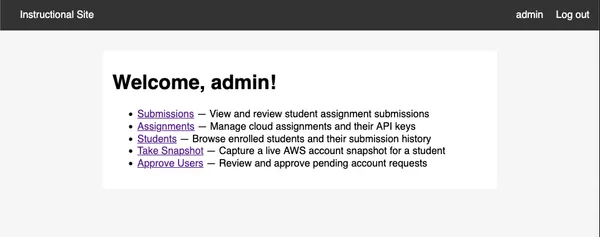
There is a monitoring script in the autograder containers. On each run, it will collect submission metadata and the result of a grading attempt. We can use the assignment data to uniquely identify a student using their email address.
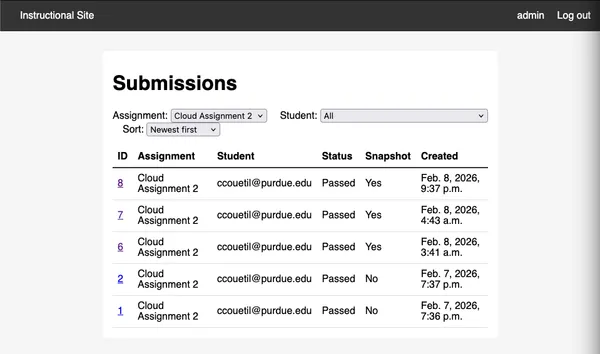
The submission metadata also provides their Purdue ID.
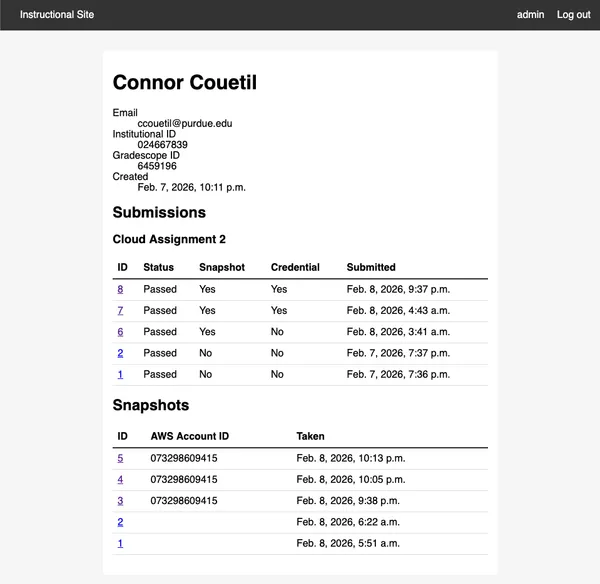
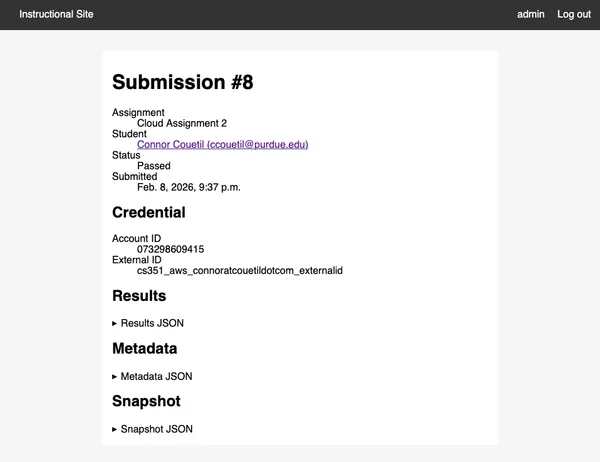
The monitoring script collects their credentials file. The site will associate the credentials file with a user and keep track of if any changes between assignments. Storing the users credentials gives us another capability.
First, we can create a snapshot of their AWS account and write it to a JSON file during the test run. We use it in the test script, and send it back to the instructional site in order to record exactly the data that gave a student a particular score on Gradescope. If a student ever has a question about why they got a certain score on a Cloud Assignment, we’ll be able to tell them exactly.
Let’s look closer at that snapshot. Remember, I said there was a second capability we’ve gained by storing a student’s credentials for each submission. Why don’t we go to the “Take Snapshot” feature and select a student.
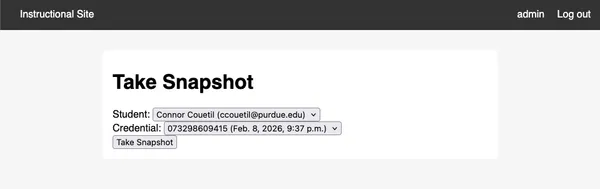
Click!
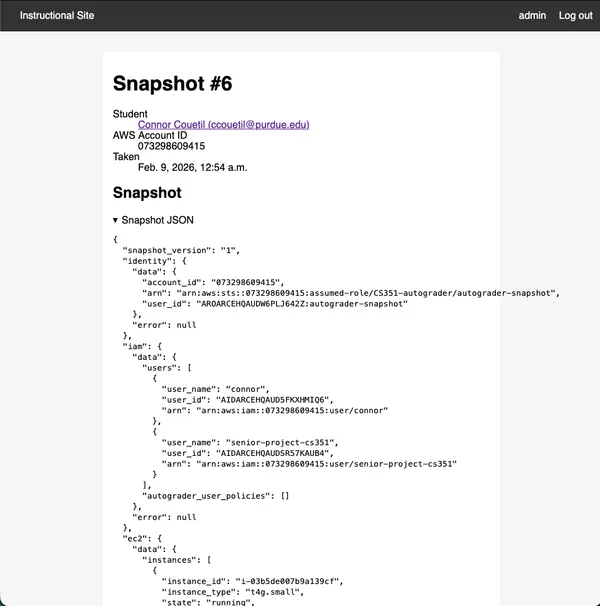
Now we can look at a student’s AWS Account configuration whenever we want. If they raise an issue on Ed, we can quickly help them debug by taking a snapshot of their AWS Account and using the information to reduce how much back and forth we do through Ed messages.
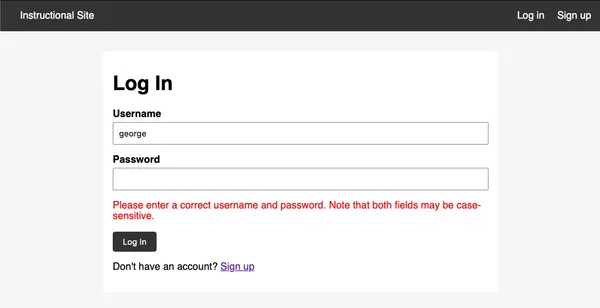
All these features are gated behind a login page. There is a public create account page, but any new user has to be approved by an existing user before they can log in.
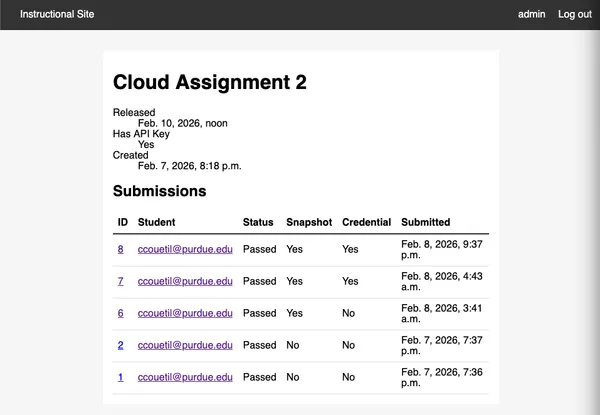
The fact that an autograder container can send submission files to our instructional site means it must also have a public API endpoint. I’ve implemented basic assignment management capabilities: an API token is generated per-assignment granting access to the API and linking a student submission to the particular assignment.
To log onto the instructional website, create an account and send me a message, I’ll approve you ASAP.
Instructional Site Infrastructure
The Instructional Site lives in my AWS account, and I’m managing it the same way I’m teaching students to manage cloud projects in these assignments.
All resource use is defined using Terraform. Application deploys and EC2 instance initialize is performed with Ansible.
The site’s resources are in us-east-1. Keeping this site the same AWS region we have students perform their assignments in reduces data transfer fees. I’ve enabled CloudWatch alarms for projected monthly billing that exceeds $20 and $50 dollars. All resources created for instructional infrastructure carry a “Project” tag I can use for billing attribution.
The projected monthly cost for this application architecture is ~30/month.
- EC2 (t4g.small) ~$12.26
- EBS (20 GiB gp3) ~$1.60
- RDS (db.t3.micro) ~$13.14
- RDS Storage (20 GiB gp3) ~$2.30
- ECR (2 images) ~$0
- Cloudwatch (7 alarms) ~$0
- SNS (email notifications) ~$0
- Cloudfront (< 1TB/month egress, < 2M function invocations) ~$0
The infrastructure is meant to be managed through several commands packaged as scripts:
./bin/tf: Runtf applyto update provisioned infrastructure../bin/deploy: Deploys an updated django application image to the EC2 instance../bin/connect: Access to a shell session on the production application server../bin/admin: Access to the django admin page of the production server.
The database server is a db.t3.micro that allows TCP connections to port 5432 from the EC2 instance hosting the Django server. Backups are only kept for 1 day to reduce cost. A private subnet and an availability zone is shared between application and database to reduce data transfer charges and disallow ingress traffic from the public internet.
The database minimally configured, let’s discuss some future changes.
- Add deletion protection on the database. At the moment, a terraform destroy will cause data loss.
- Extend the backup time window, which will increase monthly costs.
- Increase database size, it is currently at 1GB of RAM and 20GB of disk storage.
I’ve implemented CloudWatch alarms that will alert me at connor@couetil.com if any of the following conditions are triggered:
- CPU > 80% (sustained over 10 min)
- Freeable memory < 100 MB (sustained over 10 min)
- Free storage < 2GB (single 5-min check)
- Connections > 50
The application server is a t4g.small with 2 vCPU, 2 GiB RAM, and Amazon Linux 2023 as OS. It’s configured with a systemd unit definition that starts a the application container image. The django application is configured to use an AWS RDS connection with values injected into the systemd definition from terraform state at deploy time. The application is deployed to the EC2 instance using an Ansible playbook.
I’ve added a CloudWatch EC2 status check for failure and the server has been hardened with fail2ban to restrict SSH access attempts and with dnf-automatic to automate software package updates.
The django application will have an default super user “admin” configured. I’ve stored the password in my password manager.
SSL termination is performed by an AWS Cloudfront distribution using the EC2 instance as an origin server. DNS is managed by Cloudflare, the website URL is “cs351.couetil.com” (I’ve moved my senior project website to “senior-project.couetil.com”). Non-SSH access to the application server is restricted to the AWS Cloudfront IP range.
Access to the django admin page is a concern, I’m storing student AWS credentials. There two means of interfacing with the django application: through a standard user interface, which can be accessed by normal users, and through the django admin page, only accessible by super users. The django admin page provides a granular view to database tables, whereas the standard user interface hides privileged information and performs all sensitive operations server-side, so no student credentials are sent out of AWS. I’ve made the admin page inaccessible publicly, it can only be accessed using SSH forwarding.
Account Snapshots
I can now generate snapshots of an AWS account, both in the autograder
container and on the instructional website. This is performed by using a Python
library I’ve created aws_snapshot.
I’ve take the AWS SDK calls being made ad-hoc in the testing script and created a typed specification that produces a JSON structure that can be stored, inspected, and asserted against. You can create a snapshot of all the resources you care about from any authorized AWS session.
When new assignments are created, the snapshot structure can be incrementally added to in a safe way. The library has 100% test coverage (in fact, all the code for my senior project has 100% test coverage, even the instructional site.)
There’s a config.ini file injected into each autograder image that powers the
snapshot feature. It specifies the API url to POST the submission data to, the
API token for the assignment, and aws credentials that container uses to
authorize a snapshot of the student’s AWS account.
[api]
url = <SUBMISSION_API_ENDPOINT>
token = <API_TOKEN>

[aws]
aws_access_key_id = <FROM_INSTRUCTIONAL_AUTOGRADER_USER>
aws_secret_access_key = <FROM_INSTRUCTIONAL_AUTOGRADER_USER>
Student credential concerns
I am storing student AWS credentials in plain text in a database that is encrypted on disk and in a private network. The credentials are read-only access to a student AWS account. I am still concerned about storing stateful long-lasting privileged secrets. Gradescope already stores and shows them to any instructor or teaching assistant assigned to a class. It would be better if we had a mechanism for a student to grant us an IAM role temporarily for a single autograder run.
Let’s discuss a way to grant that temporary credential.
We’ll instruct students to set up cross-account role assumption. Students will create an IAM “Role” instead of a “User”. The role will be called “CS351-autograder” whose permissions will follow along this template:
{
  "Role": "CS351-autograder",
  "TrustPolicy": {
    "Version": "2012-10-17",
    "Statement": [
      {
        "Effect": "Allow",
        "Principal": {
          "AWS": "arn:aws:iam::<INSTRUCTIONAL_ACCOUNT_ID>:user/autograder"
        },
        "Action": "sts:AssumeRole"
      }
    ]
  },
  "ManagedPolicyArn": "arn:aws:iam::aws:policy/ReadOnlyAccess"
}
The policy grants permission to an IAM user in the instructional AWS account to “assume” the role a student created in their account. Role assumption comes with temporary credentials granting all privileges associated with that role. Students will assign the ReadOnlyAccess policy to the role and will no longer have to generate an access key. Roles are different than users. Roles are identities with minimal permissions and short-lived credentials. There is no way to gain access to the AWS console through a role and no way to attach a privileged access key to a role.
We’ll discuss the other half of this authorization flow, but first I want to
describe how it has worked for previous assignments. Our grading scripts run on
Gradescope’s infrastructure in a container we provide them. Gradescope likely
runs the autograder container as an ECS task in their AWS account. That means
that the default AWS permissions structure in our executing container is
defined by Gradescope’s technical team. This has been experimentally validated
in the following manner: I’ve published an assignment’s autograder container to
a private Elastic Container Registry (ECR) in the instructional AWS account,
and updated the assignment settings to pull an image from that ECR repository
on each submission. At first, autograding attempts failed because the
repository was private. When I granted Gradescope’s AWS Account ID access to
the instructional ECR repository, their autograding infrastructure was then
able to pull repository images. If the default AWS permissions for an
autograder run is controlled by Gradescope, how can our autograder script get
access to a student’s AWS account for grading? That’s where the credentials
file comes in, and why we require students to create an IAM user with a
long-lived credential that they submit on Gradescope’s website. In this manner,
we use a student’s own privileged credentials at the start of each container
run to establish a new AWS SDK session that has the privileges needed to grade
a cloud assignment.
With that background, the changes needed to move liability from students to the instructional staff, while improving security for both, becomes clearer. Revisiting role assumption, the instructional AWS account will hold an IAM user “autograder”. The user will have the privilege of being able to assume a role “CS351-autograder” in any AWS account. When a student submits their AWS Account ID as a credential to a Gradescope assignment, the autograder container will read their account ID and external ID (more about that in AWS documentation and in the assignment), then assume that role. Now, short-lived credentials will be passed from the student account to the grading script and grading will continue as normal. The only long-lived AWS credential during an autograding run will be an access key from the instructional account packaged with the container that will set up the initial AWS SDK session. This means students are protected from accidental credential exposure (which has already happened), and instructors can carefully manage permissions between Gradescope, grading scripts, and student accounts.
The credentials packaged in the grading container for user “autograder” from the instructional account has minimal privileges. All it can do is assume a role in a student account, and get the user ID and account ID for the current AWS session. No other access to the instructional account is enabled.
{
    "Version": "2012-10-17",
    "Statement": [
        {
            "Action": "sts:AssumeRole",
            "Effect": "Allow",
            "Resource": "arn:aws:iam::*:role/CS351-autograder",
            "Sid": "AllowAssumeGradingRole"
        },
        {
            "Action": "sts:GetCallerIdentity",
            "Effect": "Allow",
            "Resource": "*",
            "Sid": "AllowGetCallerIdentity"
        }
    ]
}
And with that the instructional staff becomes an intermediary managing access between Gradescope and the student.
Students now only have to submit their Account ID and their secret External ID
to Gradescope to trigger an autograde request. They will continue to upload a
credentials file, and it will be an INI file with fields.
[default]
aws_account_id = ...
external_id = ...
We have now made some progress towards securing the execution environment. Let’s discuss possible work for the future by reflecting on the question, “what essential roles does Gradescope perform?” First and foremost, Gradescope integrates with Brightspace to pass along grades. Second, it authenticates a student and provides course management options to the instructor. Third, it is an innovative user interface for students and staff to interact with. A fourth feature used by this class appears to be essential, but is in fact, incidental. Autograding does not need to be triggered by Gradescope. They are the inspiration, but the autograding action performed is simple and wholly defined by the instructional staff in assignment docker containers.
If we want to take more control over the cloud assignments, we can take one step, then another.
The first step is to have our autograder scripts execute in the instructional AWS account rather than Gradescope’s. The flow is as follows. An assignment docker container (for example, “Cloud Assignment 2”) is constructed and provided a configuration file containing an API token granting permission to the instructional site’s REST API with permissions scoped to a particular assignment. Gradescope will execute this container when a student submits their account id, and the container will collect the credentials file and POST it to the instructional site along with the assignment ID and API key. The instructional site will read the student’s AWS account ID from the request, find the grading script for the corresponding assignment, and start an ECS+Fargate task that will perform the grading. It responds to the initial container request with a URL of an endpoint the Gradescope container should poll until the grading task is complete. When the grading task has completed, the poll request will return an updated status and a URL to fetch the results.json file for the student submission. Remember, the results.json file is the API Gradescope has defined to control a student’s score on a particular assignment. The autograder container will download the results.json file to the appropriate location on its filesystem, and exit. The student will then see the result of their submission in Gradescope’s user interface. With this setup, all autograder containers submitted to Gradescope are the same except for a configuration file that provides an assignment ID and API token for the instructional website. No AWS credentials, either from the instructional staff or students, will ever be shared with Gradescope. Publishing assignment containers becomes simpler and more secure, and instructors will have total control on the methodology used to grade cloud assignments, opening up avenues for automation and innovation.
The second step, which is much too long of a step to consider at the moment, is exploring what this class looks like without using Gradescope’s autograding feature, and experimenting with different ways to provide Cloud Assignment material to students.
Billing Event Streams
It would be nice to get a stream of billing events from students. That would indicate what resources they’re experimenting with, as well as give us as instructors an idea of if they are within or exceeding any free tier limits.
That might be possible by setting up AWS EventBus across instructional and student accounts to collect billing events. AWS EventBus charges per 64KB sent, and $1 buys you a million 64KB. Unfortunately, cross account requests double charge, once for each account. This approach would necessarily incur a charge for the student, even if small.
It’s impractical to stream billing events from AWS, as its expensive and the real accounting is every 24 hours anyway. Instead, during each snapshot, the CloudWatch “EstimatedCharges” metric will be recorded instead.
Submission Data Visualization
I will have to consider what pieces of data I’ll want to visualize per-assignment.
- Submission counts over time where their density determines the Y-Axis height
- X-Axis: submission time
- Y-Axis: submission density (how many submissions are near it in time)
- Line: One smoothed line through all points
- scores for students over time
- X-Axis: submission time
- Y-Axis: submission score
- Line: Un-smoothed line for each student through their submission points.
- bar chart of students current monthly bill
- X-Axis: Students sorted by bill size
- Y-Axis: bill size
- billing for students over time
- X-Axis: billing snapshot
- Y-Axis: billing snapshot
- Line: Un-smoothed line for each student through their submission points.
This is all I can think of at the moment.
Cloud Assignment 1 reflection
Next week I will reflect on Cloud Assignment 1’s Ed issues. I don’t have time to go through them at the moment.
Managing Autograder SSH credentials
In order to grade Cloud Assignments, we have to access student instances over
SSH. Currently, we ask students to SSH into a fresh instance and manually
include autograder’s public key in the authorized_keys file. We publish the
public key in the assignment.
We could create an Amazon Machine Image (AMI) with the authorized_keys file containing the autograder public key already present. Creating AMIs for students to use in assignments provides opportunities for automation and monitoring during assignments.
Accessibility Concerns
Cloud Assignments already have alt-text for all images and links. But it is manually created, so they are minimally accessible. As part of the build step for the Astro project, I can send each image and link to an LLM to summarize as alt-text, then include that alt-text in the final build result. I can also cache the result for every image and link based on a content-hash, so repeated calls to an LLM for the same content will not be made. This is a low priority at the moment, and will likely be worked on when I develop the markdown editor integration when this course will be handed-off.
As a start, I could perform this step when I generate a single file of an assignment.
Accessibility standards provided by Grace.
I need a Microsoft CoPilot API key from Grace.
There is GenAI studio offered by Purdue. Grace shared the link, it didn’t work for me at first. https://www.rcac.purdue.edu/knowledge/genaistudio
Student concerns about cost
There have been a lot of students outside of the free tier. Several students have already incurred (minimal) usage costs. One student, with minimal extra usage, suggested he might have blown $3 on his mistake.
It would be good to be upfront with students about how much an assignment will cost in cloud credits. First of all, it teaches them to always attach a cost number to their cloud use because it is not free (for serious use). Second, its an opportunity for us to present the business side of cloud computing in a way that directly affects their wallet, and being able to price cloud usage, and knowing all the different components that go into a bill, is actually really useful. So each assignment can have a “Cost” section where we do a projected calculation of the price of an assignment, based on some parameters. This would be fun, and a good educational addition to this course.
So an assignment will have a projected cost, and comparing the cost of different assignments will give a notion of the “scale” of an assignment to the students. As well as keep us, the instructional staff, honest about how much of a student’s free tier we’re using and force us to make that calculation for each assignment so we can present it to the student. Keeps us honest, keeps them informed.
Cloud Assignment Structure
Cloud assignments are starting to develop a common structure
- Introduction
- informs the student of the learning outcome of the assignment
- Content
- a “Table of Contents” linking to assignment headings (auto-generated).
- Initial Setup
- walks the student through integrating their AWS Account with the Cloud Computing course.
- Update from bird.ai
- a punchy introduction entertaining students and selling the motivation for this week’s cloud assignment tasks
- Feature Design: <NAME>
- a design brief that describes the feature requirements. May include screenshots of the final application for user-facing features, dangling a tangible goal in front of students. Will provide background on any software or services used to implement and release the feature.
- Feature Implementation: <NAME>
- Walks them through how to implement the “Feature Design”. Students will have to perform tasks that will be graded when they release to production. If the autograder indicates they have made a mistake, they will have to re-implement and re-deploy.
- Feature Release: <NAME>
- This section will explain how to release the feature to production. Also contains tasks that students will be graded on.
- Estimating Assignment Cost
- This section will break down all the AWS services that are being used and what they cost. It will provide the worst-case cost for the assignment, as well as estimate the cost depending on how quickly a student finishes the assignment.
- Teardown
- This section will explain to students how to clean up AWS resources after the cloud assignment