Week 7
2,471 words · 13 min read
Summary
February 23 - March 1
Meetings
- 2/24 3:30-5:00PM Tuesday, 1-on-1-on-1 with Prof. Adams and Grace Lingley
- 2/27 1:30-2:30PM Friday, Instructional Team Meeting
Accomplishments
- Email based magic link login and onboarding for students and instructional staff
- Implemented dual-stack autograding (native and gradescope) in instructional site
1-on-1-on-1 Meeting Outcomes
Assignment 3 Part 1 on Tuesday. Due Saturday night. Gradescope assignment “CA03 Part 1”. Will be worth 50 points.
Assignment 3 Part 2 on Saturday. Due Friday night. Gradescope assignment “CA03 Part 2”. Will be worth 50 points. Autograder will give 0/0 points for points from Part 1.
Assignment 4 will use student AWS Accounts under instructional control and will be a group assignment.
Connor’s office hours: I will do 2:30-5:00pm on Fridays.
Theory of Assignment Development and Student Engagement
Split the 10-day cloud assignment into two 5-day assignments.
Students who start earlier do better. 2:30h per assignment part is do-able in 5 days for students.
Issues are caught earlier. Less pressure to deliver on both faculty and students. Establish a class cadence of practical projects, like shop class.
We can enable this by making hard things easy through automation, so students can tackle larger problems over the semester.
We should tell them it’s ok to use AI. They can use RCAC GenAI service for this class, it’s free for students.
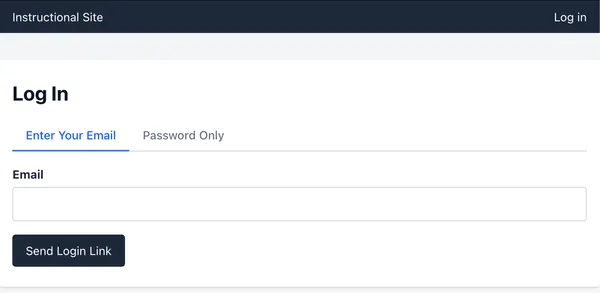
Magic-link login for staff and students
I’ve implemented magic-link onboarding for staff, and magic-link logins for staff and students. Over the next month, I will be transitioning the website to a purely email-based login flow for security and ease-of-use. For now, there continues to be a password based login option.
First, we side-step issues surrounding accidental password disclosure by pushing that responsibility to the email provider. Second, it reduces the number of passwords users need to keep track of and makes sign-in straightforward (although you will have to wait for an email to arrive). For heavy users of the site (visiting more than once every two weeks), they may never have to login again. For temporary visitors (visiting once in a two week period), they simply have to wait for the email to arrive to login.
Staff will have a new onboarding flow. They’ll receive an onboarding link in the mail which can be used once. Once used, the account is confirmed and they can login with a different magic link. Students onboarding flow is tied to the enrollment of a class. If a student is assigned to an active class (which already records their email), then magic-link logins will immediately work for them. Students do not have the same access to the instructional site that staff does, they will see pages only related to making submissions to an active cloud assignment.
I’ve been trying to get AWS to approve production usage of our email service, they denied the first request, it’s still stuck in sandbox mode (you have to pre-approve every receiver and they have to confirm). I’m going to try again, but George, you may have to create an AWS account with the instructional site and jump in as an official representative of this Purdue course. This is blocking having students use the instructional site directly for submissions, so for now we will continue to rely on Gradescope as the primary interface students use for assignment submissions.
Implementing Autograding
This feature requires significant architectural considerations, I’ve made an effort to keep them simple and cost-effective. First, I’ll list some key features, then mention the added infrastructure.
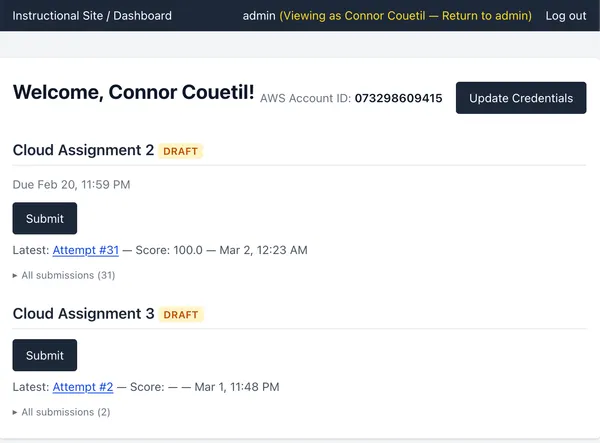
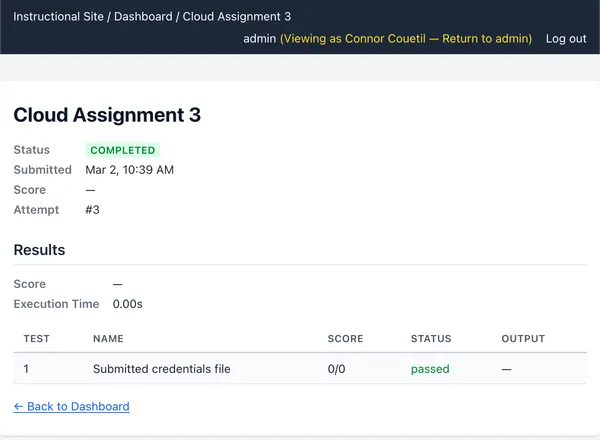
- native autograding pipeline, students can submit directly from the instructional site and see their results, the site manages their AWS credentials for them and provides a helpful dashboard.
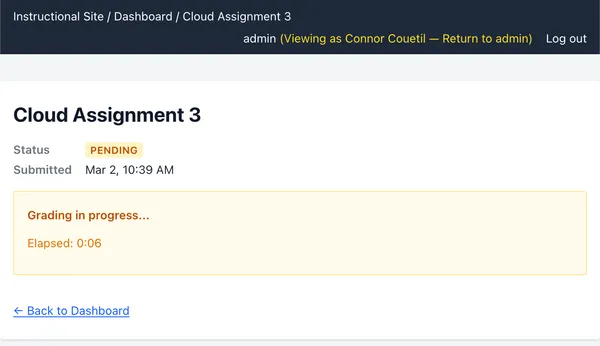
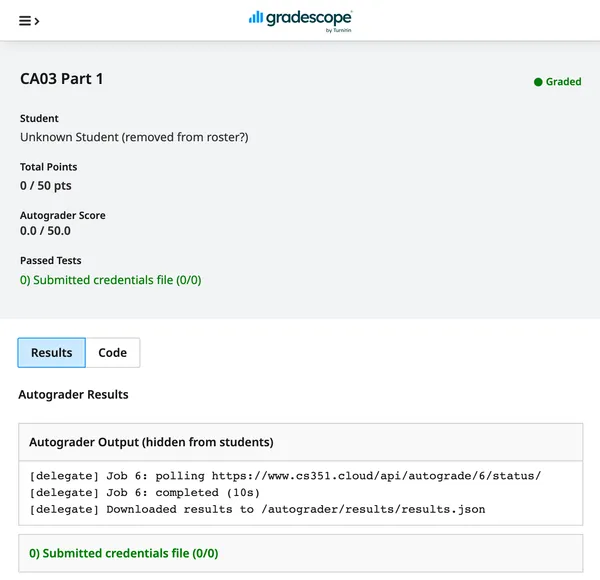
- gradescope containers no longer run the autograding script, they call back to the instructional site and poll for results (thin proxy).
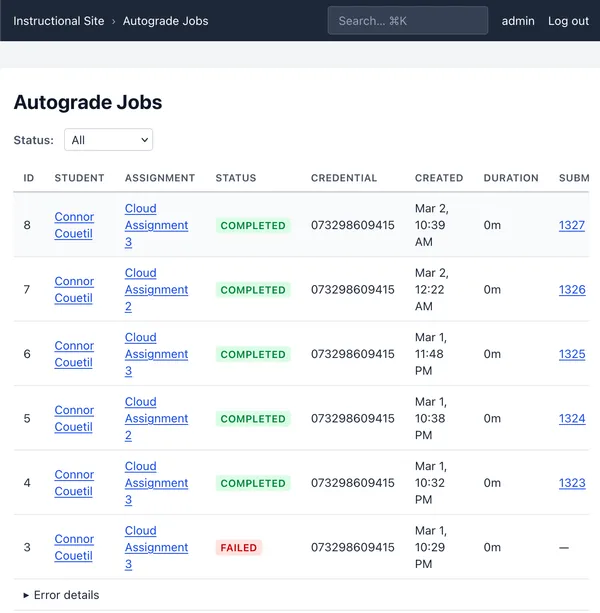
- there is an “Autograde Jobs” dashboard that shows the status of all jobs for instructional staff.
- implementation handles both local development and production workloads seamlessly, allowing for rapid feature iteration and deployment loops.
The autograder jobs run on a dedicated t4g.small worker instance that coordinates with the main application server through the database, using a Django 6 feature called “tasks” with a PostgreSQL backend. My original idea was to spawn ECS tasks on-demand, but there are a lot of edge cases surrounding the ECS/Fargate integration that are avoided by having a dedicated worker node. The pros are better local/production parity and control over the runtime environment, the con is now there is a risk the site can’t handle a bunch of concurrent student submissions and we carry a higher baseline cost of compute.
It’s worth mentioning the series of features I had to implement to make this possible.
- Enable AWS Organization SSO for the instructional site (granting access to AWS console for manual tasks like creating support requests that enable email)
- Integrate email-sending into the application (enables login and onboarding)
- Course management, student enrollment statuses (manages student access to website)
- Magic link onboarding (piggybacks on Outlook’s Purdue SSO integration to authorize students)
- Staff impersonation of student accounts (allows instructors to see what a particular students sees, necessary for testing and debugging the student dashboard)
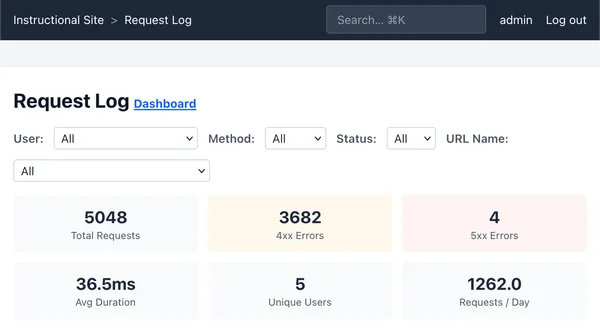
- Observability dashboards (tracking emails sent, logging all HTTP requests, and surfacing traffic insights in a dashboard for security and to understand usage)
- Load testing under burst and baseline conditions (to prepare for students rushing to the site to submit around deadlines)
- Container Registry / ECR integration with cloud assignments (so autograding runs can pull an assignment-specific autograding image)
- Dedicated task queue worker node in production (this worker node runs all background jobs, not just autograding tasks)
After all that, I was finally able to construct a simple student dashboard that first triggered autograding jobs locally, working through the challenges that came up one-by-one until I finally got a working production deployment. I then finished by revisiting and reimplementing Gradescope autograding, this time powered by the instructional site. Phew!
Load testing
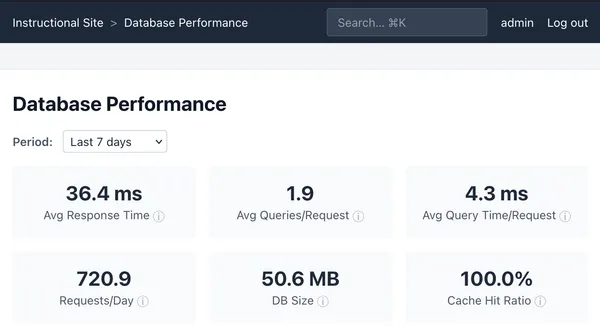
I’ve been running load tests against the application stack (haproxy + django) to tune healthcheck settings and identify slow pages, preparing for increased usage from students and instructional staff.
I’m running the application stack both in “burst” mode, where the containers are given their full burst capacity of 2GB of memory and 100% of CPU time, and “baseline” mode, where CPU time is restricted to 40% and 20% CPU time for app and db, respectively.
The first insight from this test was that any un-paginated views in the application would increase unbounded in size.
The second insight was that under sustained load in baseline settings, Django handles 100 concurrent users, but response times can increase above the healthcheck threshold that HAProxy uses to determine if a backend is unhealthy. Increasing the tolerance for slow health check responses from 5s to 15s dramatically drops the false postive rate of an unhealthy backend, improving application availability under high-load.
The third insight was as concurrent users rise to 80+, the default two django workers had insufficient threads to multiplex the user sessions, causing dropped connections. Increasing haproxy timeouts, and giving workers 8 threads each instead of two, dropped the error rate from ~40% with 100 concurrent users to 0%.
There are a few parameters we now use to tune performance:
- django OS worker processes (should match vCPU count of EC2 instance)
- django worker thread count (total should match expected number of concurrent requests)
- haproxy max connections (should be slightly above expected number of concurrent requests)
- haproxy timeout queue (absorbs bursts while waiting for django to respond)
- haproxy health check interval (should decrease frequency when expecting high load)
Under sustained load from 100 concurrent users with ~10 requests per second, the failure rate is 0% and response times rise to 10s per-page on average at baseline settings.
I want to call out there are a lot of DB writes per-view because I track a lot of usage statistics. There is a lot of opportunities for optimization, but that is outside the scope of this project. Our usage is relatively low, and we use the cheapest and weakest EC2 instance types. If the website gets slow, the best and obvious choice is to rent bigger instance types. We also don’t have any performance metrics that would be part of an SLA. These performance metrics would define an acceptable performance boundary against which we would set harder limits on parameters to guide performance improvement decisions, balancing cost against user experience.
Agent Tool Calls
A lot of people aren’t aware of what these coding agents are capable of. Can I quantify it somehow? The best idea I have at the moment, is keeping track of every tool call made by an agent while developing the instructional site.
I took this idea from “entire.io”, a tool by ex-GitHub engineers I was using to keep tracking of my token usage and agent conversations. Their tool was slow, and failed often, so I analyzed it with claude code to understand all the data they were tracking, then recreated it in a Rust CLI tool that stores data locally in a SQLite DB and shows a more useful statistics summary then they were exposing in their web application.
Is the vibe-coding class tracking agentic tool use statistics across all their students?
Here is the agent usage from my weekend of cloud assignment development, pulled
from my tool claude-track:
$ claude-track stats
=== Claude Code Usage Stats ===
Database: /Users/connor/.claude/claude-track.db (15.3 MB)
Tracking since: 2026-02-28T03:01:23Z

--- Sessions ---
Total sessions:         126
Total duration:     81h 14m
Avg session:            40m
Sessions today:          16

--- Models ---
Model            I/O Toks  Sessions
───────────────  ────────  ────────
claude-opus-4-6  1,631,309       106  ████████████████████

--- Token Usage ---
Input tokens:             175,256
Cache creation:        14,929,111
Cache reads:          514,766,398
Output tokens:          1,456,053
API calls:                  8,127
Cache hit rate:             97.2%
Est. cost (total):       $387.97

--- Prompts ---
Total prompts:          829
Avg per session:        6.9
Avg length:         119 chars

--- Plans ---
Total plans:            280

--- Tool Usage ---
Total tool calls: 12,232
 Calls  Tool
──────  ───────────────
 4,718  Read             ████████████████████
 3,166  Bash             █████████████
 1,244  Edit             █████
   851  Grep             ████
   607  Glob             ███
   541  TaskUpdate       ██
   277  TaskCreate       █
   247  Write            █
   187  Agent            █
    98  ExitPlanMode     █
    68  WebFetch         █
    67  Skill            █
    44  WebSearch        █
    35  EnterPlanMode    █
    28  Task             █
    27  AskUserQuestion  █
    19  EnterWorktree    █
     6  TaskOutput       █
     2  TaskStop         █

--- Top 10 Files Read ---
 Reads  File
──────  ────
   120  ~/.../gradescope/tests.py
   109  ~/.../accounts/tests.py
   103  ~/.../accounts/views.py
    91  ~/.../app/settings.py
    83  ~/.../requestlog/tests.py
    82  ~/repos/claude-question/src/commands/stats.rs
    74  ~/.../app/urls.py
    71  ~/.../requestlog/dashboard.html
    63  ~/.../submissions/views.py
    60  ~/.../requestlog/views.py

--- Top 10 Bash Commands ---
  Runs  Command
──────  ───────
   695  git
   458  find
   443  cd
   341  ls
   263  grep
   125  docker
   120  instructional_site/bin/django-tests
    80  cat
    72  cargo
    62  python3

--- Activity by Date ---
Date         Calls
──────────  ──────
2026-02-28   6,022
2026-03-01   4,853
2026-03-02   1,357

--- By Project ---
 Calls  Project
──────  ───────
11,232  ~/repos/senior_project_cloud_computing
   986    ↳ gradescope-api-skill
   538    ↳ dapper-percolating-flamingo
   310    ↳ iridescent-imagining-rocket
   276    ↳ cache-headers
   240    ↳ giggly-hopping-lerdorf
   233    ↳ nav-search
   210    ↳ statistical-models-evaluation
   143    ↳ radiant-waddling-lollipop
   122    ↳ request-log-pagination
    94    ↳ invite-instructor-wording
    75    ↳ shimmying-juggling-sky
    67    ↳ assignment-course-display
    60    ↳ test-django-dev
    28    ↳ responsive-nav
   968  ~/repos/claude-question
    31  ~/repos/dotfiles
     1  /tmp
Best thing since sliced bread.
SSO access to AWS Organization
I’ve enabled “AWS SSO” in the “IAM Identity Center” for the AWS management account. This allows us to provide AWS console access to the infrastructure account for instructional staff. The management account continues to be restricted to root login only (I have those credentials). Any users with access to the infrastructure account on AWS will be required to register an MFA key for login. There is a link on the instructional site dashboard to log into the infrastructure AWS console.
To enable a new user to log into the AWS console, currently it’s a manual process where the terraform configuration has to be updated creating a user with a target email. It will remain that way for the time being, I am the only one developing this project.
I had to implement this so I could see the status of our email integration. We send “noreply@cs351.cloud” emails using AWS SES, which has its own approval process.
Gradescope API integration
I’ve integrated Gradescope syncing by storing my personal login credentials in the instructional site, then authenticating against the Gradescope website and parsing their webpage HTML. Gradescope is a Ruby on Rails application that server-side renders some React-driven components to the page. This is a classic startup architecture, and is favorable to scraping by simple html-parsers.
There were challenges developing against the API. When they make certain web page updates, it will break our parsing logic, so I developed a live-data fixture-based testing loop to verify our integration will continue to work over time. The implementation is tied pretty tightly to the instructional site. If I did it over again, or if we move towards tighter integration with gradescope rather than away from it, I would make it a separate python library totally, and run integrations on a schedule periodically so the package self-heals when Gradescope makes any API changes. The added benefit is that I could then create a typed and tested library interface to the gradescope API for the instructional site, avoiding context pollution and test bloat in the instructional site.
This is one of the first pieces of technical debt we’ve accrued in the instructional site, and should be addressed in the future when we reassess our use of Gradescope.
AWS Bill
I got a $38.70 bill from AWS for February. Not bad considering all the instructional site and cloud assignment 2 work.
- Account ****9333: $28.94
- Account ****3789: $5.63
- Account ****9415: $4.13
Cluster Analysis from Cloud Assignment 2
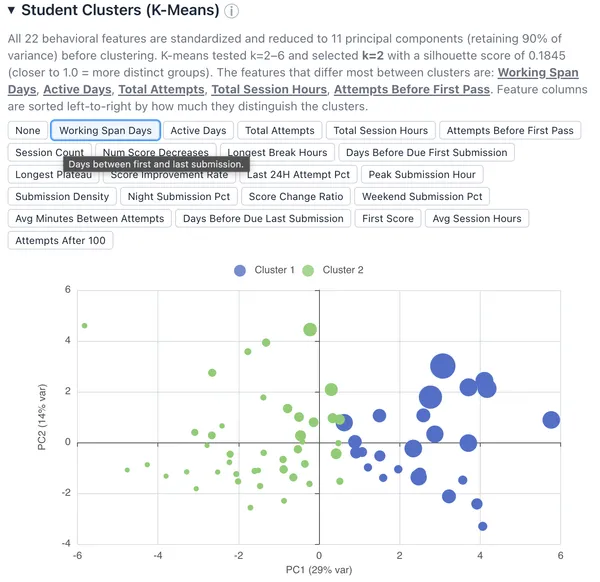
The 2 cluster student categorization ranks students against two axes.
The horizontal axis is a proxy for the span of time a student has worked on the project. The right-most outlier is ████████████, who worked on the assignment over 5 days, and the left-most outlier is ████████████████, who worked on the assignment over 5 hours.
The horizontal axis may be a proxy for sustained effort regardless of point outcome.
The vertical axis has a positive outlier, ██████████████████, who started the assignment early and finished in 2 hours in 2 sessions over 2 days. It seems to be a proxy for rapidity of progress and starting early.
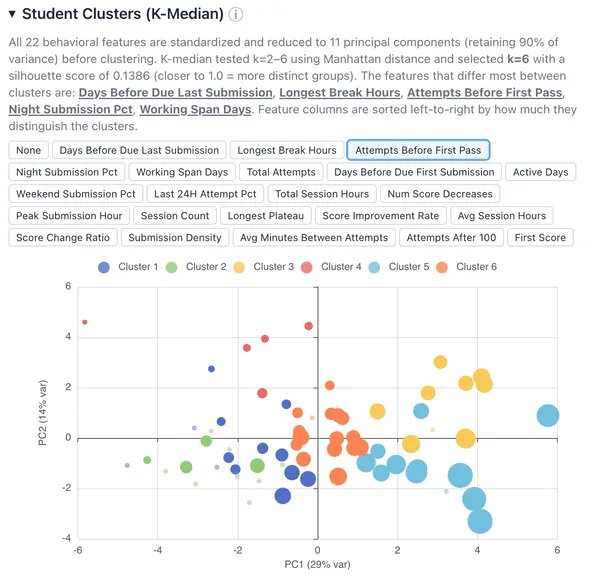
I’ve added a visualization to the cluster data, when you select a factor, it changes the size of a plotted dot proportional the distance from the mean the factor was for that student. Makes it easy to do a visual check of student clusters by particular factors.
I bet we’ll have more, and clearer, student clusters with more data. Once we have that data, let’s think of some questions to ask.
Here’s a quick discussion of what clusters appeared when applying K-means and K-medians to the Cloud Assignment 2 data.
K-Means: k=2 — a simple binary split:
- Cluster 1 : high-effort, spread-out workers — 3+ active days, 26 attempts, 6h
session time, started ~5 days before due
- 25 students, 92% scored 100
- Cluster 2 : last-minute, concentrated workers — <2 active days, 14 attempts,
3h sessions, 54% of attempts in the last 24h
- 43 students, 70% scored 100
K-Median: k=6 — six distinct behavioral profiles:
- Cluster 1: Daytime last-minute workers (100% in last 24h, low night %)
- 14 students, 71% scored 100
- Cluster 2: Night-owl weekend crammers (100% night, 78% weekend, peak hour 3:30am)
- 12 students, 33% scored 100
- Cluster 3: Early planners (started 7 days early, 4 active days, longest breaks ~88h)
- 9 students, 89% scored 100
- Cluster 4: Efficient early starters (started ~7 days early, only 8 attempts needed)
- 5 students, 100% scored 100
- Cluster 5: Persistent grinders (30 attempts, 6h sessions, 3.5 score decreases)
- 12 students, 92% scored 100
- Cluster 6: Steady moderate workers (19 attempts, 5 sessions, balanced timing)
- 16 students, 94% scored 100
Removing instructor outliers let k-median explore higher k values and find meaningful sub-populations. The standout finding is Cluster 2 — 12 students working almost exclusively at night on weekends with only a 33% success rate. That’s a group k-means completely misses by lumping them into the generic “low effort” bucket. Similarly, k-median distinguishes the efficient early starters (Cluster 4, 100% success in just 8 attempts) from the persistent grinders (Cluster 5, 92% success but needing 30 attempts).
Data inconsistencies
█████████ is a student where I noticed a score discrepancy between Gradescope and the instructional site. See: https://www.cs351.cloud/students/55/.
His last score on Gradescope is an 80. His last score on the instructional site is 5.
Gradescope seems to have a race condition where the submission_metadata does not correspond with the results.json. The student submitted twice in less than a minute, I believe this caused the inconsistency. There may also be an issue with concurrent autograder scripts running, a reboot was a part of the last assignment, I have to block concurrency for autograding attempts, that is, a student can only have one autograding happening at a time, otherwise their results will not be accurate. I’ve also made so even if a double submission happens on Gradescope, only one autograding run will be triggered and both Gradescope runs will be given the same results endpoint to poll, eliminating concurrent autograding jobs.
In this case it turned out alright for Ariel, his highest score was the one that stuck.